
Build Firework Trails Using Emitters
By copying the first empty emitter, you can create the trail of the firework and add the modules you need to create the trail effect.
-
To concentrate on one emitter at a time, you can turn off multiple emitters by clicking the blue checkmark and leaving the working one selected.
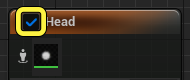
-
You can turn off an emitter by selecting multiple emitters then right-clicking and selecting Enable, Disable, or Isolate from the drop down menu to focus on one emitter while working in the System Editor.
-
If you accidentally close a window or panel you need for editing your effect, you can find all the windows and panels in the Windows menu.
-
If the emitter has an issue or error message, all issues and errors are captured either by the Niagara Log or the Output Log. From these logs you should be able to see what is causing the issue or error in your effect.
- Select the first empty emitter stack and right-click.
- Select Copy from the dropdown menu.
- Right-click in the System Editor and select Paste from the dropdown menu.
- Select the new emitter.
- Click the emitter name and change to Trail.
You're reading a preview
The full reference is free for BrainDeadGuild Discord members — sign in to read it all, or open the original at the source.
Sign in with your BrainDead.TV / BrainDeadGuild Discord account for full access.