VerseIsland
Feed Learn Leaderboard Guides Reference Explore Search Docs Verse Library
Sign in
Feed Learn 📖 Codex Leaderboard Guides Reference Explore Search Docs Verse Library
Fortnite › General · Up to Fortnite · General · 21 of 123 in General
Browse Fortnite

Creating Roads and Pathways in UEFN

In Fortnite Battle Royal, the roads and pathways make traveling between points easy whether a player is on foot or in a vehicle. These were all created using the Spline tool.

You can add roads and pathways to your project using the architectural props from Street Gallery B or the Racetrack Gallery, but these props require the flat grid plates to lay on top of.

The Spline tool in Landscape Mode provides greater control because you determine the number of splines needed to create the path, the mesh type, and the amount of brush falloff to work with the weight and height maps of the terrain.

If you want to add dirt along the path around your mountain, you could use the Spline tool, but using the Paint tool to add small dirt patches is an easier way to create a worn path. Select the dirt layer as the material, then paint small patches of the landscape.

In the editor, select Landscape Mode > Manage > Spline.
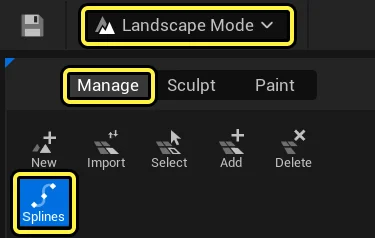
Select the Spline tool from Landscape Mode.

Click All Splines in the Spline settings to make sure that as you lay a spline point the terrain and spline work together, blending the spline mesh with the terrain mesh to create a natural looking path as you set down each spline segment.

You're reading a preview

The full reference is free for BrainDeadGuild Discord members — sign in to read it all, or open the original at the source.

Sign in with Discord — free for members Read the original at Epic Games

Sign in with your BrainDead.TV / BrainDeadGuild Discord account for full access.

Comments

    Sign in to vote, comment, or suggest an edit. Sign in
    📄
    Source
    Epic Games

    © Epic Games. Official Epic developer documentation, shown here as a reference with a link to the original. All rights remain with Epic Games. Terms ↗

    View original Sources & licensing
    Request removal
    Last updated Feb 11, 2026
    Keep exploring
    More in General · 21 of 123
    Prev
    creating fireworks 5 making the second firework explosion in unreal editor for fortnite
    Next
    creating rocket racing islands in unreal editor for fortnite
    Browse all files in this folder (A–Z)
    Next up
    • Landscape Splines In Unreal Engine
    • h options open, from here select the **Road Straight** mesh type and scale.
    • When the road is finished, you’re ready to [add foliage
    Related topics
    • Creating Roads And Pathways In Unreal Editor For Fortnite General
    • Escape Room 02 Landscaping In Unreal Editor For Fortnite Tutorials
    • Escape Room 2 Landscaping In Unreal Editor For Fortnite Tutorials
    • Making A Cave In Unreal Editor For Fortnite General
    • Fortnite Tools Mode In Fortnite General

    Related

    Open in graph →

    Related topics

    • Creating Roads And Pathways In Unreal Editor For Fortnite
    • Escape Room 02 Landscaping In Unreal Editor For Fortnite
    • Escape Room 2 Landscaping In Unreal Editor For Fortnite
    • Making A Cave In Unreal Editor For Fortnite
    • Fortnite Tools Mode In Fortnite
    VerseIsland · an archipelago of Verse & UEFN knowledge
    🗺️ Island atlas Learn Guides History About & Press Sources & Licensing Status

    Not affiliated with Epic Games. Fortnite, UEFN, Unreal Engine, and Verse are trademarks of Epic Games, Inc. Content is attributed to its source — see Sources & Licensing.

    🦜

    Scout · your island guide

    The Isle of Verse