VerseIsland
Feed Learn Leaderboard Guides Reference Explore Search Docs Verse Library
Sign in
Feed Learn 📖 Codex Leaderboard Guides Reference Explore Search Docs Verse Library
Fortnite › Player · Up to Fortnite · Player · 7 of 142 in Player
Browse Fortnite

Creating Teams in Creator Portal

The Creator Portal provides a way for you to form collaborative teams of developers that can work together on shared UEFN projects.

With the UEFN teams feature, you can set clear roles and responsibilities, have different team members working on different features at the same time, and track changes and versions of shared projects.

These collaborative UEFN projects can also be published through the Creator Portal.

Setting Up Teams and Assigning Roles

Team members can have different roles depending on the project, so assign roles according to each one’s strengths, and the permissions you want to grant them. Teams have a maximum number of 30 members.
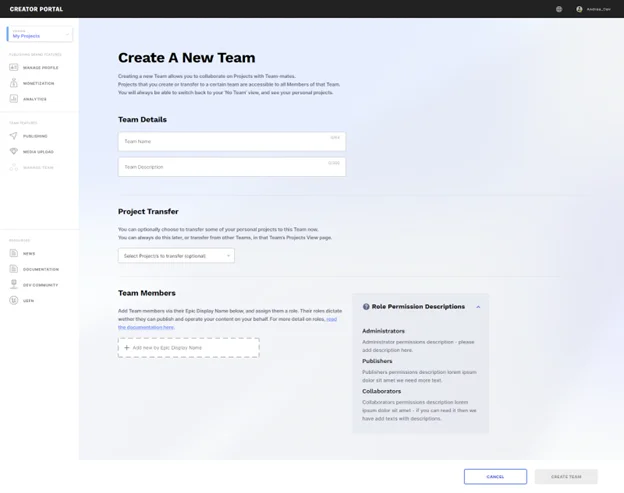
Create Teams window

To invite others to a team, you will go through an age verification process that includes providing the email address used with your Epic account.

You must be over 18 to invite other developers to a team, or accept an invite to join another developer’s team.
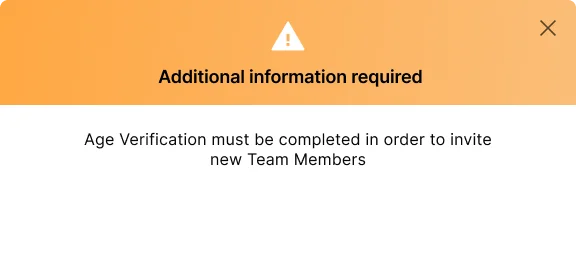
Verify your age with the email used to create your Epic account.

You're reading a preview

The full reference is free for BrainDeadGuild Discord members — sign in to read it all, or open the original at the source.

Sign in with Discord — free for members Read the original at Epic Games

Sign in with your BrainDead.TV / BrainDeadGuild Discord account for full access.

Comments

    Sign in to vote, comment, or suggest an edit. Sign in
    📄
    Source
    Epic Games

    © Epic Games. Official Epic developer documentation, shown here as a reference with a link to the original. All rights remain with Epic Games. Terms ↗

    View original Sources & licensing
    Request removal
    Last updated Jun 23, 2026
    Keep exploring
    More in Player · 7 of 142
    Prev
    class setup in an arena gameplay example in fortnite creative
    Next
    end of round team swapping in fortnite creative
    Browse all files in this folder (A–Z)
    Next up
    • e-creating-teams-in-creator-portal-in-unreal-editor-for-fortnite/09e5889a-7f92-4ed8-ad30-614fb1758fa6_24.png)
    • | **Owner** | Has access to everything in the project. Controls all team branding, [branding profiles
    • Publishing a Team Project
    Related topics
    • Setting Up Teams In Fortnite Creative Player
    • Setting Up Your Account And Teams In Fortnite Creative Player
    • Customize Device Properties In Verse Devices
    • Creator Portal Creator Economy
    • Creating Teams In Creator Portal In Unreal Editor For Fortnite Player

    Related

    Open in graph →

    Related topics

    • Setting Up Teams In Fortnite Creative
    • Setting Up Your Account And Teams In Fortnite Creative
    • Customize Device Properties In Verse
    • Creator Portal
    • Creating Teams In Creator Portal In Unreal Editor For Fortnite
    VerseIsland · an archipelago of Verse & UEFN knowledge
    🗺️ Island atlas Learn Guides History About & Press Sources & Licensing Status

    Not affiliated with Epic Games. Fortnite, UEFN, Unreal Engine, and Verse are trademarks of Epic Games, Inc. Content is attributed to its source — see Sources & Licensing.

    🦜

    Scout · your island guide

    The Isle of Verse