VerseIsland
Feed Learn Leaderboard Guides Reference Explore Search Docs Verse Library
Sign in
Feed Learn 📖 Codex Leaderboard Guides Reference Explore Search Docs Verse Library
Fortnite › UI · Up to Fortnite · UI · 7 of 147 in UI
Browse Fortnite

Exploring The Content Browser Menu

The Content browser is where you can access the Fortnite Creative inventory and tools to create your gameplay experiences.
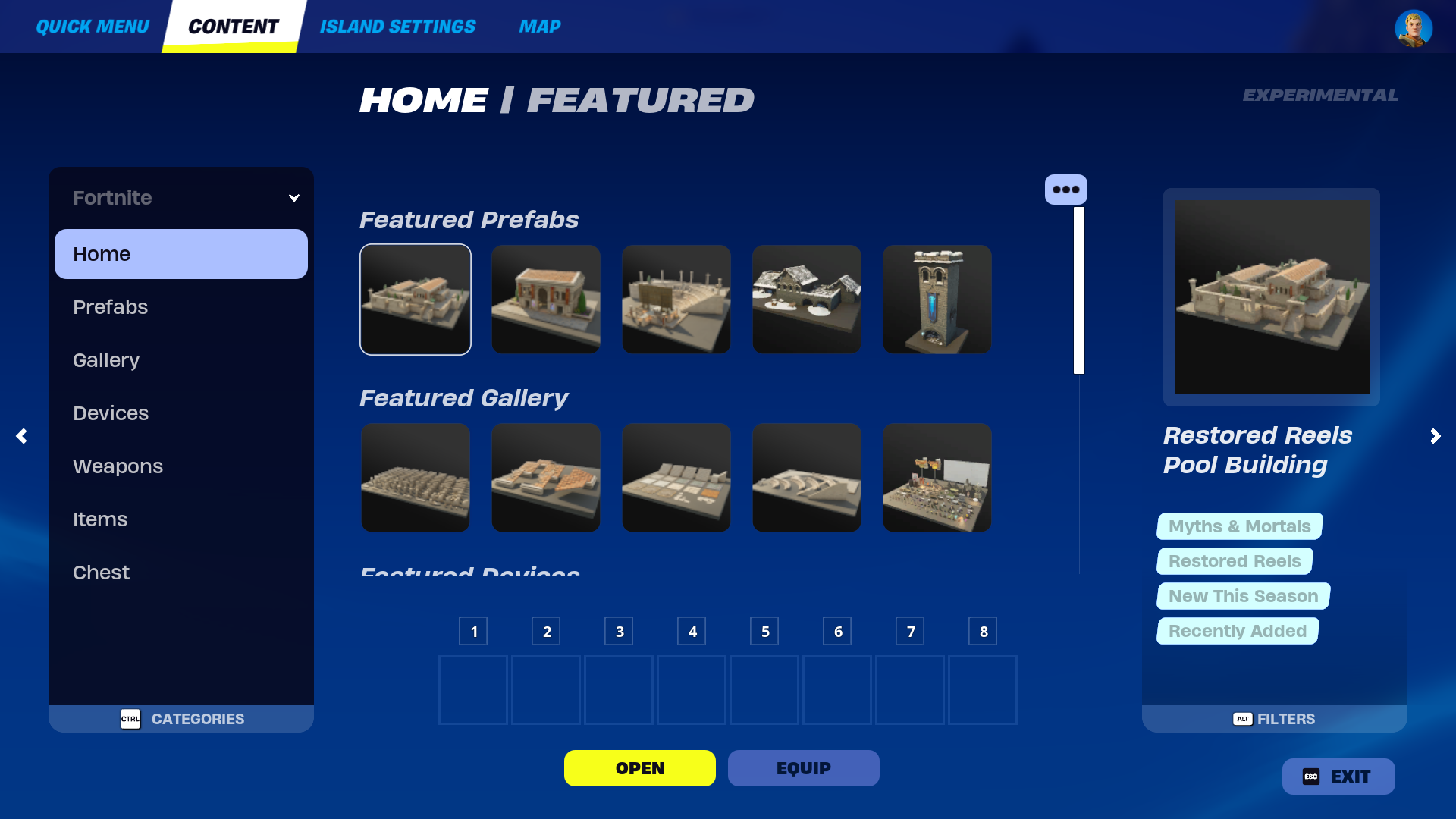
Content Browser

Follow the steps below to access the Content browser.

  1. Spawn into your Creative island.
  2. Press ~ on your keyboard to select the Phone Tool.
  3. Press Tab on your keyboard to open the Content browser.

The assets within the Content browser are updated with every update. With this growing inventory, you can easily use sidebars and filters to find assets by name, theme, and even tags.

Content Browser Sidebars
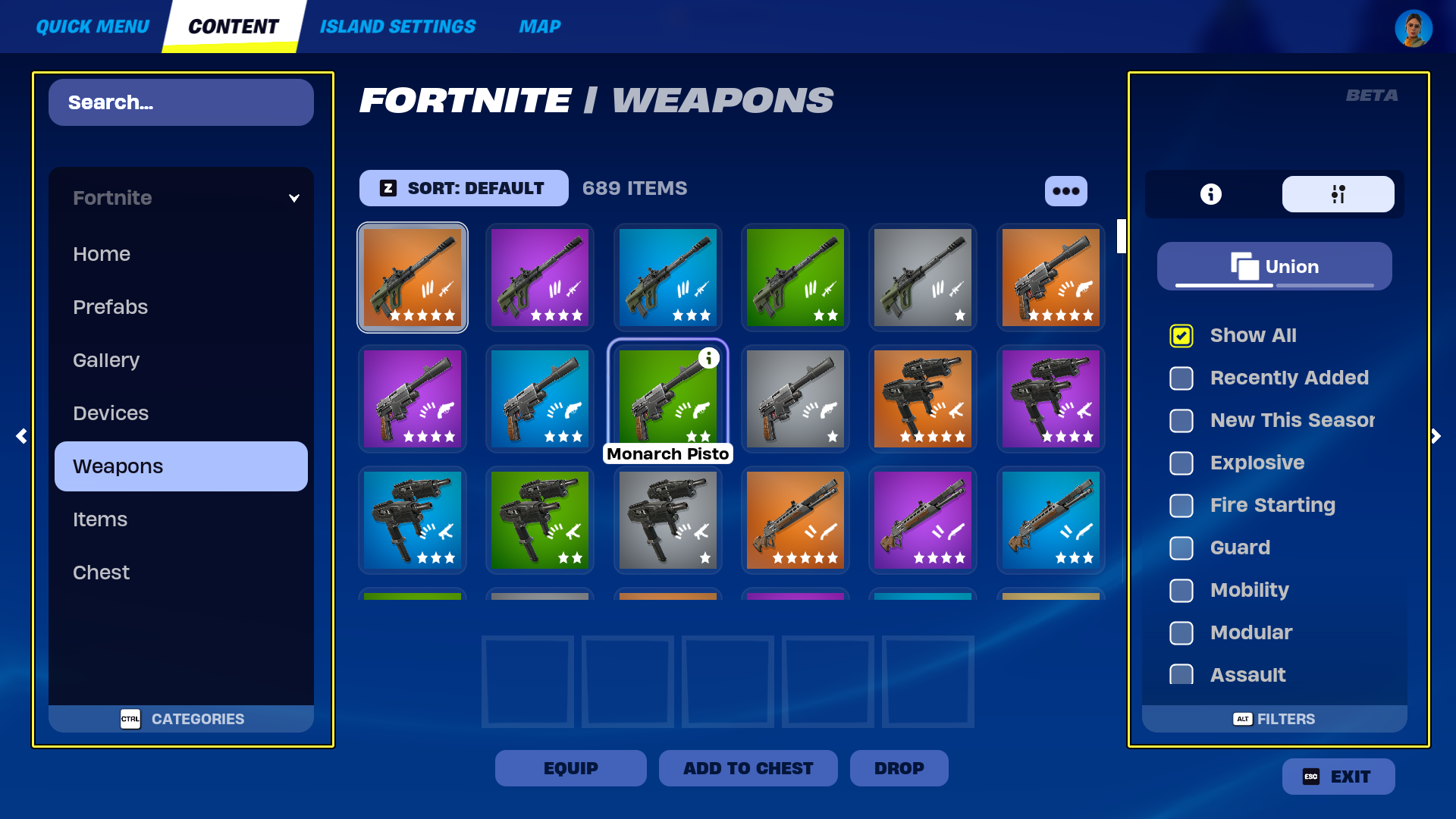
Sidebars

The Creative inventory holds all of the assets to create both the environment and mechanics of your unique gameplay experiences.

Because of the wide range of tools offered, you can easily navigate through assets using the left and right sidebars.

The left sidebar displays the Categories panel, which contains a search bar and categories to help you locate the assets offered. The right sidebar displays both the Details panel and Filters tabs to sort through assets by tags.

You're reading a preview

The full reference is free for BrainDeadGuild Discord members — sign in to read it all, or open the original at the source.

Sign in with Discord — free for members Read the original at Epic Games

Sign in with your BrainDead.TV / BrainDeadGuild Discord account for full access.

Comments

    Sign in to vote, comment, or suggest an edit. Sign in
    📄
    Source
    Epic Games

    © Epic Games. Official Epic developer documentation, shown here as a reference with a link to the original. All rights remain with Epic Games. Terms ↗

    View original Sources & licensing
    Request removal
    Last updated Mar 29, 2026
    Keep exploring
    More in UI · 7 of 147
    Prev
    custom conversation ui in unreal editor for fortnite
    Next
    exploring the sidebar and game menu in fortnite creative
    Browse all files in this folder (A–Z)
    Next up
    • The left sidebar displays the [Categories panel
    • Prefabs and Galleries
    • Combine assets from these categories to create unique environments like [Lava Cave
    • Devices
    • Combine devices like the [Player Spawner
    • 0b939f-9911-4817-8bec-e73d28a8871a_9.png)
    Related topics
    • Exploring The Content Browser Menu In Fortnite Creative Ui
    • Creative User Interface For Fortnite Creative Ui
    • Event Browser In Fortnite Creative General
    • Fortnite Creative Glossary Verse Language
    • Exploring The Sidebar And Game Menu In Fortnite Creative Ui

    Related

    Open in graph →

    Related topics

    • Exploring The Content Browser Menu In Fortnite Creative
    • Creative User Interface For Fortnite Creative
    • Event Browser In Fortnite Creative
    • Fortnite Creative Glossary
    • Exploring The Sidebar And Game Menu In Fortnite Creative
    VerseIsland · an archipelago of Verse & UEFN knowledge
    🗺️ Island atlas Learn Guides History About & Press Sources & Licensing Status

    Not affiliated with Epic Games. Fortnite, UEFN, Unreal Engine, and Verse are trademarks of Epic Games, Inc. Content is attributed to its source — see Sources & Licensing.

    🦜

    Scout · your island guide

    The Isle of Verse