
Fortnite Tools Mode in Fortnite
The Fortnite Tools editor mode, also known as Fortnite Tools, provides a variety of utility tools to speed up island creation when working in UEFN.
These tools are adapted from tools authored by Epic technical artists for use by the Epic teams that make Fortnite.
Get started by opening the Fortnite Tools:
-
In the toolbar, navigate to the Selection Mode dropdown and select Fortnite Tools.
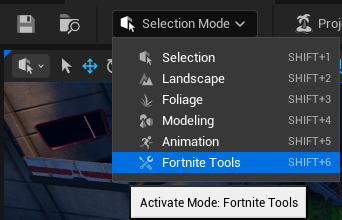
Click to enlarge image.
You can also switch to Fortnite Tools using the keyboard shortcut Shift+6. To learn more about the various modes, see Level Editor Mode.
Fortnite Tools Overview
When you select Fortnite Tools mode, the user interface (UI) appears in a tab on the left side of the viewport, with multiple tools available.
Fortnite Tools include a series of level design tools that provide ways to:
- See the scale and color of assets in the level.
- Quickly duplicate or delete assets in the viewport.
- Snap assets in place for water- tight construction.
- Find out the time it will take for players to traverse your island.
You're reading a preview
The full reference is free for BrainDeadGuild Discord members — sign in to read it all, or open the original at the source.
Sign in with your BrainDead.TV / BrainDeadGuild Discord account for full access.