VerseIsland
Feed Learn Leaderboard Guides Reference Explore Search Docs Verse Library
Sign in
Feed Learn 📖 Codex Leaderboard Guides Reference Explore Search Docs Verse Library
Fortnite › Materials/VFX · Up to Fortnite · Materials/VFX · 25 of 211 in Materials/VFX
Browse Fortnite

Lighting Scalability Manager

The Lighting Scalability Manager in Unreal Editor for Fortnite (UEFN) is used to hide and show lights and post process volumes (PPV) based on specific scalability settings (cinematic, epic, high, medium and low). This allows you to customize and optimize your lighting per platform and situation.

Behind the scenes the Lighting Scalability Manager is listening to changes in Global Illumination Quality.

Using the Lighting Scalability Manager

The Lighting Scalability Manager can be found in the ContentBrowser under All > Fortnite > Lighting > Tools.
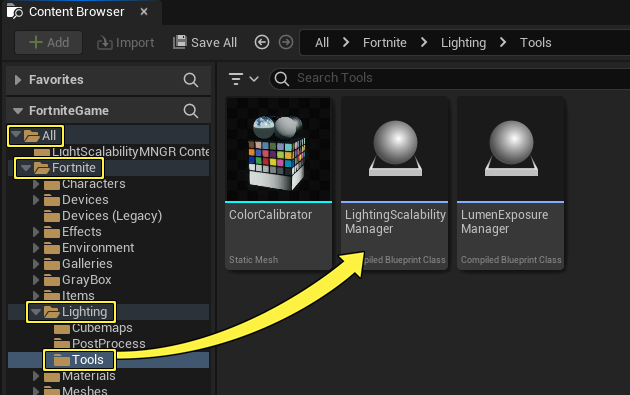
Finding the Lighting Scalability Manager

To use the Lighting Scalability Manager:

  1. From the Content Browser search for the Lighting Scalability Manager in the search bar, drag the Lighting Scalability Manager thumbnail into the viewport. The thumbnail is replaced with an Editor Icon in the scene.

  2. Open the Actor dropdown menu in the toolbar and select a light actor to add to the scene.
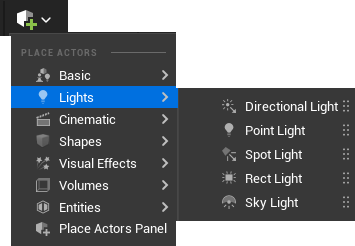
    Open the Actor dropdown menu to select a light

  3. In the Outliner, rename your lighting actor Low.

  4. In the Outliner duplicate the lighting actor until you have two more copies, then rename them:

You're reading a preview

The full reference is free for BrainDeadGuild Discord members — sign in to read it all, or open the original at the source.

Sign in with Discord — free for members Read the original at Epic Games

Sign in with your BrainDead.TV / BrainDeadGuild Discord account for full access.

Comments

    Sign in to vote, comment, or suggest an edit. Sign in
    📄
    Source
    Epic Games

    © Epic Games. Official Epic developer documentation, shown here as a reference with a link to the original. All rights remain with Epic Games. Terms ↗

    View original Sources & licensing
    Request removal
    Last updated Feb 10, 2026
    Keep exploring
    More in Materials/VFX · 25 of 211
    Prev
    lighting in unreal editor for fortnite
    Next
    lighting starter island template in unreal editor for fortnite
    Browse all files in this folder (A–Z)
    Related topics
    • Lighting Scalability Manager In Unreal Editor For Fortnite Materials/Vfx
    • Lighting In Unreal Editor For Fortnite Materials/Vfx
    • Fortnite Ecosystem Updates And Release Notes In Creative And Unreal Editor For Fortnite Release Notes
    • Lighting In Unreal Editor For Fortnite Materials/Vfx
    • Lighting Starter Island Template In Unreal Editor For Fortnite Materials/Vfx

    Related

    Open in graph →

    Related topics

    • Lighting Scalability Manager In Unreal Editor For Fortnite
    • Lighting In Unreal Editor For Fortnite
    • Fortnite Ecosystem Updates And Release Notes In Creative And Unreal Editor For Fortnite
    • Lighting In Unreal Editor For Fortnite
    • Lighting Starter Island Template In Unreal Editor For Fortnite
    VerseIsland · an archipelago of Verse & UEFN knowledge
    🗺️ Island atlas Learn Guides History About & Press Sources & Licensing Status

    Not affiliated with Epic Games. Fortnite, UEFN, Unreal Engine, and Verse are trademarks of Epic Games, Inc. Content is attributed to its source — see Sources & Licensing.

    🦜

    Scout · your island guide

    The Isle of Verse