
Multiplayer Previewing In Unreal Editor For Fortnite
Unreal Editor for Fortnite (UEFN) and Fortnite Creative allow you to test your multiplayer experiences by spawning up to 98 test players into your level. You no longer need to manage multiple accounts and devices when testing alone, or assemble other Fortnite users to test incremental design changes—you can simply launch a session with the number of test players required for your multiplayer experience!
Test players behave exactly like idle players: they can be damaged, assigned to a team, spawn on Player Spawners and be instigators for devices. You can set the number of test players to be as high as the max player limit in your project's Island Settings.
Adding Test Players to Your Level in UEFN
Adding test players to your experience is simple:
-
Launch UEFN and open a new or existing project.
-
In the Outliner, find and select IslandSettings.
-
In the Details panel, search for "debug" or scroll to the Debug section.
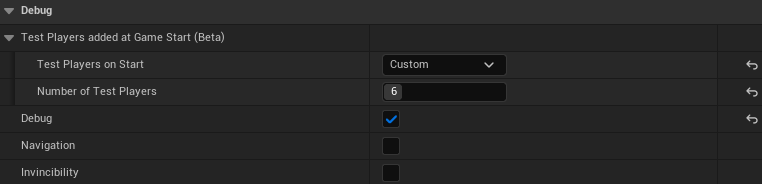
-
Check the box next to Debug. Notice that Test Players on Start option becomes available to edit.
-
Choose between the following:
You're reading a preview
The full reference is free for BrainDeadGuild Discord members — sign in to read it all, or open the original at the source.
Sign in with your BrainDead.TV / BrainDeadGuild Discord account for full access.