VerseIsland
Feed Learn Leaderboard Guides Reference Explore Search Docs Verse Library
Sign in
Feed Learn 📖 Codex Leaderboard Guides Reference Explore Search Docs Verse Library
Fortnite › Materials/VFX · Up to Fortnite · Materials/VFX · 46 of 211 in Materials/VFX
Browse Fortnite

Managing and Displaying Scores in Verse

By completing this step in the Time Trial: Pizza Pursuit tutorial, you’ll learn how to manage the score when a player picks up items and delivers them, and to update the UI to display scores. To learn more about creating an in-game UI in Verse, see Creating an In-Game UI.

The score manager will track and display:

  • Total Points: Represents the overall points the player has scored in-game.
  • Pending Points: Represents the points the player has accumulated for the current set of pickups.
  • Pickup Level: Represents the current pickup level.
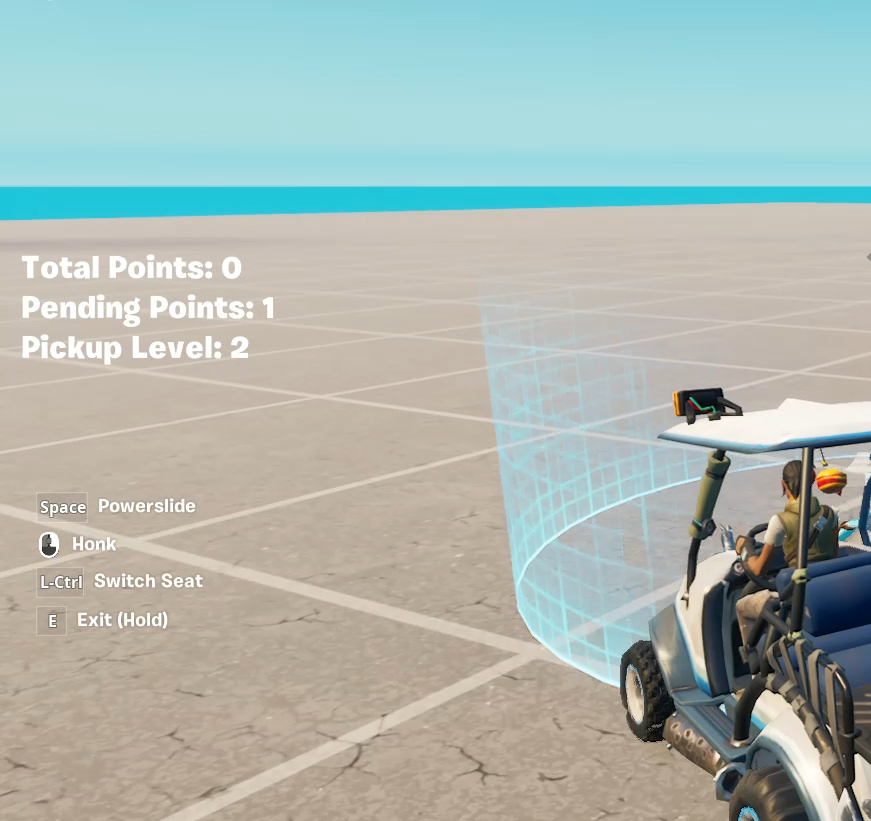
Score manager UI dispalys on left-side of screen

Creating the UI

Follow these steps to create the UI for the score manager in Verse:

  1. Create a new empty Verse file and name it score_manager.verse.
  2. Create a new class named score_manager, and add the following fields to the class:

You're reading a preview

The full reference is free for BrainDeadGuild Discord members — sign in to read it all, or open the original at the source.

Sign in with Discord — free for members Read the original at Epic Games

Sign in with your BrainDead.TV / BrainDeadGuild Discord account for full access.

Comments

    Sign in to vote, comment, or suggest an edit. Sign in
    📄
    Source
    Epic Games

    © Epic Games. Official Epic developer documentation, shown here as a reference with a link to the original. All rights remain with Epic Games. Terms ↗

    View original Sources & licensing
    Request removal
    Last updated May 12, 2026
    Keep exploring
    More in Materials/VFX · 46 of 211
    Prev
    particle system component in unreal editor for fortnite
    Next
    post process device design examples in fortnite
    Browse all files in this folder (A–Z)
    Next up
    • By completing this step in the [Time Trial: Pizza Pursuit
    • Ingame User Interfaces In Unreal Editor For Fortnite
    • var PickupLevel<private> : int = 0`
    • Collapse code Copy full snippet(73 lines long)
    • 5. Improving Feedback and Player Experience
    Related topics
    • Pizza Pursuit 4 Managing And Displaying The Score In Verse Materials/Vfx
    • Pizza Pursuit 6 Final Result For Time Trial In Verse Verse Language
    • Time Trial Pizza Pursuit In Verse Verse Language
    • Pizza Pursuit 1 Setting Up The Level For Time Trial In Verse Verse Language
    • Pizza Pursuit 6 Final Result In Verse Verse Language

    Related

    Open in graph →

    Related topics

    • Pizza Pursuit 4 Managing And Displaying The Score In Verse
    • Pizza Pursuit 5 Improving Feedback And Player Experience For Time Trial In Verse
    • Time Trial Pizza Pursuit In Verse
    • Pizza Pursuit 6 Final Result For Time Trial In Verse
    • Time Trial Pizza Pursuit In Verse
    VerseIsland · an archipelago of Verse & UEFN knowledge
    🗺️ Island atlas Learn Guides History About & Press Sources & Licensing Status

    Not affiliated with Epic Games. Fortnite, UEFN, Unreal Engine, and Verse are trademarks of Epic Games, Inc. Content is attributed to its source — see Sources & Licensing.

    🦜

    Scout · your island guide

    The Isle of Verse