
Setting Level of Detail
Level of Detail (LOD) is important for rendering your asset across different platforms. Setting LODs also helps to improve performance for players since the LODs render according to a player's proximity to props.
Setting Up the LOD Transition Distances and Reduction Settings
Expand the LOD Settings section in the Details panel on the right side of the Static Mesh Editor.
LOD Group
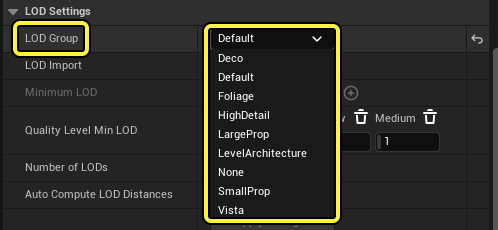
The LOD Group dropdown provides a list of asset types and assigns default LOD settings based on your selection.
Recommended LOD groups for Fortnite Creative assets:
You're reading a preview
The full reference is free for BrainDeadGuild Discord members — sign in to read it all, or open the original at the source.
Sign in with your BrainDead.TV / BrainDeadGuild Discord account for full access.