
The Walking Dead Universe Islands in Fortnite
Run, don't walk! The Walking Dead Universe (TWDU) is available in Unreal Editor for Fortnite (UEFN) with everything you need to mutate your creativity so that you can design a pleasantly horrific gameplay experience.
First, take a peek at the prison-themed starter island designed so well that you'll think you are hallucinating. It's fine, you're not. Then, learn to get the best out of the new Walker NPC to create terrifying survival-horror gameplay, or summon mass hordes to mow down in powerful action sequences.
After you check out the template islands, browse through the many resources linked below to get started creating your own TWDU project.
Accessing The Walking Dead Universe
Follow the steps below to create a project within TWDU.
-
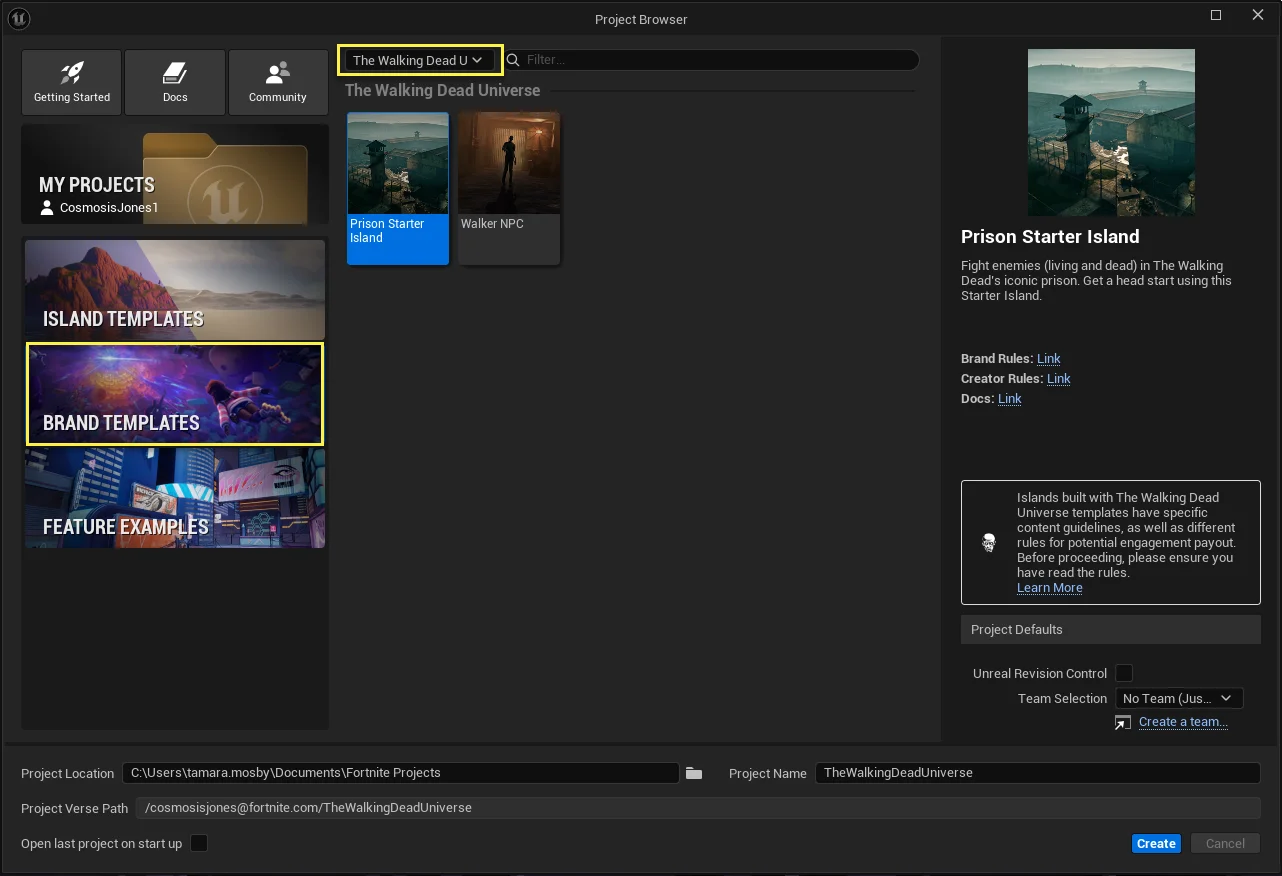
In the Project Browser, navigate to Brand Templates, then in the All Brands dropdown select The Walking Dead Universe. You can also create a project after selecting Brand Templates and navigate to a template underneath The Walking Dead Universe.
-
Select your desired template island. In the Project Name field, enter the text for your project's name.
-
Under Project Defaults, set your project’s team and whether your project will be under Unreal Revision Control.
-
Click Create to load your project.
-
Launch a session to play through these templates before you make any changes.
You're reading a preview
The full reference is free for BrainDeadGuild Discord members — sign in to read it all, or open the original at the source.
Sign in with your BrainDead.TV / BrainDeadGuild Discord account for full access.