
Outliner Tips and Tricks
The Outliner panel, or Outliner for short, displays all actors within a scene in a hierarchical view. You can save time when working in Unreal Editor for Fortnite (UEFN) by using the Outliner shortcuts below.
Make Copies
Creating landscapes or building structures can be monotonous work, especiallly if you're dragging the same prop over and over from the Content Drawer. Instead, use the following workflow to increase your productivity.
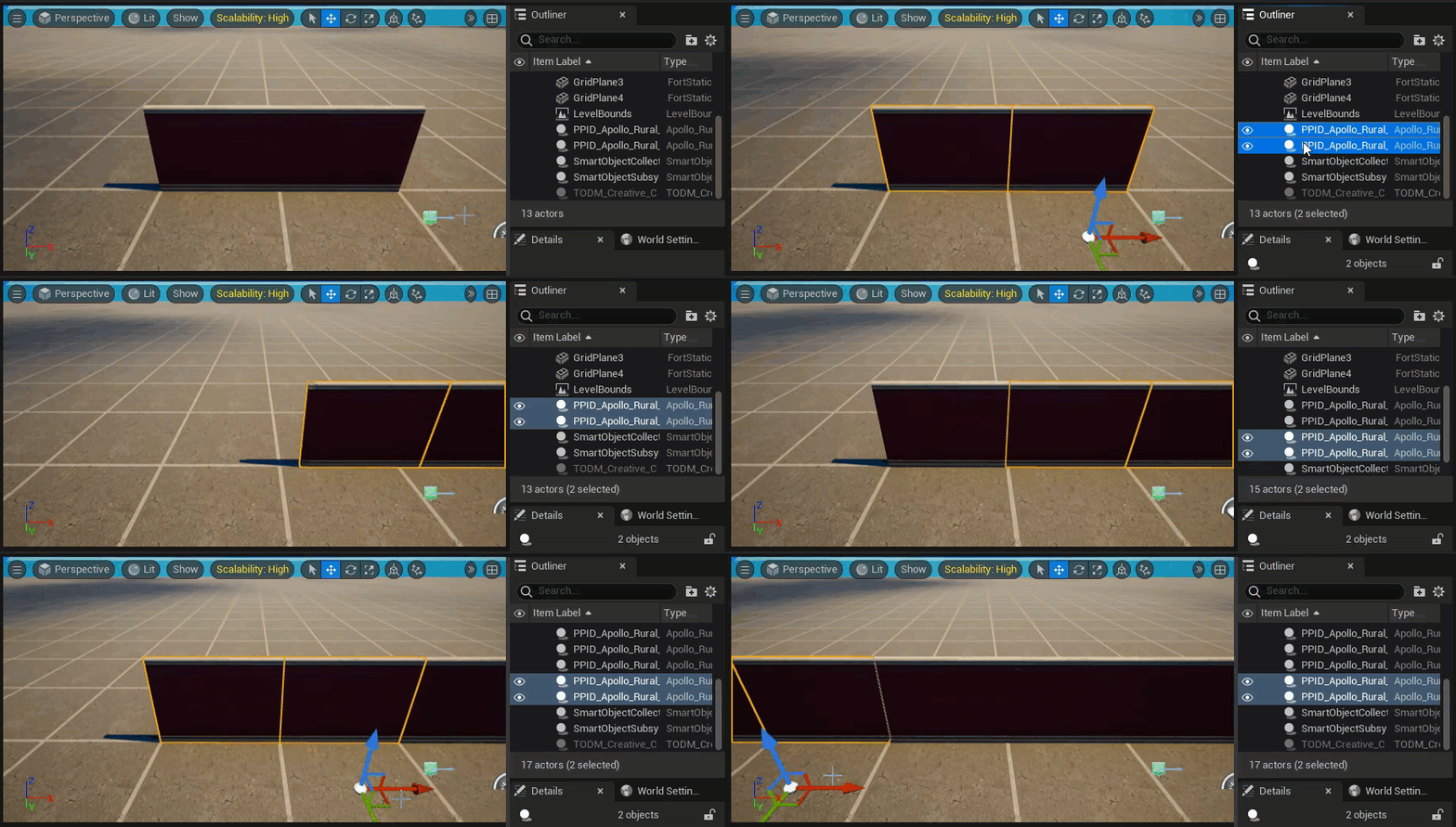
- Create a group of props by selecting and dragging two or more props from the Content Drawer at the same time. They will appear in the viewport, and also appear in the Outliner panel.
- Press and hold Shift while selecting props from the Outliner. A gold outline appears around a selected prop in the viewport.
- Press Ctrl + C to copy the selected props, and Ctrl + V to paste them.
- Use the directional arrows for the pivot point to place the copied props where you want them.
- Repeat these steps to create large buildings or expansive landscapes.
You're reading a preview
The full reference is free for BrainDeadGuild Discord members — sign in to read it all, or open the original at the source.
Sign in with your BrainDead.TV / BrainDeadGuild Discord account for full access.