
Concurrency in Verse: Async, race, and State Machines for Game Logic
Concurrency in Verse: Async, race, and State Machines for Game Logic
Most code runs one line after another: do this, then this, then this. That's called sequential execution, and it's most of what you've written so far. But games aren't sequential. While the storm closes, a scoreboard ticks, a door animates open, and an NPC is deciding whether you're worth chasing — all at the same time.
That's concurrency: more than one thing in flight at once. Verse has a small, sharp set of words for it, and once you can read them, a whole class of game logic — timers, cinematics, and especially AI — stops being mysterious.
This is an intermediate lesson. You should already be comfortable reading Verse as sentences, and know events and .Subscribe. We build from there.
The one big idea: some code can pause and wait without freezing the game. Everything else here is built on that.
Part 1 — The async world: <suspends> and Await
<!-- section-art:part-1-the-async-world-suspends-and-await -->

The Living Pause
A normal function runs start-to-finish and returns. It can't wait — if it tried to "sleep for 3 seconds," it would freeze the entire game for 3 seconds.
Verse solves this with a special kind of function: an async function, marked with the effect label <suspends>. A <suspends> function is allowed to pause itself — to wait for time to pass, or for an event to fire — and while it's paused, the rest of the game keeps running.
You've already met one without knowing it. A device's start-up function is async:
using { /Fortnite.com/Devices }
using { /Verse.org/Simulation }

clock_device := class(creative_device):

    # OnBegin is <suspends> — it is allowed to wait
    OnBegin<override>()<suspends> : void =
        Print("Tick")
        Sleep(1.0)        # pause THIS function for 1 second; game keeps running
        Print("Tock")
Read the signature like a sentence: OnBegin is an action that takes nothing, is allowed to suspend (<suspends>), and gives back nothing (void). The label goes after the () and before the return-type :. Sleep(Seconds : float) is itself a <suspends> function — the simplest way to wait — and it lives in /Verse.org/Simulation, so you must open that module with using.
The rule that follows: only a <suspends> function can call another <suspends> function (or Sleep, or Await). Async is contagious — if a verb waits, its caller must be allowed to wait too. (And <suspends> can never be combined with <decides>; a verb either waits or it can fail, not both.)
Await — wait for something to happen
Sleep waits for time. Await() waits for an event. An event is a thing other code can Signal, and any async function can .Await() it — pausing until the signal comes, then receiving whatever value was sent:
# Declare an event that carries no payload
DoorOpened : event() = event(){}

# Somewhere, an async function waits for it:
#   DoorOpened.Await()        # pauses here until...
# ...somewhere else, code fires it:
#   DoorOpened.Signal()       # ...this runs, and the Await above wakes up
That's the whole async world: Sleep waits for time, Await waits for an event, and a <suspends> function is the only place either is allowed. Everything below is about running several of these waits at once.
Part 2 — The six concurrency expressions
Verse gives you six words for running async work. Here is each one with the smallest correct example. Read them as a family — they only differ in who they wait for and what happens to the losers.
spawn — fire and forget
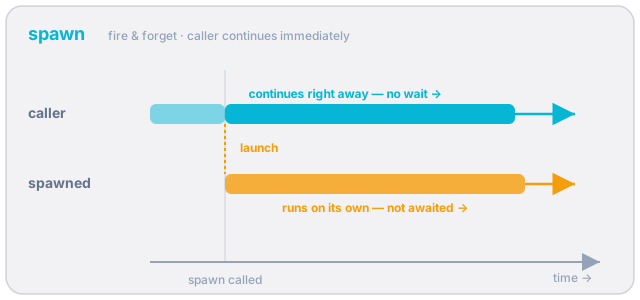 Fire-and-forget: the task is launched and the caller continues immediately — nothing waits for it.
spawn starts an async job in the background and does not wait for it. Your code moves on immediately. It takes a brace block (not a bare call), and unlike everything else here it works even in a non-<suspends> caller — it's how you kick off async work from ordinary code:
# Start the countdown running; don't wait for it — keep going
spawn { RunCountdown() }
loop — do it again, forever
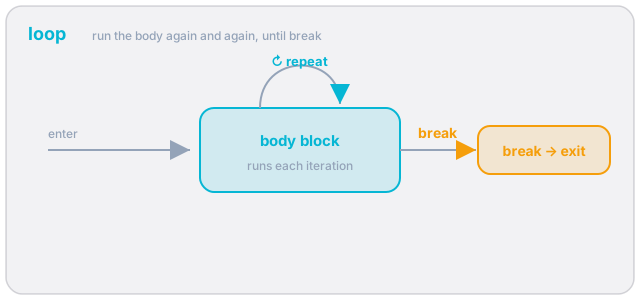 A body block repeats every iteration until a
 break exits the loop.
loop repeats its body endlessly until you break. It's the heartbeat of most game logic. Because it's inside a <suspends> context you put a Sleep (or an Await) in it so it yields each pass instead of spinning:
loop:
    Sleep(1.0)              # yield once per second
    set TimeLeft -= 1
    if (TimeLeft <= 0):
        break              # leave the loop
(break only exits the innermost loop. Note Verse's for is for iterating a range — for (I := 0..5) — it has no C-style for(init; cond; step); a countdown is a loop with a manual set and break, as above.)
sync — run all, wait for all
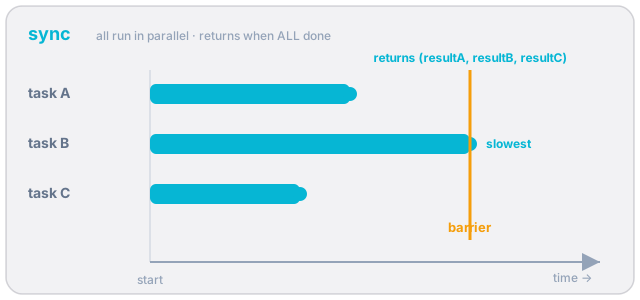 All arms run in parallel; execution resumes only when the slowest finishes, returning a tuple of every result.
sync starts every arm at once and waits for all of them to finish, then hands back a tuple of their results in order:
# Open the door AND play the chime AND wait 2s — all at once;
# continue only when the slowest finishes.
sync:
    OpenDoor()
    PlayChime()
    Sleep(2.0)
If the arms return values, capture the tuple: Results := sync: ... then Results(0), Results(1), …
race — first to finish wins, losers are cancelled
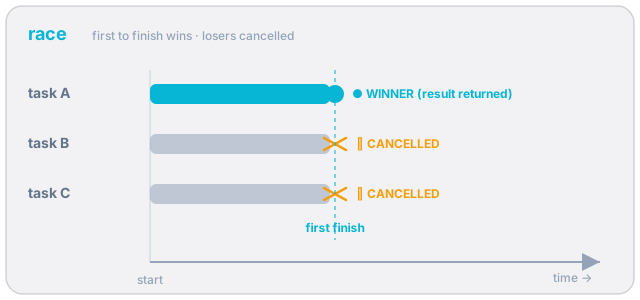 Every arm starts together; the first to finish wins and its result is returned — the losers are cancelled.
This is the important one. race starts every arm at once; the first to complete wins, its value is the result, and every other arm is cancelled on the spot. Think of a foot race: the moment someone crosses the line, the race is over for everyone.
# Wait for the player to press the button, but no longer than 5 seconds.
# Whichever happens first wins; the other is cancelled.
race:
    ButtonPressed.Await()    # arm A: the player acted
    Sleep(5.0)               # arm B: time ran out
That single pattern — "do X, but with a timeout" — is everywhere in games, and it's just a race between an Await and a Sleep.
rush — first to finish wins, losers keep running
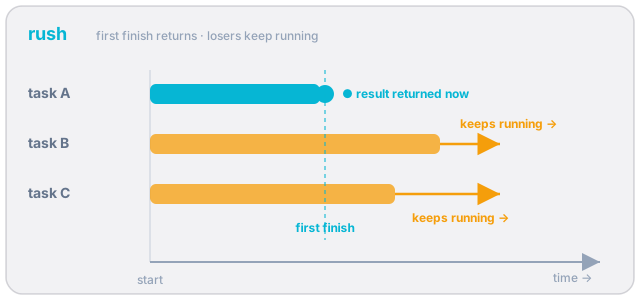 The first arm to finish returns its result now, but the slower arms keep running to completion.
rush looks like race but differs in one decisive way: when the first arm finishes, you get its result and move on — but the other arms keep running in the background instead of being cancelled.
# Get the quick result NOW, but let the slow background work finish on its own.
First := rush:
    QuickCheck()             # finishes first → its value returns here
    LongBackgroundJob()      # NOT cancelled — keeps running after rush returns
race vs rush is the distinction to burn in: both return the first to complete, but race cancels the losers; rush lets them run. Reach for race when the losers are now pointless (a timeout, a cancelled wait); reach for rush when the slow work still needs to finish (logging, cleanup, a long animation).
branch — start without waiting (scoped)
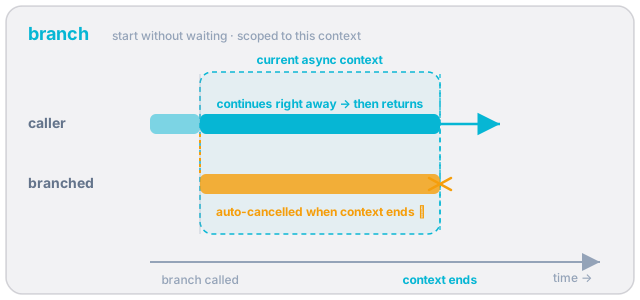 Like
Like spawn, the caller continues immediately — but the branched task is tied to the current async context and is auto-cancelled when that context ends.
branch starts its body as a background task and continues immediately, like spawn — but a branch task is cancelled when the enclosing function ends. Use it for background work that should only live as long as the function that started it:
# Keep a UI label ticking while this function does its real work below;
# the ticker is automatically cancelled when this function returns.
branch:
    loop:
        Sleep(1.0)
        UpdateLabel()
(spawn vs branch: spawn tasks outlive the scope that made them — use it when the work must finish; branch tasks are tied to the scope — use it for "only while I'm here" background work.)
Part 3 — The key pattern: a race of awaited events, then decide
Here's where it becomes game logic. Real situations have several things that could happen next, and you want to wait for whichever happens first and then branch on which one it was.
The trick: make each race arm a block: that does its wait and then returns a tag value saying "I won." Bind the race's result, then case on the tag:
# Three things could end this phase. Whichever happens first wins;
# the others are cancelled. The winning arm's number tells us what happened.
Winner := race:
    block:
        DamageTaken.Await()      # the NPC got hit
        1
    block:
        PlayerSpotted.Await()    # the NPC saw a player
        2
    block:
        Sleep(8.0)               # nothing happened for 8 seconds
        3

case (Winner):
    1 => Print("Hit! React.")
    2 => Print("Spotted a player — give chase.")
    3 => Print("All quiet — go back to idle.")
    _ => Print("unreachable")
Read it: "Wait for damage, or seeing a player, or eight seconds — whichever comes first. The loser arms are cancelled. The winning arm's number tells us which, so we can do the right thing." Every arm returns an int, so the race's result is an int, and case routes on it.
This isn't a textbook contrivance — it's exactly how our shipping cinematic player decides whether a cutscene ended on its own or a player skipped it. From our real skipable_cinematic_player.verse:
# Wait for the cinematic to finish naturally OR for any player to skip it,
# whichever happens first. The loser Await is cancelled.
race:
    block:
        CinematicSequence.StoppedEvent.Await()   # finished on its own
        Logger.Print("Cinematic completed naturally")
    block:
        CinematicCompleted.Await()               # a player skipped it
        Logger.Print("Cinematic was skipped by player")
# Either way, we land here and tear the cinematic down for everyone.
Two awaited events, one race, and the code past it runs the moment either fires — the other is cancelled. That's the whole pattern.
This — a race of awaited events whose winner decides what happens next — is the engine inside almost every state machine.
Part 4 — From the pattern to a state machine
An NPC isn't "running code"; it's in a state — Idle, Alert, Chase, Attack — and it changes state when something happens. That's a state machine: a current state, plus rules for which state to go to next.
The structure writes itself from Part 3:
- a
varholds the current state (use anenumso the states are named, not magic numbers), - a
loopkeeps the NPC alive, - inside the loop, a
raceof awaited events waits for whatever can change this state, - the winner picks the next state, you
setthe state var, and the loop comes around again.
That loop-around-a-race is a decision tree that runs over time: at each state, only the events that matter in that state are raced, and the outcome routes you to the next state. Idle listens for "player spotted"; Chase listens for "reached the player" or "lost them"; Attack listens for "player fled" or "a cooldown elapsed." Same shape every time.
This is exactly how our shipping NPCs are built
This isn't a teaching simplification — it's the architecture of every NPC in our codebase. Our real *_npc_behavior.verse scripts all follow the same skeleton: OnBegin kicks the machine off with spawn, a dispatcher **case**s the current state to a per-state <suspends> method, and each state method awaits the things that matter to it. From our production NPC behaviour (lightly trimmed):
# OnBegin spins up the state machine in the background and returns immediately.
InternalStateMachineHandler(NPCAgent : agent) : void =
    spawn{ InternalStateMachine(NPCAgent) }

# The dispatcher: pick the current state and run its method.
InternalStateMachine(InAgent : agent)<suspends> : void =
    case (CurrentState):
        npc_states.Idle  => StateIdle(InAgent)
        npc_states.Sleep => StateSleep(InAgent)
        npc_states.Hint  => StateHint(InAgent)
        # ...one method per state
And inside a state, the workhorse is a race of a work loop against a timeout — straight out of our real "sleep until healed, but no longer than MaxSleepDuration" state:
# Heal a little each second until full — but cap the total nap with a timeout.
# Whichever finishes first wins; race cancels the other.
race:
    block:
        Sleep(MaxSleepDuration)         # the cap: nap no longer than this
    loop:
        if (CurrentHealth < MaxHealth):
            Heal(InAgent)
            Sleep(1.0)
        else:
            break                       # fully healed → this arm completes
Learn this shape once and you can read — and write — the AI in any of our games. The capstone below is the same skeleton, simplified to the bare control flow so nothing distracts from it.
Part 5 — Capstone: a working NPC behaviour state machine
<!-- section-art:part-5-capstone-a-working-npc-behaviour-state-ma -->
NPC State Brain
Here is the whole idea as one compiling device — the same skeleton as our shipping *_npc_behavior.verse scripts (Part 4), distilled to its control flow. It models a guard with three states. Real perception (line-of-sight, distance checks) would Signal the events; here a button stands in for "a player was spotted" and timers drive the rest, so the control flow — the part this lesson is about — is real, complete, and compile-verified.
Walk the control flow once and you've used everything:
OnBegin<suspends>(Part 1) wires a device event and starts the brain.RunBrainis aloop(Part 2) — the heartbeat that never stops.- Each state is a
<suspends>function that awaits the things that can change it. ChaseandAttackare araceof awaited events whose winner is a tag (Part 3), and thecaseroutes to the next state.- The
var Stateand theenummake it a real state machine (Part 4): current state in, next state out, around and around.
Notice the Attack state's race — it's the work-loop-against-a-timeout shape from our real NPC code (Part 4): one arm is a loop that strikes every second and never returns (it can never win), the other is Sleep(5.0). When the timeout wins, race cancels the striking loop. That's race's cancel-the-losers behaviour doing exactly what our shipping NPCs rely on: the work runs until the escape condition, then stops cleanly with no leftover task.
Recap
<suspends>marks an async function — the only place allowed to wait.Sleepwaits for time;Await()waits for an event (raised withSignal).spawn { }— background, fire-and-forget, works anywhere.branch:— background, but cancelled when its scope ends.loop:— repeat untilbreak; the heartbeat of game logic.sync:— run all arms, wait for all, get a tuple of results.race:— first to finish wins, losers cancelled.rush:— first wins, losers keep running. Getting this pair right is the whole skill.- The key pattern: a
racewhose arms eachAwaita different event and return a tag, thencaseon the tag to decide what happens next. - A state machine is that pattern in a
loopwith avarstate: await the events that matter in this state, let the winner pick the next state, repeat. That's how NPC behaviour — idle → chase → attack — is really built.
You didn't memorize a timing API. You learned that async is just waiting without freezing, and that all of game AI is a loop deciding, over and over, which awaited thing happened first.
References
Primary — our real, shipping Verse (the authority for every pattern here):
- Our production NPC state machines —
*_npc_behavior.verse(theOnBegin→spawn{ StateMachine }→ per-state<suspends>method skeleton, and theraceof a work-loop against a timeout). - Our cinematic player —
skipable_cinematic_player.verse(theraceof two awaited events: natural completion vs player skip). - Our mission and loot controllers —
mission_controller.verse,loot_controller.verse(spawnfire-and-forget orchestration;OnBegin<suspends>entry points). - Semantics verified against the Verse Cortex knowledge base: the Verse Book concurrency chapter and the Verse API digests (
Sleep<suspends>:voidin/Verse.org/Simulation;event(t)with.Await()/.Signal(); theawaitableinterface).
Epic docs (secondary, for the formal spec):
Get the complete code — free
You've read the full walkthrough. The complete, copy-paste-ready Verse solution is free for members — sign in to unlock it.
Free with your BrainDead.TV / BrainDeadGuild Discord account. The walkthrough above is always free.
Verse source files
- 01-device.verse · device
- 02-fragment.verse · fragment
- 03-fragment.verse · fragment
- 04-fragment.verse · fragment
- 05-fragment.verse · fragment
- 06-fragment.verse · fragment
- 07-fragment.verse · fragment
- 08-fragment.verse · fragment
- 09-fragment.verse · fragment
- 10-fragment.verse · fragment
- 11-fragment.verse · fragment
- 12-fragment.verse · fragment
- 13-device.verse · device
Check your understanding
Test yourself with an interactive quiz and track your progress + earn XP — free for members.
Turn this into a guided course
Add Verse concurrency — the async world (<suspends>/Await), spawn/loop/sync/race/rush/branch, racing awaited events, and building NPC state machines to your free study plan — we'll suggest related pages and stitch the lot into one compile-checked, self-guided lesson with worked examples and quizzes.
References
Original tutorial generated by Verse Island from the Verse/UEFN knowledge base, with references to the Epic Games sources above. Code is validated against the knowledge base.