VerseIsland
Feed Learn Leaderboard Guides Reference Explore Search Docs Verse Library
Sign in
Feed Learn 📖 Codex Leaderboard Guides Reference Explore Search Docs Verse Library
Fortnite Creative › Devices · Up to Fortnite Creative · Devices · 3 of 174 in Devices
Browse Fortnite Creative

Analytics Device Dashboard

The Analytics Dashboard displays the event data gathered by the Analytics device.

The data on this dashboard is useful for analyzing gameplay to find areas that players might find too difficult, where on the island players drop off due to uninteresting gameplay, or other factors. This gives you the chance to re-engage players with new obstacles.

To view your Analytics Dashboard, sign into the Creator Portal and click the Analytics icon from the navbar. Your analytics dashboard opens automatically.
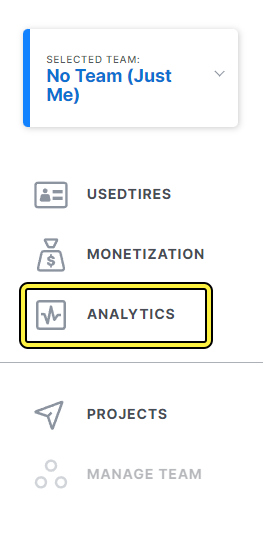
Click the Analytics icon to go to the Analytics dashboard.

How It Works

Analytics are gathered by the Analytics device daily and sent to the Analytics Dashboard in the Creator Portal. The Analytics device is able to retrieve this data based on Island Code.

You're reading a preview

The full reference is free for BrainDeadGuild Discord members — sign in to read it all, or open the original at the source.

Sign in with Discord — free for members Read the original at Epic Games

Sign in with your BrainDead.TV / BrainDeadGuild Discord account for full access.

Comments

    Sign in to vote, comment, or suggest an edit. Sign in
    📄
    Source
    Epic Games

    © Epic Games. Official Epic developer documentation, shown here as a reference with a link to the original. All rights remain with Epic Games. Terms ↗

    View original Sources & licensing
    Request removal
    Last updated Dec 7, 2024
    Keep exploring
    More in Devices · 3 of 174
    Prev
    air vent device design examples in fortnite creative
    Next
    ascender device design examples in fortnite creative
    Browse all files in this folder (A–Z)
    Next up
    • The **Analytics Dashboard** displays the [event
    • Using Analytics Devices In Fortnite Creative
    • Click the Analytics icon to go to the Analytics dashboard.
    Related topics
    • Analytics Device Dashboard In Fortnite Creative Devices
    • Using Analytics Devices In Fortnite Creative Devices
    • Insights Dashboard In Fortnite Creative Creator Economy
    • Using Analytics In Unreal Editor For Fortnite Creator Economy
    • Insights Dashboard In Fortnite Creative Creator Economy

    Related

    Open in graph →

    Related topics

    • Analytics Device Dashboard In Fortnite Creative
    • Using Analytics Devices In Fortnite Creative
    • Using Analytics Devices In Fortnite Creative
    • Insights Dashboard In Fortnite Creative
    • Using Analytics In Unreal Editor For Fortnite
    VerseIsland · an archipelago of Verse & UEFN knowledge
    🗺️ Island atlas Learn Guides History About & Press Sources & Licensing Status

    Not affiliated with Epic Games. Fortnite, UEFN, Unreal Engine, and Verse are trademarks of Epic Games, Inc. Content is attributed to its source — see Sources & Licensing.

    🦜

    Scout · your island guide

    The Isle of Verse