VerseIsland
Feed Learn Leaderboard Guides Reference Explore Search Docs Verse Library
Sign in
Feed Learn 📖 Codex Leaderboard Guides Reference Explore Search Docs Verse Library
Fortnite Creative › Creator Economy · Up to Fortnite Creative · Creator Economy · 6 of 15 in Creator Economy
Browse Fortnite Creative

Island Creator Program

You’ve created a great island using the Fortnite Creative or Unreal Editor for Fortnite toolset, and now you want to share your creation with Fortnite!

Join the Fortnite Island Creator & Engagement Program to:

  • Publish islands within Fortnite.
  • Receive money based on player engagement with your island.

How to Join

If you’re already enrolled in the Support-A-Creator (SAC) program, you’ll still have access to publish through the new Creator Portal, but if you want to be eligible for engagement payouts, you will need to also join the Fortnite Island Creator & Engagement Program.

To join, you must:

  • Be at least 18 years old.
  • Have an Epic Games account and have logged into Fortnite at least 30 days before applying.
  • Your Epic account must have been editing islands in Fortnite Creative or projects in Unreal Editor for 7 of the last 30 days.

Go to the Creator Portal and follow the steps below to apply.

  1. Click SIGN IN. The Epic Games account sign-in pop-up appears.
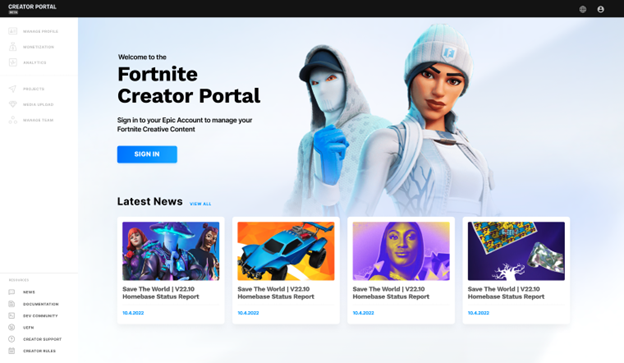
    Click Log In

  2. Enter your Epic Games account log in information and click LOG IN NOW. You are now logged into Creator Portal. You will see the prompt to ENROLL NOW in the Island Creator & Engagement Program.

You're reading a preview

The full reference is free for BrainDeadGuild Discord members — sign in to read it all, or open the original at the source.

Sign in with Discord — free for members Read the original at Epic Games

Sign in with your BrainDead.TV / BrainDeadGuild Discord account for full access.

Comments

    Sign in to vote, comment, or suggest an edit. Sign in
    📄
    Source
    Epic Games

    © Epic Games. Official Epic developer documentation, shown here as a reference with a link to the original. All rights remain with Epic Games. Terms ↗

    View original Sources & licensing
    Request removal
    Last updated Dec 7, 2024
    Keep exploring
    More in Creator Economy · 6 of 15
    Prev
    insights dashboard in fortnite creative
    Next
    lego brand and creator rules in fortnite creative
    Browse all files in this folder (A–Z)
    Next up
    • Go to the [Creator Portal
    • Read the Legal Acknowledgement terms and complete the Legal Acknowledgement.
    • Community Rules
    • Identity**.
    • If you are exempt from needing to enter tax and/or payout information, please contact [Epic Games Support
    • If you have any questions about the Tax Interview process, see [Set Up Your Tax Profile
    Related topics
    • Island Creator And Engagement Program In Fortnite Creative Creator Economy
    • Setting Up Your Account And Teams In Fortnite Creative Player
    • Setting Up Your Account And Teams In Fortnite Creative Player
    • Publishing From The Creator Portal In Fortnite Creative Creator Economy
    • Lego Brand And Creator Rules In Fortnite Creative Creator Economy

    Related

    Open in graph →

    Related topics

    • Island Creator And Engagement Program In Fortnite Creative
    • Setting Up Your Account And Teams In Fortnite Creative
    • Setting Up Your Account And Teams In Fortnite Creative
    • Publishing From The Creator Portal In Fortnite Creative
    • Lego Brand And Creator Rules In Fortnite Creative
    VerseIsland · an archipelago of Verse & UEFN knowledge
    🗺️ Island atlas Learn Guides History About & Press Sources & Licensing Status

    Not affiliated with Epic Games. Fortnite, UEFN, Unreal Engine, and Verse are trademarks of Epic Games, Inc. Content is attributed to its source — see Sources & Licensing.

    🦜

    Scout · your island guide

    The Isle of Verse