VerseIsland
Feed Learn Leaderboard Guides Reference Explore Search Docs Verse Library
Sign in
Feed Learn 📖 Codex Leaderboard Guides Reference Explore Search Docs Verse Library
Fortnite Creative › Devices · Up to Fortnite Creative · Devices · 114 of 174 in Devices
Browse Fortnite Creative

Patchwork Speaker Device

The Patchwork Speaker (SPK) device outputs audio generated from other Patchwork devices. The Patchwork Speaker is the end of the chain that results in audio.

Ther Patchwork Speaker is meant to work with other Patchwork devices only. This speaker will not play sound cues.

The Patchwork Speaker accepts audio input, then plays the sound that players can hear.

You can set up multiple speakers on an island and have each play different sounds. This will let you mix your audio by adjusting the relative volume of each speaker, without he need to travel back to the source audio devices.

Device Options
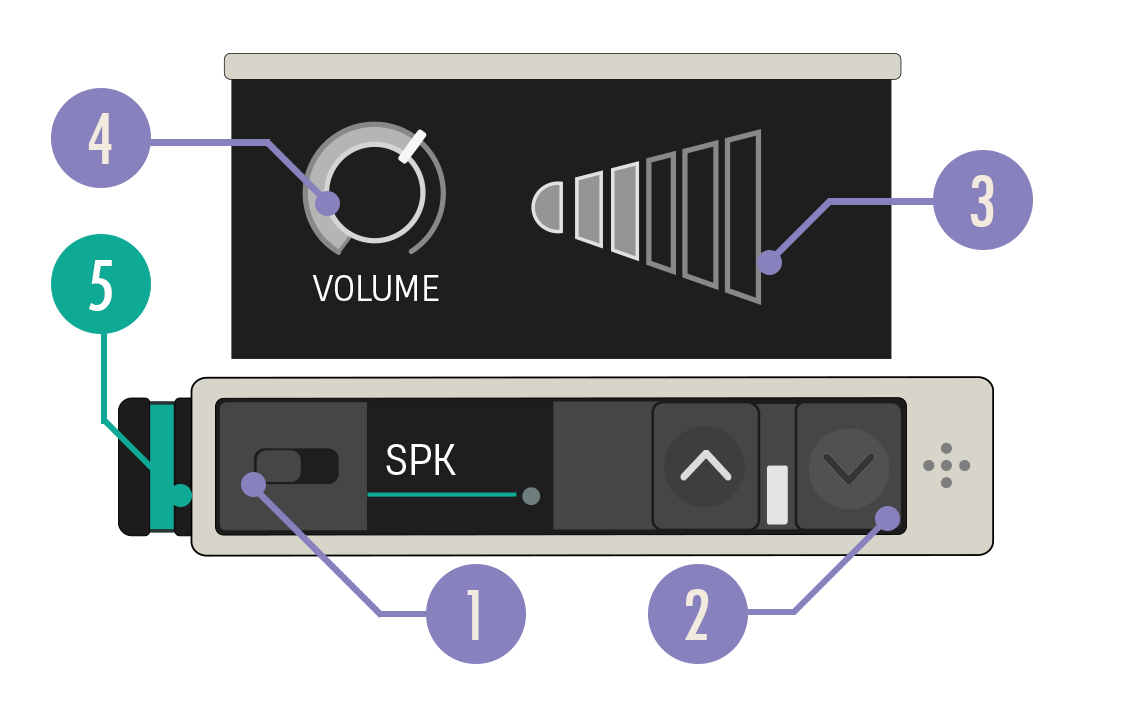
Speaker device diagram

Option Values Description
1. Enabled Switch On, Off When set to Off, no sound is produced.
2. Expand Buttons Closed, Open Expand the device to reveal more customization options.
3. Volume Bars N/A Simple visualization of the volume level. Useful for comparing the relative volume of multiple speakers at a glance.
4. Volume Knob 0.0 - 2.0, default 1.0 Sets the volume of the speaker.
5. Audio In Port N/A Can only receive a teal Audio Out cable.

You're reading a preview

The full reference is free for BrainDeadGuild Discord members — sign in to read it all, or open the original at the source.

Sign in with Discord — free for members Read the original at Epic Games

Sign in with your BrainDead.TV / BrainDeadGuild Discord account for full access.

Comments

    Sign in to vote, comment, or suggest an edit. Sign in
    📄
    Source
    Epic Games

    © Epic Games. Official Epic developer documentation, shown here as a reference with a link to the original. All rights remain with Epic Games. Terms ↗

    View original Sources & licensing
    Request removal
    Last updated Dec 7, 2024
    Keep exploring
    More in Devices · 114 of 174
    Prev
    using patchwork song sync devices in fortnite creative
    Next
    using patchwork step modulator devices in fortnite creative
    Browse all files in this folder (A–Z)
    Next up
    • Preview VFX gif
    • 1. Drag a Speaker device onto your island.
    • The Instrument Player device gives you a selection of instruments for playing melodic content.
    • Use this audio-shaping tool that results in sounds typical of genres like electronic, rock, and metal.
    • This device takes in an audio signal and sends it out again, but with a time delay, like your voice echoing in a canyon.
    • The Omega Synthesizer device allows you to turn note inputs into audio data.
    Related topics
    • Using Patchwork Speaker Devices In Fortnite Creative Devices
    • Using Patchwork Omega Synthesizer Devices In Fortnite Creative Devices
    • Using Patchwork Value Setter Devices In Fortnite Creative Devices
    • Using Patchwork Instrument Player Devices In Fortnite Creative Devices
    • Using Patchwork Devices In Fortnite Creative Devices

    Related

    Open in graph →

    Related topics

    • Using Patchwork Speaker Devices In Fortnite Creative
    • Using Patchwork Omega Synthesizer Devices In Fortnite Creative
    • Using Patchwork Value Setter Devices In Fortnite Creative
    • Using Patchwork Instrument Player Devices In Fortnite Creative
    • Using Patchwork Devices In Fortnite Creative
    VerseIsland · an archipelago of Verse & UEFN knowledge
    🗺️ Island atlas Learn Guides History About & Press Sources & Licensing Status

    Not affiliated with Epic Games. Fortnite, UEFN, Unreal Engine, and Verse are trademarks of Epic Games, Inc. Content is attributed to its source — see Sources & Licensing.

    🦜

    Scout · your island guide

    The Isle of Verse