VerseIsland
Feed Learn Leaderboard Guides Reference Explore Search Docs Verse Library
Sign in
Feed Learn 📖 Codex Leaderboard Guides Reference Explore Search Docs Verse Library
Fortnite Creative › Devices · Up to Fortnite Creative · Devices · 147 of 174 in Devices
Browse Fortnite Creative

Skilled Interaction Devices

Use the Skilled Interaction device to create skill-based interactions as mini-games for your players. Customize this device's settings to create good, perfect, or bad zones for players to target, which can trigger individual events attached to other devices.

For help on how to find the Skilled Interaction device, see Using Devices.

If you're using multiple copies of a device on an island, it can be helpful to rename them. You can choose names that relate to each device’s purpose, so it’s easier to remember what each one does.

Interaction Types

You can alter this device's settings to create charge and release, timed, and quick press interactions.

Charge and Release

The following settings were altered to create a skilled interaction where players can press and hold a command to target good and perfect zones that grant success when hit.
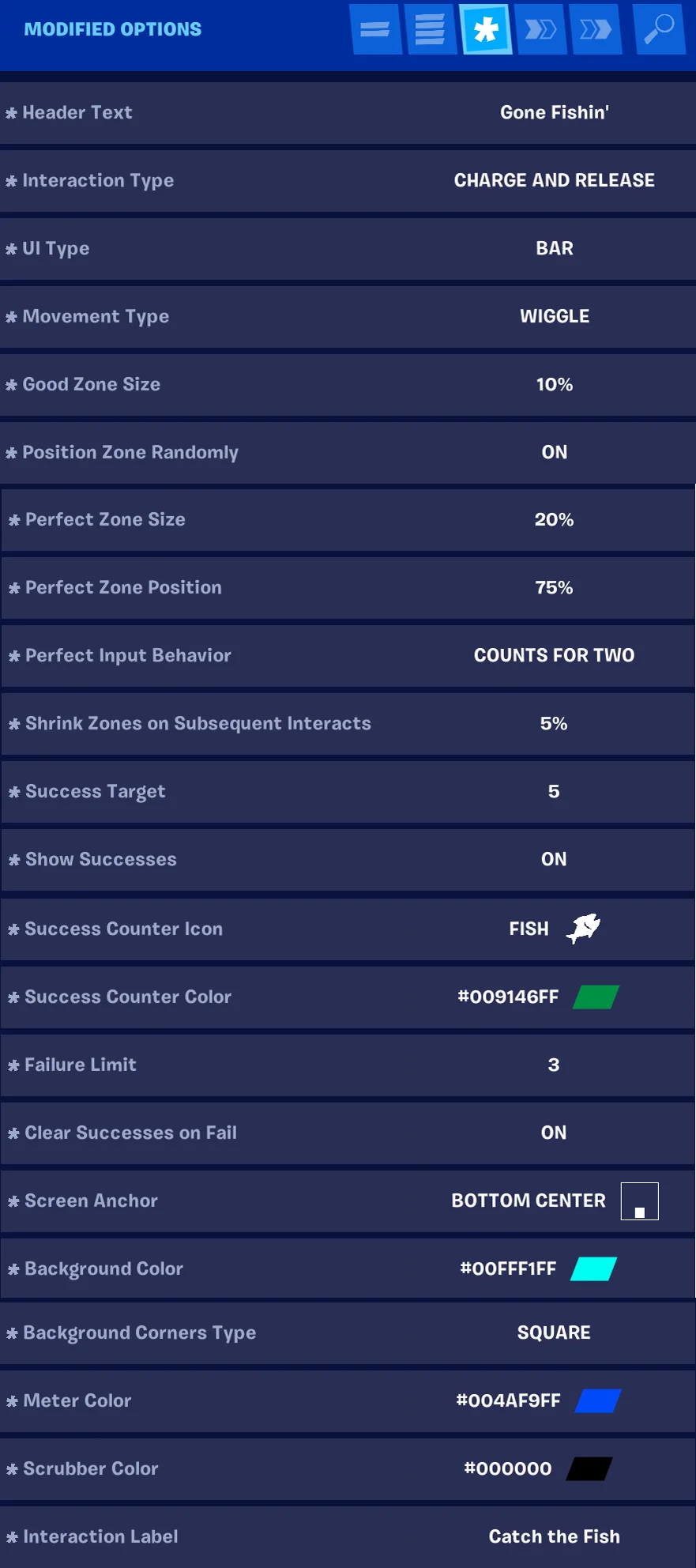
Image of customized settings for creating a fishing skill minigame with the Skilled Interaction Device.

You're reading a preview

The full reference is free for BrainDeadGuild Discord members — sign in to read it all, or open the original at the source.

Sign in with Discord — free for members Read the original at Epic Games

Sign in with your BrainDead.TV / BrainDeadGuild Discord account for full access.

Comments

    Sign in to vote, comment, or suggest an edit. Sign in
    📄
    Source
    Epic Games

    © Epic Games. Official Epic developer documentation, shown here as a reference with a link to the original. All rights remain with Epic Games. Terms ↗

    View original Sources & licensing
    Request removal
    Last updated Feb 11, 2026
    Keep exploring
    More in Devices · 147 of 174
    Prev
    using signal remote manager devices in fortnite creative
    Next
    using skydive volume devices in fortnite creative
    Browse all files in this folder (A–Z)
    Next up
    • For help on how to find the Skilled Interaction device, see [**Using Devices**
    • If you're using multiple copies of a device on an island, it can be helpful to [rename
    Related topics
    • Using Skilled Interaction Devices In Fortnite Creative Devices
    • Skilled Interaction Device Design Examples Devices
    • Skilled Interaction Device Design Examples Devices
    • 32 00 Fortnite Ecosystem Updates And Release Notes In Creative And Unreal Editor For Fortnite Release Notes
    • Skilled Interaction Device Devices

    Related

    Open in graph →

    Linked docs

    • Using Devices In Fortnite Creative
    • Fortnite Creative Glossary

    Related topics

    • Using Skilled Interaction Devices In Fortnite Creative
    • Skilled Interaction Device Design Examples
    • Skilled Interaction Device Design Examples
    VerseIsland · an archipelago of Verse & UEFN knowledge
    🗺️ Island atlas Learn Guides History About & Press Sources & Licensing Status

    Not affiliated with Epic Games. Fortnite, UEFN, Unreal Engine, and Verse are trademarks of Epic Games, Inc. Content is attributed to its source — see Sources & Licensing.

    🦜

    Scout · your island guide

    The Isle of Verse