
Constants And Variables In Verse
Constants
A constant is a location where a value is stored, and its value cannot change during the runtime of the program.
To create a constant, you have to specify its identifier and type, known as declaring a constant, and provide a value for the constant, known as initializing a constant.
A constant must be initialized when it is declared, and must be declared before it can be used.
Constant creation has the following syntax:
Identifier : type = expression
Identifier : type = expression
Copy full snippet(1 line long)
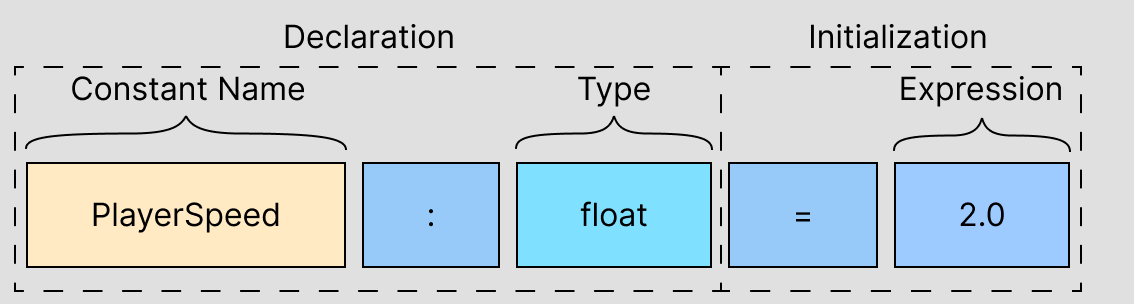
Constants declared in a function can omit the type:
Identifier := expression
Identifier := expression
Copy full snippet(1 line long)
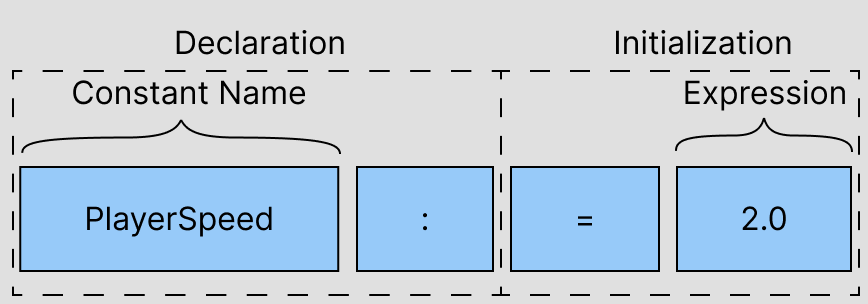
If the type is omitted, the constant's type is inferred from the expression used to initialize the constant. Only local constants can omit the type because the type describes how the constant can be used. A constant in a module makes up part of the interface of the module that contains it. Without the type, that interface is nonobvious.
In the following example, a random number is generated in each iteration of the loop and used to initialize the constant RandomNumber. The random number will only break out of the loop it is less than twenty.
|  |  |
| --- | --- |
|  | loop: |
|  | Limit := 20 |
|  | # For local constants, the type can be omitted. |
|  | RandomNumber : int = GetRandomNumber() |
|  | # Providing the type explicitly can make the code easier to read. |
|  | if (RandomNumber < Limit): |
|  | break |
loop: Limit := 20
For local constants, the type can be omitted.
RandomNumber : int = GetRandomNumber()
Providing the type explicitly can make the code easier to read.
if (RandomNumber < Limit): break
Copy full snippet(7 lines long)
Note that in each loop iteration, a new constant named RandomNumber is introduced and assigned the result of GetRandomNumber() as its value.
Variables
In addition to the constants described above, Verse also has variables.
Variables are similar to constants, but are defined with the keyword var, which means you can change their values at any point.
For example,
var MaxHealthUpgrade : int = 10
var MaxHealthUpgrade : int = 10
Copy full snippet(1 line long)
is an integer variable, and its value may not always be 10.
Variable creation has the following syntax:
var Identifier : type = expression
var Identifier : type = expression
Copy full snippet(1 line long)
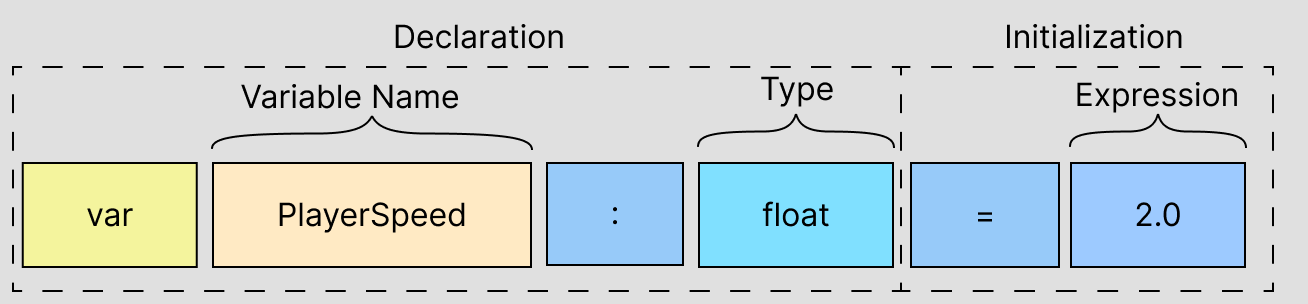
Note that the type must be explicitly specified for variables.
After you create a variable, you can assign a different value to it with the following syntax:
set Identifier = expression
set Identifier = expression
Copy full snippet(1 line long)
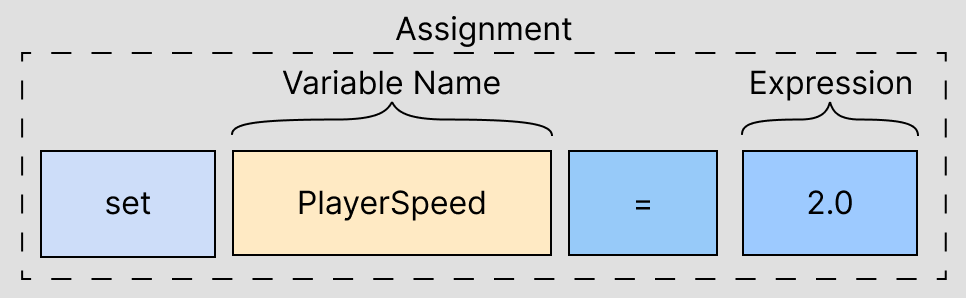
Aside from =, a variety of other operators can be used to mutate a variable. For example,
|  |  |
| --- | --- |
|  | var X:int = 0 |
|  | set X += 1 |
|  | set X *= 2 |
var X:int = 0 set X += 1 set X *= 2
Copy full snippet(3 lines long)
Global Variables
A variable defined in a module is global to any game instance running where the variable is in scope.
One way to declare a module-scoped variable in Verse is to use the weak_map(session, t) type where the key type is the type of the current Fortnite island instance, or session, and the value type is any type t. For details on weak_map, see Map.
The following example shows how to create a global integer variable named GlobalInt that is incremented every time ExampleFunction() is called.
|  |  |
| --- | --- |
|  | using { /Verse.org/Simulation } # For session |
|  |  |
|  | var GlobalInt:weak_map(session, int) = map{} |
|  |  |
|  | ExampleFunction():void= |
|  | X := if (Y := GlobalInt[GetSession()]) then Y + 1 else 0 |
|  | if: |
|  | set GlobalInt[GetSession()] = X |
|  | Print("{X}") |
using { /Verse.org/Simulation } # For session var GlobalInt:weak_map(session, int) = map{} ExampleFunction():void= X := if (Y := GlobalInt[GetSession()]) then Y + 1 else 0 if: set GlobalInt[GetSession()] = X Print("{X}")
Copy full snippet(9 lines long)
Module-scoped variables using the session type as the key have the following limitations:
- You can only access values for the current session you are in, not any other session.
- The module-scoped variable
weak_mapcannot be completely read or written to, so it's not possible to read or override values for all sessions. - You cannot iterate through the values of a
weak_mapor see how many sessions are currently active, because aweak_maphas no length.
Persistable Data
Except for module-scoped variables associated with the session, a module-scoped variable requires persistence, the storing of data beyond the current game.
You can declare a persistable variable in Verse using the type weak_map(player, t). Any type represented by t that is persistable can be stored and accessed for a particular player and the data can be visible to subsequent game sessions. Whenever a player joins a game, their previous saved data is loaded into all module-scoped variables of type weak_map(player, t).
In the following example, the global 'weak_map' variable MySavedPlayerData uses the player type as the key and an integer as the value. Once you’ve defined your persistable data, you’ll need to initialize the data for each player. You can do this by checking to see if there’s not already data stored for that player and then adding the player and an initial value to the weak_map.
using { /Fortnite.com/Devices }
using { /UnrealEngine.com/Temporary/Diagnostics }
using { /Verse.org/Simulation }

var MySavedPlayerData:weak_map(player, int) = map{}

# A Verse-authored creative device that can be placed in a level
persistence_example := class(creative_device):

    # Runs when the device is started in a running game
Expand code Copy full snippet(17 lines long)
Module-scoped variables using the player type as the key have the following limitations:
-
Accessing the player’s persistent data is only allowed when the player is in the current game.
-
If a player leaves a game or is not in the current session, you can no longer store or access their data in that game session. If the player returns or plays the same game again, then you can access and update their data.
-
The module-scoped
weak_mapcannot be completely read or written to, so it's not possible to read or override values for all players. -
You cannot iterate through the values of a
weak_mapor see how many players have a record in theweak_map, because aweak_maphas no length. -
A single island can have up to two persistent variables, that is two
weak_mapvariables withplayeras the key type. -
At least one persistent variable's
weak_mapvalue must be a class if the limit for max persistent variables has been met.- A single
weak_maprecord has a maximum data size of 128 kilobytes (KB) per player.
- A single
For more details on persistence in Verse, check out Using Persistable Data in Verse.