VerseIsland
FeedLearnLeaderboardGuidesReferenceExploreSearchDocsVerse Library
Sign in
Feed Learn 📖 Codex Leaderboard Guides Reference Explore Search Docs Verse Library
Browse Fortnite›Building & Props·Up to Fortnite · Building & Props·34 of 104 in Building & Props

Converting Static To Skeletal Meshes

You can create a unique and fully working Skeletal Mesh from a Static Mesh. Unreal Editor for Fortnite (UEFN) has two native editors that provide a way for you to create and animate a Skeletal Mesh: the Skeleton Editor and the Skeletal Mesh Editor.

You can even use these workflows to fix Skeletal Meshes you’ve imported if they have bones out of place.

The workflows below walk you through the process of:

  • Creating a Skeletal Mesh
  • Creating Bone Hierarchies
  • Fixing a Skeletal Mesh

Creating a Skeletal Mesh

To create a Skeletal Mest, you can either create or import a Static Mesh into UEFN. You’ll then convert the Static Mesh into a Skeletal Mesh.

To convert a Static Mesh into a Skeletal Mesh, do the following:

  1. In the Content Browser, right-click your Static Mesh thumbnail. The Static Mesh options open in the context menu.

  2. Select Convert to Skeletal Mesh. The Skeletal Mesh Conversion Options window opens.
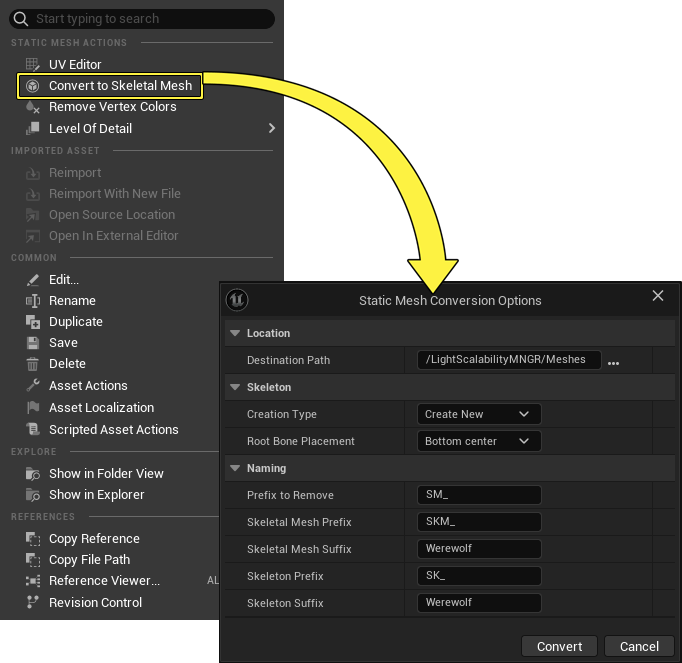
    Right-click on the Static Mesh thumbnail to open the Static Mesh options menu.

  3. Select a destination for the new asset in the Destination Path field.

You're reading a preview

The full reference is free for BrainDeadGuild Discord members — sign in to read it all, or open the original at the source.

Sign in with Discord — free for members Read the original at Epic Games documentation

Sign in with your BrainDead.TV / BrainDeadGuild Discord account for full access.

Guided course

Add this to your free study plan — we’ll suggest related material and stitch it into one compile-checked lesson.

Keep exploring
More in Building & Props · 34 of 104
Prev
configuring lego prop placement in unreal editor for fortnite
Next
converting assets into props in unreal editor for fortnite
Browse all files in this folder (A–Z)

Source

Epic Games documentation

View original

Last updated 2026-02-10T17:07:24.911348+00:00

VerseIsland· an archipelago of Verse & UEFN knowledge
🗺️ Island atlasLearnGuidesHistoryAbout & PressSources & LicensingPrivacy PolicyTermsStatus

Not affiliated with Epic Games. Fortnite, UEFN, Unreal Engine, and Verse are trademarks of Epic Games, Inc. Content is attributed to its source — see Sources & Licensing.

🦜

Scout · your island guide

The Isle of Verse