VerseIsland
Feed Learn Leaderboard Guides Reference Explore Search Docs Verse Library
Sign in
Feed Learn 📖 Codex Leaderboard Guides Reference Explore Search Docs Verse Library
Fortnite › General · Up to Fortnite · General · 13 of 123 in General
Browse Fortnite

Create Dynamic Movement In UEFN

Use material nodes to make a material that seems to be alive. To create this effect, you’ll configure your material nodes and plug them into the World Position Offset input of the Main Material node.

Follow the instructions below to create a dynamic material.

  1. Create a new material in the mesh’s Material folder and name it Moving_Mesh.

  2. Change the sphere to a flat surface in the preview window.

  3. Add the following nodes:

    1. 3 X Multiply node
    2. Sine node
    3. VertexNormalWS node
    4. Add node
    5. Time node
    6. TextureSample node
  4. Use a TextureSample node and add a badge texture to the sample in the Details panel.
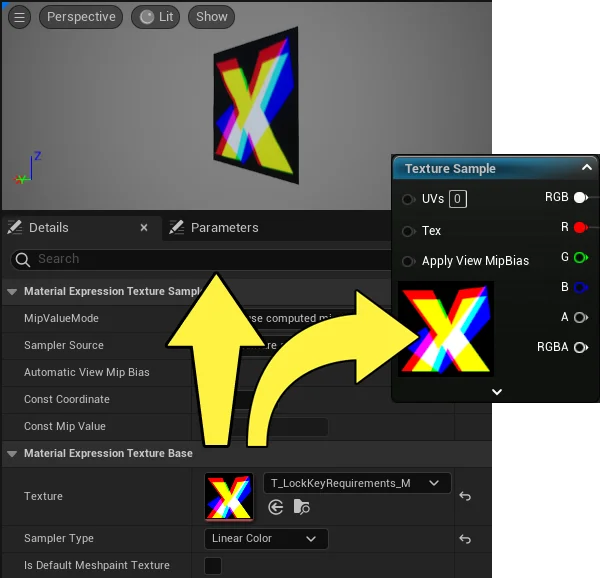
    Add a badge texture sample to the node.

  5. Drag off the RGB input on the Texture Sample node and plug into the Base Color input on the Main Material Node.

  6. Drag off the VertexNormalWS node and plug it into the first Multiply node A input.

  7. Drag off the first Multiply node and plug it into the second Multiply node’s A input.

  8. Drag off the second Multiply node and plug it into the Main Material Node World Position Offset input.

  9. Drag off the Texture Sample node and plug it into the first Multiply node B input from the R input (red UV channel input).

You're reading a preview

The full reference is free for BrainDeadGuild Discord members — sign in to read it all, or open the original at the source.

Sign in with Discord — free for members Read the original at Epic Games

Sign in with your BrainDead.TV / BrainDeadGuild Discord account for full access.

Comments

    Sign in to vote, comment, or suggest an edit. Sign in
    📄
    Source
    Epic Games

    © Epic Games. Official Epic developer documentation, shown here as a reference with a link to the original. All rights remain with Epic Games. Terms ↗

    View original Sources & licensing
    Request removal
    Last updated Feb 11, 2026
    Keep exploring
    More in General · 13 of 123
    Prev
    converting your island into a brand island in fortnite
    Next
    create moving uvs in unreal editor for fortnite
    Browse all files in this folder (A–Z)
    Related topics
    • Create Dynamic Movement In Unreal Editor For Fortnite General
    • Moving Textures In Unreal Editor For Fortnite Materials/Vfx
    • Material Effects In Unreal Editor For Fortnite Materials/Vfx
    • Create Moving Uvs In Unreal Editor For Fortnite General
    • Conversion Function Setting Material Parameters In Umg In Unreal Editor For Fortnite Materials/Vfx

    Related

    Open in graph →

    Related topics

    • Create Dynamic Movement In Unreal Editor For Fortnite
    • Moving Textures In Unreal Editor For Fortnite
    • Material Effects In Unreal Editor For Fortnite
    • Create Moving Uvs In Unreal Editor For Fortnite
    • Conversion Function Setting Material Parameters In Umg In Unreal Editor For Fortnite
    VerseIsland · an archipelago of Verse & UEFN knowledge
    🗺️ Island atlas Learn Guides History About & Press Sources & Licensing Status

    Not affiliated with Epic Games. Fortnite, UEFN, Unreal Engine, and Verse are trademarks of Epic Games, Inc. Content is attributed to its source — see Sources & Licensing.

    🦜

    Scout · your island guide

    The Isle of Verse