VerseIsland
Feed Learn Leaderboard Guides Reference Explore Search Docs Verse Library
Sign in
Feed Learn 📖 Codex Leaderboard Guides Reference Explore Search Docs Verse Library
Fortnite › Cinematics · Up to Fortnite · Cinematics · 10 of 115 in Cinematics
Browse Fortnite

Creating East and West Biomes

East - Desert

So far, you’ve learned how to create three unique environments: Neutral (center island), Winter, and Jungle. At this point in the template, you should recognize that each biome uses the same options to design the environments: Time of Day, Fog, Sky, and Clouds.

Trigger Volume Area transition point

The goal in creating the Desert biome is to make it appear hot. To achieve the desired look, the sun’s intensity is increased, the sky is clear, and an intense lens flare with chromatic aberration is added to the scene. Press the 3 key to go to the East quadrant.

Desert Secondary Day Sequence Device

Select the Day Sequence Device_East asset from the East folder in the Outliner and toggle on Show Only Modified Properties in the Details panel. Below is a list of options and settings used to achieve the desert aesthetic.
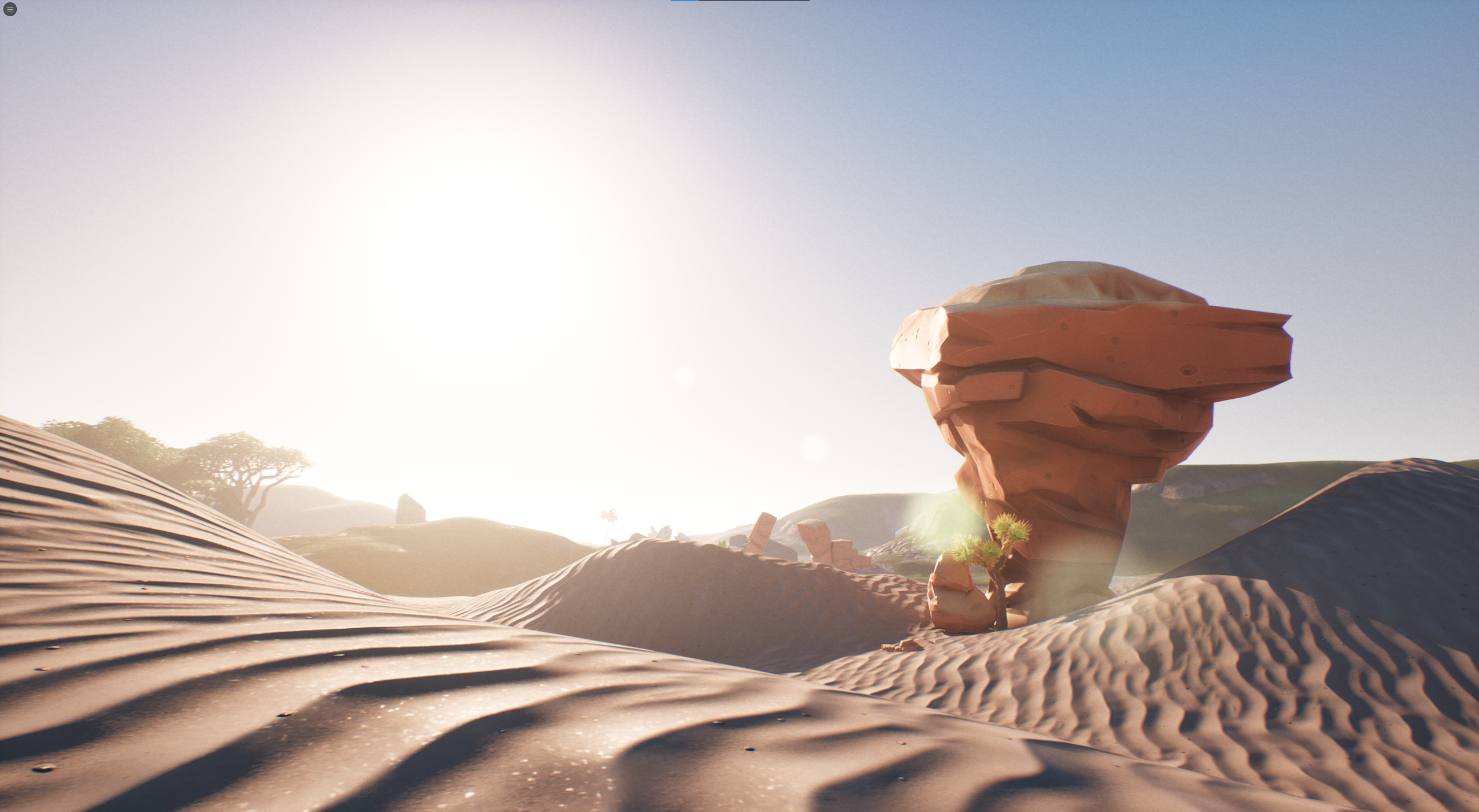
The Eastern biome

  • Time of Day: The time was set to 5am.
  • Sun Light: The following settings were adjusted to create a full-sun effect to the environment lighting.

You're reading a preview

The full reference is free for BrainDeadGuild Discord members — sign in to read it all, or open the original at the source.

Sign in with Discord — free for members Read the original at Epic Games

Sign in with your BrainDead.TV / BrainDeadGuild Discord account for full access.

Comments

    Sign in to vote, comment, or suggest an edit. Sign in
    📄
    Source
    Epic Games

    © Epic Games. Official Epic developer documentation, shown here as a reference with a link to the original. All rights remain with Epic Games. Terms ↗

    View original Sources & licensing
    Request removal
    Last updated Feb 11, 2026
    Keep exploring
    More in Cinematics · 10 of 115
    Prev
    day sequence 3 south biome in unreal editor for fortnite
    Next
    day sequence 5 postprocess volumes in unreal editor for fortnite
    Browse all files in this folder (A–Z)
    Next up
    • Unreal Editor For Fortnite Glossary
    • + **Color:** Tones of yellow and orange were used to make the biome feel warm.
    • + **Max Opacity:** The value was set to **0.5** to decrease the fog coverage.
    • + **Color:** Changed the skylight color to light blue.
    • 5. Post-Process Volumes
    Related topics
    • Day Sequence Starter Island Template In Unreal Editor For Fortnite Cinematics
    • Day Sequence 3 South Biome In Unreal Editor For Fortnite Cinematics
    • Day Sequence 2 North Biome In Unreal Editor For Fortnite Cinematics
    • Day Sequence 1 Device Information In Unreal Editor For Fortnite Cinematics
    • Environments And Landscapes In Unreal Editor For Fortnite Landscape

    Related

    Open in graph →

    Linked docs

    • Unreal Editor For Fortnite Glossary

    Related topics

    • Day Sequence Starter Island Template In Unreal Editor For Fortnite
    • Day Sequence 3 South Biome In Unreal Editor For Fortnite
    • Day Sequence 2 North Biome In Unreal Editor For Fortnite
    • Day Sequence 1 Device Information In Unreal Editor For Fortnite
    VerseIsland · an archipelago of Verse & UEFN knowledge
    🗺️ Island atlas Learn Guides History About & Press Sources & Licensing Status

    Not affiliated with Epic Games. Fortnite, UEFN, Unreal Engine, and Verse are trademarks of Epic Games, Inc. Content is attributed to its source — see Sources & Licensing.

    🦜

    Scout · your island guide

    The Isle of Verse