VerseIsland
Feed Learn Leaderboard Guides Reference Explore Search Docs Verse Library
Sign in
Feed Learn 📖 Codex Leaderboard Guides Reference Explore Search Docs Verse Library
Fortnite › Cinematics · Up to Fortnite · Cinematics · 13 of 115 in Cinematics
Browse Fortnite

Day Sequence Island Template

This tutorial is a companion document to the Day Sequence template island, and explains how to use the Day Sequence Device to create diverse, art-driven environment designs for your project.

The template was designed to demonstrate how to use the Day Sequence device and Post Processing Volumes (PPV) available in Unreal Editor for Fortnite (UEFN) in numerous ways to create different types of environments. This is accomplished by using the Day Sequence device to control the art direction of the Time of Day Manager.

The template island used here is split into quadrants that contain small biomes (environmental settings). Each biome is as simple as possible to focus on the lighting. You can find the Day Sequence template in the Feature Examples section of the Project Browser.
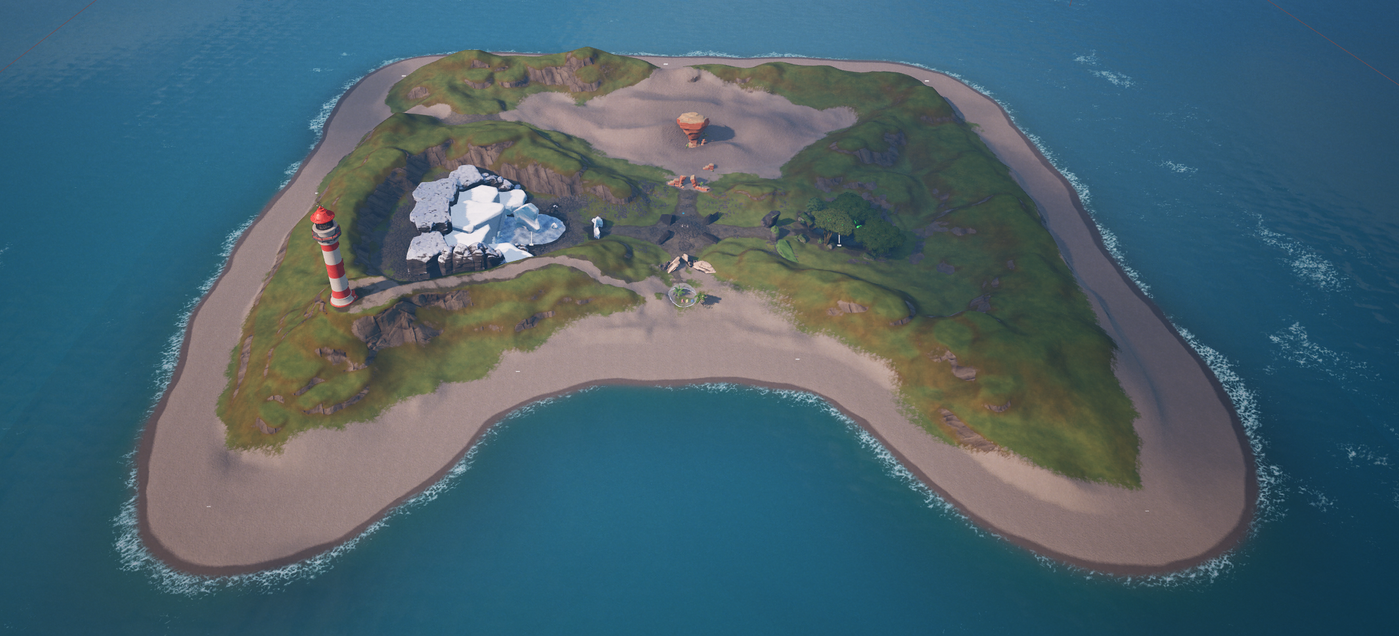
An aerial view of the Day Sequence Start Template Island.

Before exploring the island, open the DaySeq_EnvLook folder to see how the basic environmental look was established. Quadrants are packaged in the Outliner so you can easily search and filter Post Process Volumes, props, static meshes, and set dressing that make the biome. The quadrants are named:

You're reading a preview

The full reference is free for BrainDeadGuild Discord members — sign in to read it all, or open the original at the source.

Sign in with Discord — free for members Read the original at Epic Games

Sign in with your BrainDead.TV / BrainDeadGuild Discord account for full access.

Comments

    Sign in to vote, comment, or suggest an edit. Sign in
    📄
    Source
    Epic Games

    © Epic Games. Official Epic developer documentation, shown here as a reference with a link to the original. All rights remain with Epic Games. Terms ↗

    View original Sources & licensing
    Request removal
    Last updated Feb 10, 2026
    Keep exploring
    More in Cinematics · 13 of 115
    Prev
    day sequence device in fortnite creative
    Next
    designing with cameras and controls in fortnite creative
    Browse all files in this folder (A–Z)
    Next up
    • Using Day Sequence Devices In Unreal Editor For Fortnite
    • The template was designed to demonstrate how to use the Day Sequence device and [Post Processing Volumes
    • 1. Device Information
    • 2. North Biome
    • 3. South Biome
    • 4. East and West Biomes
    Related topics
    • Day Sequence Starter Island Template In Unreal Editor For Fortnite Cinematics
    • Unreal Editor For Fortnite Starter Templates Tutorials
    • Lighting In Unreal Editor For Fortnite Materials/Vfx
    • Making Cinematics 2 Lighting And Color In Unreal Editor For Fortnite Cinematics
    • Lighting In Unreal Editor For Fortnite Materials/Vfx

    Related

    Open in graph →

    Linked docs

    • Using Day Sequence Devices In Unreal Editor For Fortnite
    • Unreal Editor For Fortnite Glossary

    Related topics

    • Day Sequence Starter Island Template In Unreal Editor For Fortnite
    • Unreal Editor For Fortnite Starter Templates
    • Lighting In Unreal Editor For Fortnite
    VerseIsland · an archipelago of Verse & UEFN knowledge
    🗺️ Island atlas Learn Guides History About & Press Sources & Licensing Status

    Not affiliated with Epic Games. Fortnite, UEFN, Unreal Engine, and Verse are trademarks of Epic Games, Inc. Content is attributed to its source — see Sources & Licensing.

    🦜

    Scout · your island guide

    The Isle of Verse