VerseIsland
Feed Learn Leaderboard Guides Reference Explore Search Docs Verse Library
Sign in
Feed Learn 📖 Codex Leaderboard Guides Reference Explore Search Docs Verse Library
Fortnite › Verse Language · Up to Fortnite · Verse Language · 34 of 570 in Verse Language
Browse Fortnite

Debug Your Game with Debug Draw in Verse

To help with debugging your game, you can display certain game data for testing purposes while hiding that information from the player. One way to do this is logging, but you can show some game data in a more visual way with the Debug Draw API.

Using the Debug Draw API, you can draw basic shapes and set their location, size, color, and the length of time they appear on screen. For example, you might want to visualize the visibility range of an NPC or the distance from which audio can be heard from its point of origin. With the box debug shape, you could draw a box with dimensions and a location that match any volume, even if that volume is invisible in your game. This can help with figuring out the placement of volumes with certain effects.
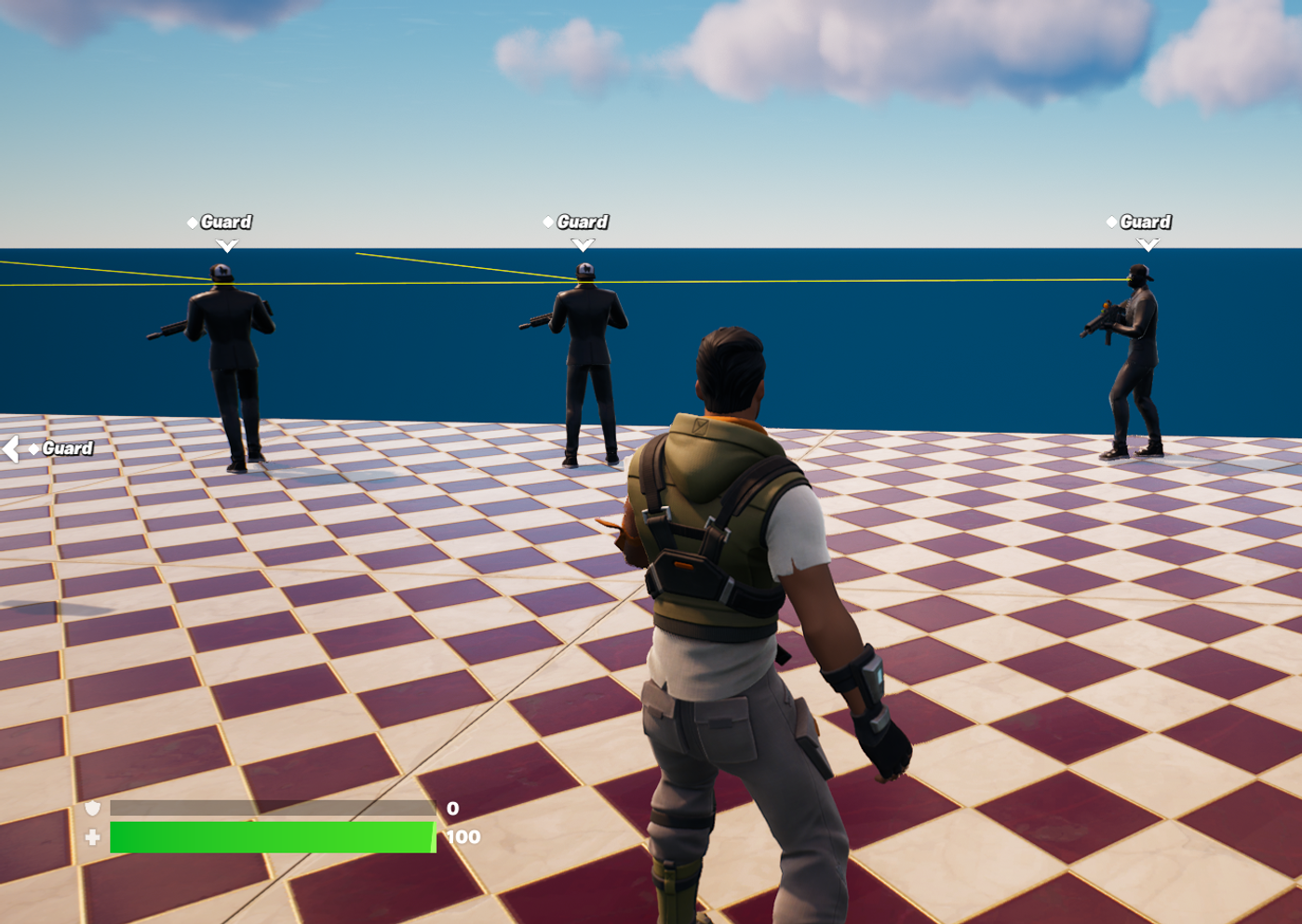
Debug arrows drawing the line of sight of guards

The arrow debug shape drawn from an NPC’s face to the limit of their visibility range can be used to help design the perfect placement for guards.

Enable Verse Debug Draw

The first step is to make sure you can see the shapes you draw.

You're reading a preview

The full reference is free for BrainDeadGuild Discord members — sign in to read it all, or open the original at the source.

Sign in with Discord — free for members Read the original at Epic Games

Sign in with your BrainDead.TV / BrainDeadGuild Discord account for full access.

Comments

    Sign in to vote, comment, or suggest an edit. Sign in
    📄
    Source
    Epic Games

    © Epic Games. Official Epic developer documentation, shown here as a reference with a link to the original. All rights remain with Epic Games. Terms ↗

    View original Sources & licensing
    Request removal
    Last updated May 12, 2026
    Keep exploring
    More in Verse Language · 34 of 570
    Prev
    conversion functions to text int and to text double in unreal editor for fortnite
    Next
    debugging and troubleshooting in verse
    Browse all files in this folder (A–Z)
    Next up
    • To help with [debugging
    • Copy full snippet(1 line long)
    • Copy full snippet(1 line long)
    • Common Parameters
    • ### Color
    • The [Audio Player Device
    Related topics
    • Debug Draw In Verse Verse Language
    • Debugging And Troubleshooting In Verse Verse Language
    • Debug Draw Verse Language
    • Programming With Verse In Unreal Editor For Fortnite Verse Language
    • Debug Draw Verse Language

    Related

    Open in graph →

    Linked docs

    • Verse Glossary

    Related topics

    • Debug Draw In Verse
    • Debugging And Troubleshooting In Verse
    • Debug Draw
    • Programming With Verse In Unreal Editor For Fortnite
    VerseIsland · an archipelago of Verse & UEFN knowledge
    🗺️ Island atlas Learn Guides History About & Press Sources & Licensing Status

    Not affiliated with Epic Games. Fortnite, UEFN, Unreal Engine, and Verse are trademarks of Epic Games, Inc. Content is attributed to its source — see Sources & Licensing.

    🦜

    Scout · your island guide

    The Isle of Verse