
Setting Up The Level In Unreal Editor
Once you’re done preparing the terrain and area you’re going to place the cabin, you need to create a hole in the landscape where you’ll build your basement and sub-basement underneath the cabin prefab.
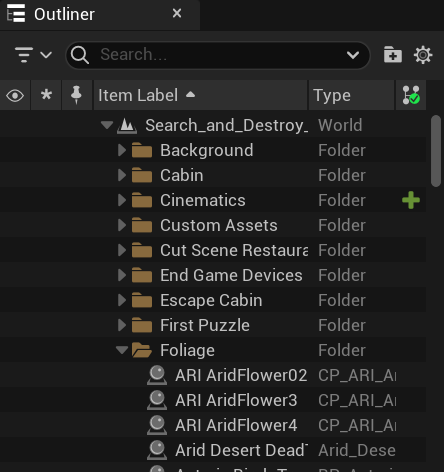
Before you start adding props and prefabs to your project, create a series of folders in the Outliner to keep your escape room props and devices organized so you can easily find any set of devices or props you need when you’re tweaking your project later.
Creating the Cabin Basement
You will need the following prefabs and galleries to build your base:
- Cozy Cabin: Navigate to All > Fortnite > Prefabs > Lonely Lodge for this prefab. This building will be the creepy cabin in the woods.
- Brick Simple AAA Solid Wall: Navigate to All > Fortnite > Galleries > Building for the next items. These architectural assets will be used to build the walls, floors, and ceiling of the basement. There are a number of styles for Brick Simple AAA, the ones used in this project use the walls with the Concrete and House Interior materials.
- Business Floor A: This floor separates the sub basement from the basement.
- Concrete Solid: This floor is used as the sub basement flooring.
- Vent Wall NoDoor Bottom: This wall piece will lead to the secret room in the sub basement.
- Catwalk Stairs R: These stairs lead out of the sub basement.
- Asteria HarvestHome Railing: Block in the catwalk stairs so players don’t fall off the stairs.
- Agency Flat SideDoorway: Place this door at the top of the catwalk stairs.
- Agency DoorFrame Cntr: Place this door leading to the basement entrance.
- Boardwalk Archway: Place this under the cabin to raise it up off the ground so players can easily exit the hidden basement.
- Hexylvania Castle Gothic D Stairs: Place these in front of the deck on the front of the cabin.
- Durr Burger: This is where you will film the first cut scene.
- CobbleStone Solid: Place this in front of the Durr Burger restaurant to create a path to the entrance of the restaurant.
- PowerPlant Parking Arrows: To create the in and out arrows for the restaurant parking lot.
- PowerPlant Stripe: To create the parking spaces in the parking lot.
You're reading a preview
The full reference is free for BrainDeadGuild Discord members — sign in to read it all, or open the original at the source.
Sign in with your BrainDead.TV / BrainDeadGuild Discord account for full access.