VerseIsland
Feed Learn Leaderboard Guides Reference Explore Search Docs Verse Library
Sign in
Feed Learn 📖 Codex Leaderboard Guides Reference Explore Search Docs Verse Library
Fortnite › Assets · Up to Fortnite · Assets · 7 of 44 in Assets
Browse Fortnite

Fab User Interface Reference

When working in Unreal Editor for Fortnite (UEFN), you can access Fab directly to acquire and download plugins and assets for your project, by using the Fab window. This works similarly to accessing Fab through your browser, but there are some differences.

Accessing Fab

To access Fab in UEFN, navigate to the Window menu, and scroll down to Fab in the Get Content section.
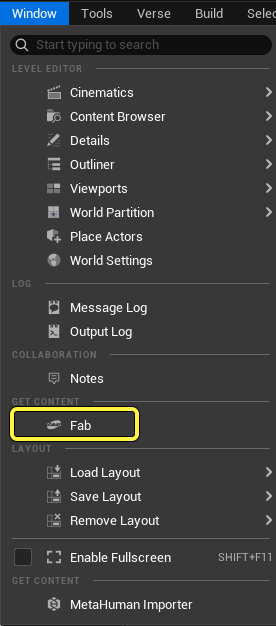
the Fab window can be opened from the Window menu.

Click to enlarge image.

Alternatively, you can open the Content Browser, then click on the Fab button right next to the Save All button.

Fab can be opened from the Content Browser as well.

Click to enlarge image.

The Fab window is enabled in UEFN by default.

Fab Products

The Fab window provides a way for you to find, view, and evaluate product listings, so that you can acquire these products for use in your projects in UEFN. Product listings can be either free or priced. You can interact with listings both as product tiles in the Fab window, and by clicking the product tiles to view the full listing.

You're reading a preview

The full reference is free for BrainDeadGuild Discord members — sign in to read it all, or open the original at the source.

Sign in with Discord — free for members Read the original at Epic Games

Sign in with your BrainDead.TV / BrainDeadGuild Discord account for full access.

Comments

    Sign in to vote, comment, or suggest an edit. Sign in
    📄
    Source
    Epic Games

    © Epic Games. Official Epic developer documentation, shown here as a reference with a link to the original. All rights remain with Epic Games. Terms ↗

    View original Sources & licensing
    Request removal
    Last updated Mar 29, 2026
    Keep exploring
    More in Assets · 7 of 44
    Prev
    exposing assets with asset reflection to verse in unreal editor for fortnite
    Next
    fall guys obstacle course assets in fortnite creative
    Browse all files in this folder (A–Z)
    Next up
    • Fab Documentation
    • Hovering on a product tile provides information about the product type and compatible file formats.
    • Click the cart icon to add the product to your cart, or click the wishlist icon to add the product to your wishlist.
    • 9. AI usage and generation.
    • 1. The [Creative Commons Attribution license (CC-BY 4.0)
    Related topics
    • Fab User Interface Reference For Unreal Editor For Fortnite Assets
    • Import From Fab In Unreal Editor For Fortnite Assets
    • User Interface Reference For Unreal Editor For Fortnite Ui
    • User Interface Reference For Unreal Editor For Fortnite Ui
    • 37 30 Fortnite Ecosystem Updates And Release Notes Release Notes

    Related

    Open in graph →

    Related topics

    • Fab User Interface Reference For Unreal Editor For Fortnite
    • Import From Fab In Unreal Editor For Fortnite
    • User Interface Reference For Unreal Editor For Fortnite
    • User Interface Reference For Unreal Editor For Fortnite
    • 37 30 Fortnite Ecosystem Updates And Release Notes
    VerseIsland · an archipelago of Verse & UEFN knowledge
    🗺️ Island atlas Learn Guides History About & Press Sources & Licensing Status

    Not affiliated with Epic Games. Fortnite, UEFN, Unreal Engine, and Verse are trademarks of Epic Games, Inc. Content is attributed to its source — see Sources & Licensing.

    🦜

    Scout · your island guide

    The Isle of Verse