
Playtest Your Island in Fortnite
Playtesting is how you check whether your game mechanics do what they're supposed to. It's a vital part of game development.
It's also a way to check object scale, which will become important later when you start adding set dressing.
When you click the Launch Session button from UEFN, you're actually opening a live connection from UEFN to Creative, called a live edit. This means that some changes made in UEFN will show up in Creative immediately, and you will need to Push Changes for others.
Control Your Playtest Settings
There are three settings that help you control what happens when you playtest. Click the vertical ellipsis icon to open the menu.
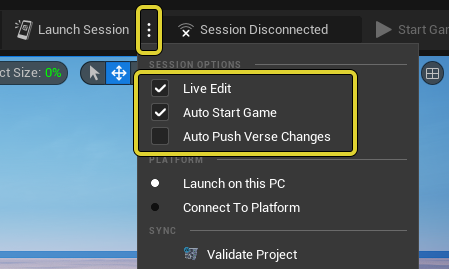
Play Session options.
- Live Edit saves changes you make in Creative to UEFN.
- Auto Start Game takes you directly into the game when you launch a session. To make edits in Creative, it's faster to turn this off.
- Auto Push Verse Changes shows changes made with Verse (covered in 5. Spice Up the Gameplay with Verse) when the code is updated.
You're reading a preview
The full reference is free for BrainDeadGuild Discord members — sign in to read it all, or open the original at the source.
Sign in with your BrainDead.TV / BrainDeadGuild Discord account for full access.