
Spicing Up Gameplay with Verse
Verse is a programming language that works with UEFN. This page covers the basics for quickly adding Verse into your projects, providing a foundation for programmers both new and experienced to get a feel for what can be done with the language.
The target devices you created earlier in this tutorial cannot be knocked down with a single hit, so you're going to learn how to use Verse to make them do exactly that!
Create a New Verse Device
You're going to create a Verse device and place it on your island.
Think of this as a device that will tell other devices what to do based on your instructions. Another way of putting it is that you're going to make a Verse program that reprograms an existing device in UEFN!
-
On the menu bar, select Verse > Verse Explorer.
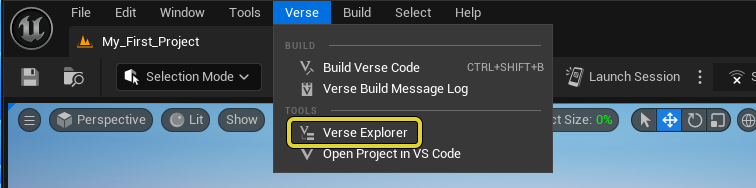
Open the Verse Explorer.
-
In the Verse Explorer, right-click on your project and select Add new Verse file to project.
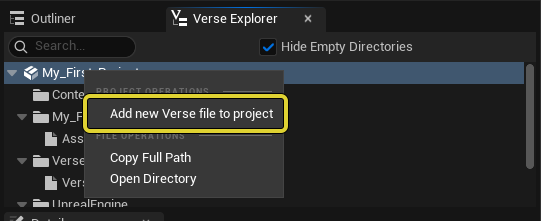
You're reading a preview
The full reference is free for BrainDeadGuild Discord members — sign in to read it all, or open the original at the source.
Sign in with your BrainDead.TV / BrainDeadGuild Discord account for full access.