
Getting Started with Scene Graph
With Scene Graph, you can quickly transition from greyboxing and world building to a complete playable level in a few simple steps.
Scene Graph is a Verse native system that takes advantage of Verse’s characteristics. This provides a way for you to add more customization to your projects with interactive, custom-built objects, and gameplay experiences.
Scene Graph improves project stability because Verse does all the heavy lifting in the background, ensuring entities work as intended. Verse also has deep access to all parts of the scene entities and components, which means you can add greater variety to your scene.
Enabling Experimental Scene Graph Features
Scene Graph is enabled by default when you create a project in UEFN. There are some Scene Graph features that are behind Experimental Access. To use these experimental Scene Graph features in your project:
-
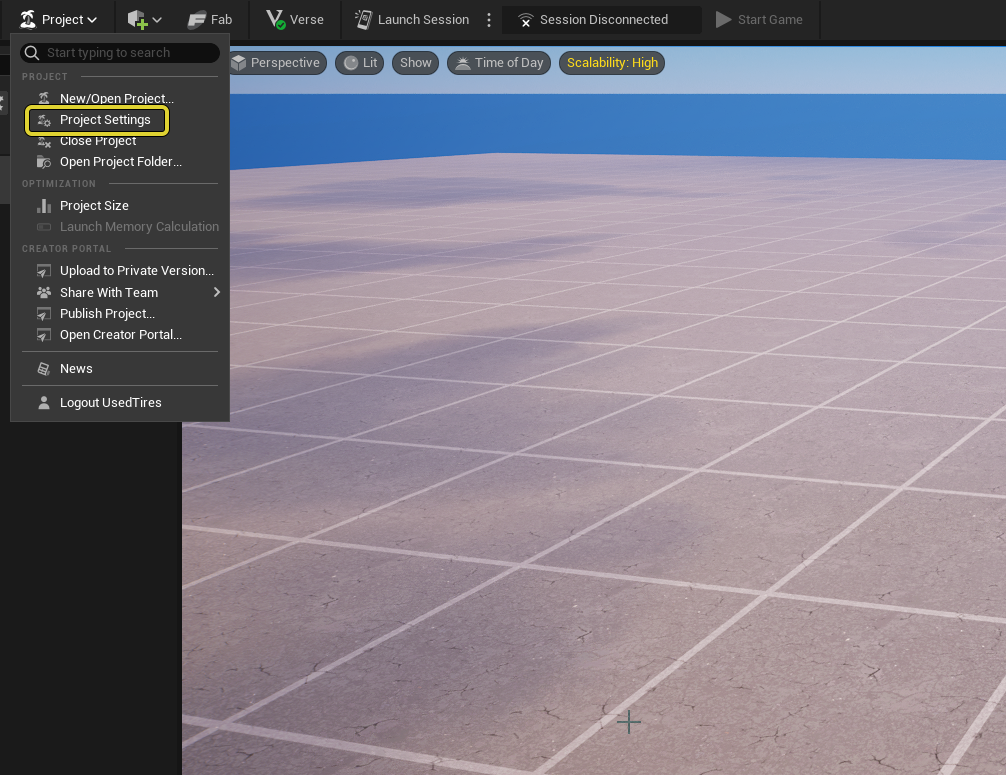
In the Toolbar, choose Project > Project Settings to open the Project Settings window.
You're reading a preview
The full reference is free for BrainDeadGuild Discord members — sign in to read it all, or open the original at the source.
Sign in with your BrainDead.TV / BrainDeadGuild Discord account for full access.