VerseIsland
Feed Learn Leaderboard Guides Reference Explore Search Docs Verse Library
Sign in
Feed Learn 📖 Codex Leaderboard Guides Reference Explore Search Docs Verse Library
Fortnite › Scene Graph · Up to Fortnite · Scene Graph · 9 of 179 in Scene Graph
Browse Fortnite

Getting Started with Scene Graph

With Scene Graph, you can quickly transition from greyboxing and world building to a complete playable level in a few simple steps.

Scene Graph is a Verse native system that takes advantage of Verse’s characteristics. This provides a way for you to add more customization to your projects with interactive, custom-built objects, and gameplay experiences.

Scene Graph improves project stability because Verse does all the heavy lifting in the background, ensuring entities work as intended. Verse also has deep access to all parts of the scene entities and components, which means you can add greater variety to your scene.

Enabling Experimental Scene Graph Features

Scene Graph is enabled by default when you create a project in UEFN. There are some Scene Graph features that are behind Experimental Access. To use these experimental Scene Graph features in your project:

  1. In the Toolbar, choose Project > Project Settings to open the Project Settings window.
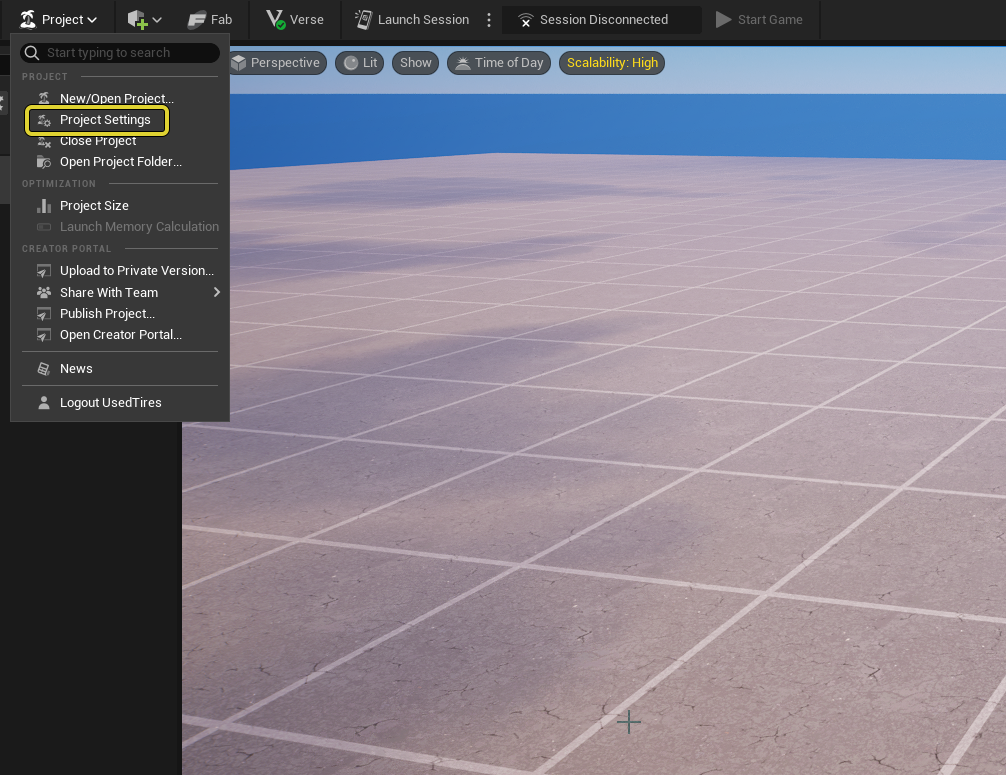
    Open the Project Settings menu from the Project dropdown.

You're reading a preview

The full reference is free for BrainDeadGuild Discord members — sign in to read it all, or open the original at the source.

Sign in with Discord — free for members Read the original at Epic Games

Sign in with your BrainDead.TV / BrainDeadGuild Discord account for full access.

Comments

    Sign in to vote, comment, or suggest an edit. Sign in
    📄
    Source
    Epic Games

    © Epic Games. Official Epic developer documentation, shown here as a reference with a link to the original. All rights remain with Epic Games. Terms ↗

    View original Sources & licensing
    Request removal
    Last updated Feb 10, 2026
    Keep exploring
    More in Scene Graph · 9 of 179
    Prev
    fort inventory component in fortnite
    Next
    interactable components
    Browse all files in this folder (A–Z)
    Next up
    • The metaverse is an online social entertainment experience in real time, where people play and connect in a [3D world
    • In the Scene Graph system, you can instance and reuse objects without Unreal Engine’s [Actor
    • Actors and entities are not interchangeable, they are different systems that work together in the scene.
    • s are not interchangeable, they are different systems that work together in the scene.
    • You can [import
    • Constructing an entity with Verse does not [create a Transform Component
    Related topics
    • Scene Graph Tutorials In Fortnite Scene Graph
    • Scene Graph In Unreal Editor For Fortnite Scene Graph
    • Scene Graph Sample Tutorial In Unreal Editor For Fortnite Scene Graph
    • Fortnite Documentation General
    • Specifiers And Attributes In Verse Verse Language

    Related

    Open in graph →

    Related topics

    • Scene Graph Tutorials In Fortnite
    • Scene Graph In Unreal Editor For Fortnite
    • Scene Graph Sample Tutorial In Unreal Editor For Fortnite
    • Fortnite Documentation
    • Specifiers And Attributes In Verse
    VerseIsland · an archipelago of Verse & UEFN knowledge
    🗺️ Island atlas Learn Guides History About & Press Sources & Licensing Status

    Not affiliated with Epic Games. Fortnite, UEFN, Unreal Engine, and Verse are trademarks of Epic Games, Inc. Content is attributed to its source — see Sources & Licensing.

    🦜

    Scout · your island guide

    The Isle of Verse