
Import Clothing Asset Into UEFN
You can import your finalized clothing asset into your Unreal Editor for Fortnite project by following these steps:
-
Open your UEFN project and click Window > MetaHuman Importer to open the MetaHuman Importer window.
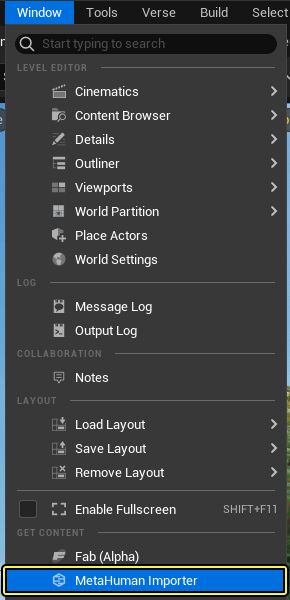
-
Download your MetaHuman and add it to your UEFN project.
- Click the MetaHuman category (1) on the left and select your desired MetaHuman from the list.
- Click Download (2) to download the MetaHuman to your local machine.
- Click Add (3) to import the MetaHuman to your UEFN project.

-
Go to your Unreal Engine project where the cloth asset was created and right click the CA_Cap_Jacket asset and select Asset Actions > Migrate.
- Click OK in the Asset Report window.
- Navigate to your UEFN project directory and go to the Plugins > [Project Name] folder. Select the Content folder and click Select Folder.
- If your UEFN project already has a MetaHuman, you may get a warning message asking if you want to overwrite existing assets. Enable the Apply to All checkbox and click No.
You're reading a preview
The full reference is free for BrainDeadGuild Discord members — sign in to read it all, or open the original at the source.
Sign in with your BrainDead.TV / BrainDeadGuild Discord account for full access.