
Read-Only Asset Editing In UEFN
You can open cooked assets in asset editors using a read-only mode. This mode allows you to view any data that is available and deemed appropriate in cooked assets without being able to modify the assets yourself.
The major advantage of being able to view cooked assets shipped with UEFN is seeing all the essential data on how they are set up, which teaches you good practices and serves as a solid point of reference for creating your own assets.
The types of assets that can be viewed in read-only mode are Static Meshes and Textures.
Assets shipped with UEFN, downloaded from Fab, and any other third-party cooked assets imported into a project can all be viewed in the Read Only Asset Editor.
Viewing UEFN Assets
-
Open a UEFN project.
-
In the Content Browser, go to All and press on the Filter funnel next to the search bar. Select Static Mesh and Texture to apply the filters.
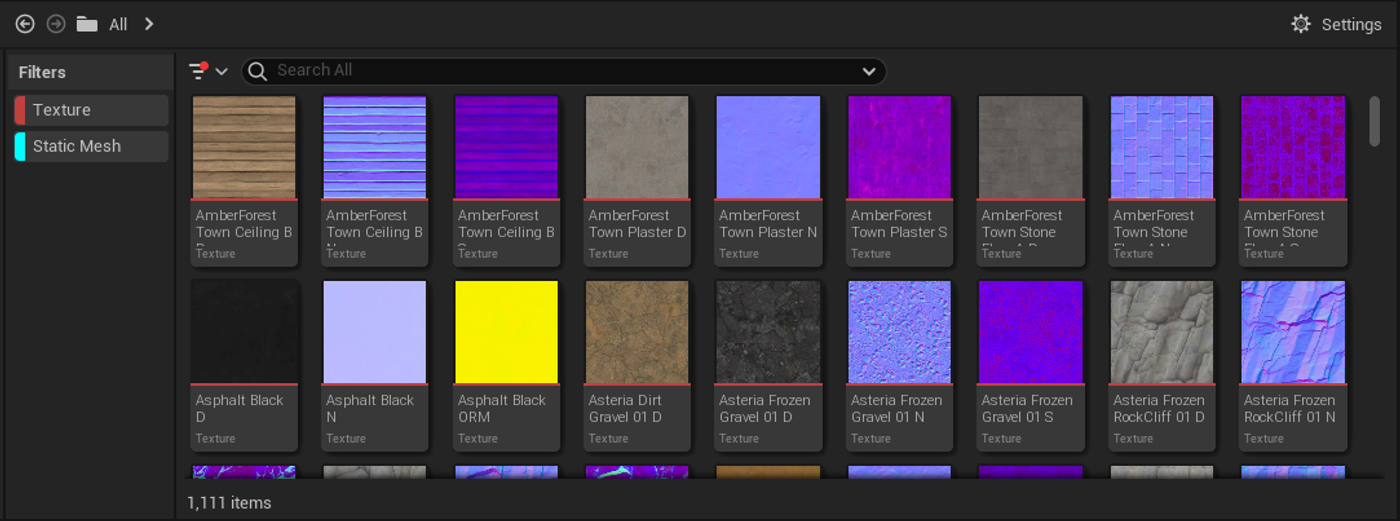
-
Double-click on a static mesh or texture to open the corresponding read-only editor.
You're reading a preview
The full reference is free for BrainDeadGuild Discord members — sign in to read it all, or open the original at the source.
Sign in with your BrainDead.TV / BrainDeadGuild Discord account for full access.