
UI Widget Editor in Unreal Editor for Fortnite
The editor opens when you double-click a widget thumbnail. Inside the editor, you can add all the parts of your custom UI by dragging them into the viewport. Below is a breakdown of the Widget Editor.
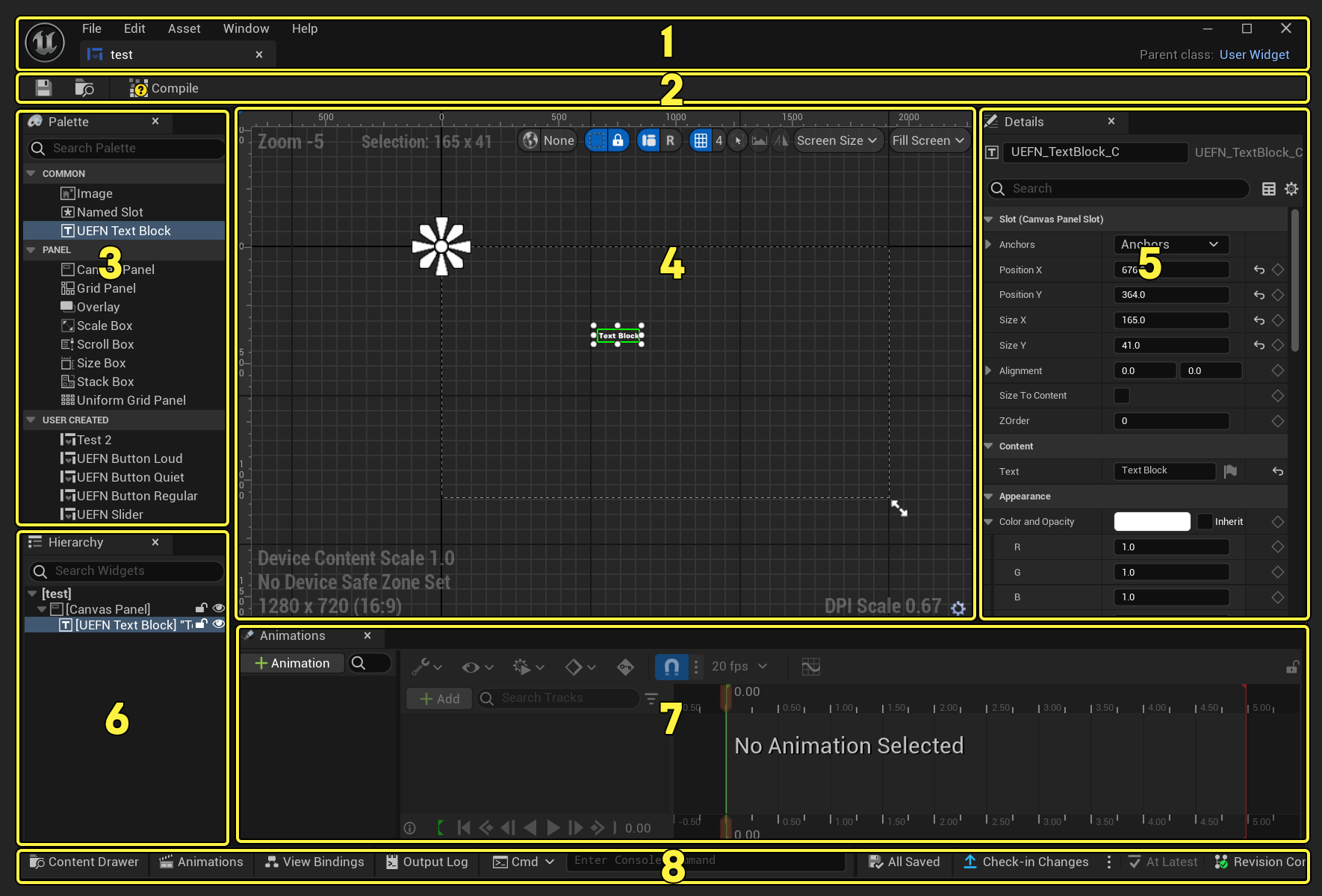
Click to enlarge image.
| Number | Description |
|---|---|
| 1 | Menu and Tab Bar |
| 2 | Quick Tools |
| 3 | Palette Panel |
| 4 | Viewport |
| 5 | Details Panel |
| 6 | Hierarchy Tab |
| 7 | Animations Tab |
| 8 | Bottom Toolbar |
Menu and Tab Bar

File
- Recent Widget Blueprint Assets: Shows a list of the recent widget assets blueprints that you've opened for the project.
- Save All: Saves all assets and levels to disk.
- Save: Saves the widget blueprint.
- Save As...: Saves the widget blueprint under a new name.
- Compile: Compiles the widget blueprint.
- Reparent Blueprint: Changes the parent of the blueprint.
You're reading a preview
The full reference is free for BrainDeadGuild Discord members — sign in to read it all, or open the original at the source.
Sign in with your BrainDead.TV / BrainDeadGuild Discord account for full access.