
Patchwork Distortion Effect Device
The Distortion Effect (FX-DIST) device can simulate the warm sound of a signal being overdriven through an analog tube amp, or an unsettling digital processing and warping.
Different styles of distortion shape the feel of audio in different ways, evoking various moods and music genres. In Patchwork, you can use distortion as a creative tool to customize your sound.
Device Options
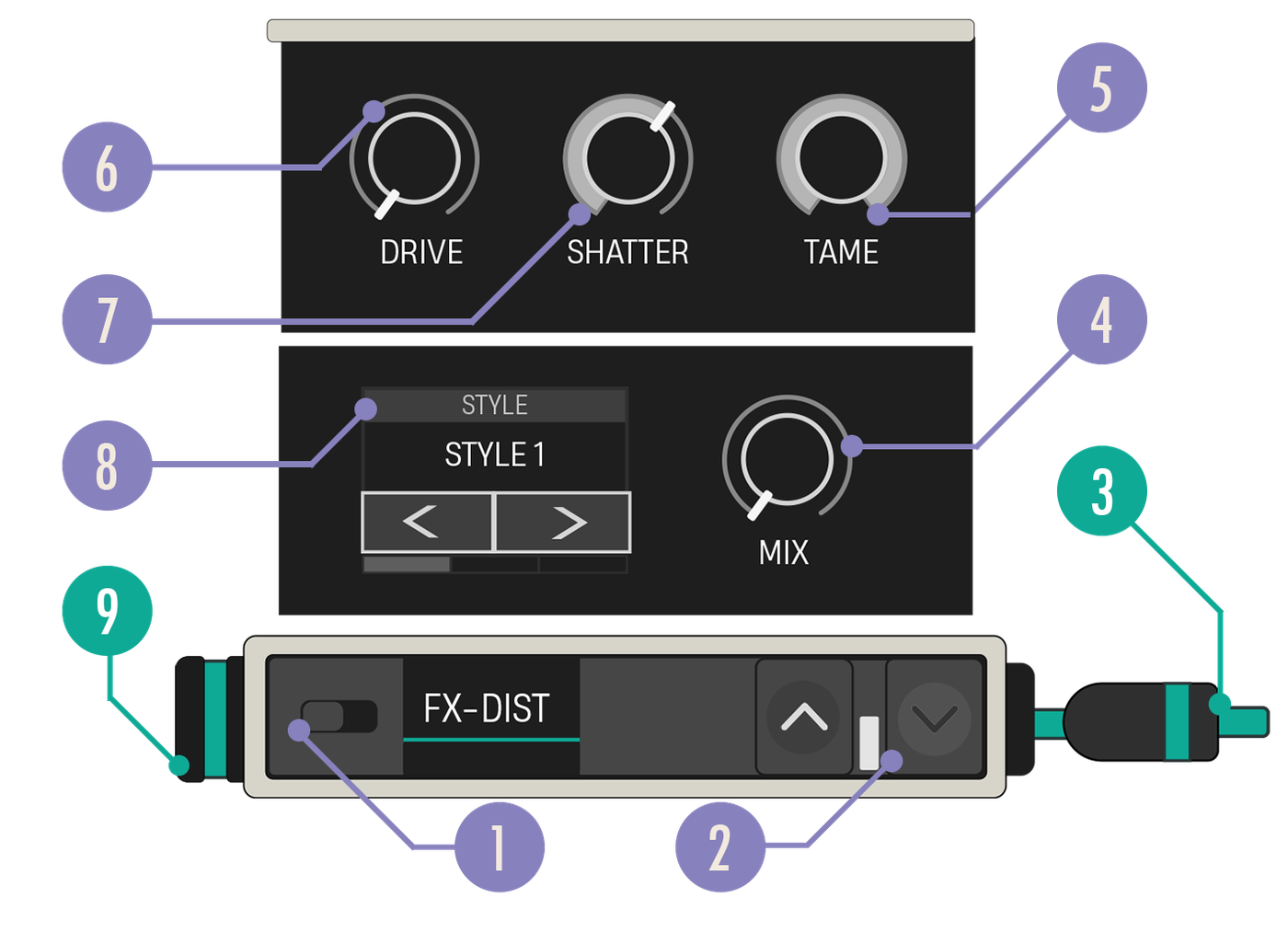
| Option | Values | Description |
|---|---|---|
| 1. Enabled Switch | On, Off | When disabled, the audio data is passed through without any effect applied. |
| 2. Expand Buttons | Closed, Open | Expand the device to reveal more customization options. |
| 3. Audio Out Cable | N/A | Connect the Audio Out cable to a teal Audio In port on another device. |
| 4. Mix knob | 1.0, 0.00-1.00 | This determines how much of the audio output is processed by the effect. |
| 5. Tame Knob | 0, 0.00-1.00 | Uses a low pass filter to reduce harsh high-frequency output caused by the distortion. Higher Tame values will filter out more frequencies. |
| 6. Shatter Knob | 0, 0.00-1.00 | Controls how much of a DC offset is applied to the input signal. Increasing this causes the distortion to alter the signal in more destructive ways. |
| 7. Drive Knob | 4, 1.00-11.00 | Sets the gain applied to the audio input. Higher Drive values will increase the distortion. |
| 8. Style Carousel | Clip, Warm, Asymmetric, Crunch | Choose from the available Distortion styles. |
| 9. Audio In Port | N/A | The Audio In port receives a teal Audio Out cable from another device. |
You're reading a preview
The full reference is free for BrainDeadGuild Discord members — sign in to read it all, or open the original at the source.
Sign in with your BrainDead.TV / BrainDeadGuild Discord account for full access.