VerseIsland
Feed Learn Leaderboard Guides Reference Explore Search Docs Verse Library
Sign in
Feed Learn 📖 Codex Leaderboard Guides Reference Explore Search Docs Verse Library
Fortnite › Materials/VFX · Up to Fortnite · Materials/VFX · 211 of 211 in Materials/VFX
Browse Fortnite

Working With The Lego Brick Editor

You can use the LEGO® Brick Editor to create uniquely built experiences on your islands like you would in your living room - brick by brick! The LEGO Brick Editor has numerous LEGO bricks available, in bright and authentic, opaque LEGO colors. Whether you’re building custom LEGO assets or your own brick-built town, the LEGO Brick Editor makes it possible.

There is no wrong way to start building your own LEGO creations; you can pull out all the bricks you need from the gallery in one go, or pull the bricks out one by one. Or pull a few bricks out and see where your instincts take you. Whatever building style suits you best is the right one!

Get started by opening the LEGO Brick Editor:

  • In the toolbar, navigate to the Selection Mode dropdown, and select LEGO®Brick Editor.
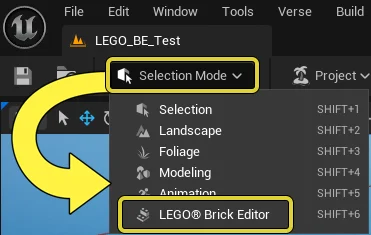
    Open the LEGO Brick Editor form the Selection dropdown menu.

    Click to enlarge image.

You can also switch to the LEGO Brick Editor using the keyboard short cut, Shift+6.

The LEGO Brick Editor is a tool you use for brick building your own LEGO static meshes that you can use as props, and more. It is a gallery that includes a fixed amount of LEGO Bricks, which you can apply the provided set of original LEGO colors to. You cannot use the LEGO Brick Editor to create your own bricks, nor scales the bricks up and down. You must work with the default stud size of the bricks. For more information about LEGO bricks, see the LEGO® Brand Rules and Working with LEGO Islands.

You're reading a preview

The full reference is free for BrainDeadGuild Discord members — sign in to read it all, or open the original at the source.

Sign in with Discord — free for members Read the original at Epic Games

Sign in with your BrainDead.TV / BrainDeadGuild Discord account for full access.

Comments

    Sign in to vote, comment, or suggest an edit. Sign in
    📄
    Source
    Epic Games

    © Epic Games. Official Epic developer documentation, shown here as a reference with a link to the original. All rights remain with Epic Games. Terms ↗

    View original Sources & licensing
    Request removal
    Last updated Feb 10, 2026
    Keep exploring
    More in Materials/VFX · 211 of 211
    Prev
    vfx lava cave in unreal editor for fortnite
    Browse all files in this folder (A–Z)
    Next up
    • Lego Brand Rules In Fortnite
    • Working With Lego Islands In Fortnite Creative
    • | [An example of a 1 x 1 brick.
    • | --- | --- | --- | --- | --- |
    • | --- | --- | --- | --- | --- |
    • Ca262Cd9 656E 4D5E B144 03E69Ba43C87?Resizing Type=Fit
    Related topics
    • Lego Brick Editor Template In Fortnite Materials/Vfx
    • Lego Brick Editor In Fortnite Materials/Vfx
    • Lego Tips And Tricks Of Building In 3d Space In Fortnite Building & Props
    • Building Lego Islands In Fortnite Creative Building & Props
    • Lego Pvp Extraction Template In Unreal Editor For Fortnite Tutorials

    Related

    Open in graph →

    Related topics

    • Lego Brick Editor Template In Fortnite
    • Lego Brick Editor In Fortnite
    • Lego Tips And Tricks Of Building In 3d Space In Fortnite
    • Building Lego Islands In Fortnite Creative
    • Lego Pvp Extraction Template In Unreal Editor For Fortnite
    VerseIsland · an archipelago of Verse & UEFN knowledge
    🗺️ Island atlas Learn Guides History About & Press Sources & Licensing Status

    Not affiliated with Epic Games. Fortnite, UEFN, Unreal Engine, and Verse are trademarks of Epic Games, Inc. Content is attributed to its source — see Sources & Licensing.

    🦜

    Scout · your island guide

    The Isle of Verse