VerseIsland
Feed Learn Leaderboard Guides Reference Explore Search Docs Verse Library
Sign in
Feed Learn 📖 Codex Leaderboard Guides Reference Explore Search Docs Verse Library
UEFN › Building & Props · Up to UEFN · Building & Props · 45 of 71 in Building & Props
Browse UEFN

Building the Firework Trail

3. Building the Firework Trail

By copying the first empty emitter, you can create the trail of the firework and add the modules you need to create the trail effect.

By copying the first empty emitter, you can create the trail of the firework and add the modules you need to create the trail effect.

  • To concentrate on one emitter at a time, you can turn off multiple emitters by clicking the blue checkmark and leaving the working one selected.
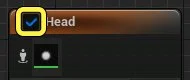
    The blue checkmark

  • You can turn off an emitter by selecting multiple emitters then right-clicking and selecting Enable, Disable, or Isolate from the drop down menu to focus on one emitter while working in the System Editor.

  • If you accidentally close a window or panel you need for editing your effect, you can find all the windows and panels in the Windows menu.

  • If the emitter has an issue or error message, all issues and errors are captured either by the Niagara Log or the Output Log. From these logs you should be able to see what is causing the issue or error in your effect.

  1. Select the first empty emitter stack and right-click.
  2. Select Copy from the dropdown menu.
  3. Right-click in the System Editor and select Paste from the dropdown menu.
  4. Select the new emitter.
  5. Click the emitter name and change to Trail.

You're reading a preview

The full reference is free for BrainDeadGuild Discord members — sign in to read it all, or open the original at the source.

Sign in with Discord — free for members Read the original at Epic Games

Sign in with your BrainDead.TV / BrainDeadGuild Discord account for full access.

Comments

    Sign in to vote, comment, or suggest an edit. Sign in
    📄
    Source
    Epic Games

    © Epic Games. Official Epic developer documentation, shown here as a reference with a link to the original. All rights remain with Epic Games. Terms ↗

    View original Sources & licensing
    Request removal
    Last updated Dec 5, 2024
    Keep exploring
    More in Building & Props · 45 of 71
    Prev
    building the firework head in unreal editor for fortnite
    Next
    configuring collision for a static mesh in unreal editor for fortnite
    Browse all files in this folder (A–Z)
    Next up
    • The result of the first two emitter stacks.
    Related topics
    • Building The Firework Head In Unreal Editor For Fortnite Building & Props
    • Making The Second Firework Explosion In Unreal Editor For Fortnite General
    • Creating Roads And Pathways In Unreal Editor For Fortnite General
    • Build A Game In Unreal Editor For Fortnite Building & Props
    • Unreal Editor For Fortnite Documentation General

    Related

    Open in graph →

    Related topics

    • Building The Firework Head In Unreal Editor For Fortnite
    • Making The First Firework Explosion In Unreal Editor For Fortnite
    • Making The Second Firework Explosion In Unreal Editor For Fortnite
    • Creating Roads And Pathways In Unreal Editor For Fortnite
    • Build A Game In Unreal Editor For Fortnite
    VerseIsland · an archipelago of Verse & UEFN knowledge
    🗺️ Island atlas Learn Guides History About & Press Sources & Licensing Status

    Not affiliated with Epic Games. Fortnite, UEFN, Unreal Engine, and Verse are trademarks of Epic Games, Inc. Content is attributed to its source — see Sources & Licensing.

    🦜

    Scout · your island guide

    The Isle of Verse