
Making the First Firework Explosion
4. Making the First Firework Explosion
Create the colorful explosion at the end of the firework by adding a circular shape to the particles that imitate how fireworks look when they explode.
Create the colorful explosion at the end of the firework by adding a circular shape to the particles that imitate how fireworks look when they explode.
- Select the first empty emitter stack and right-click.
- Select Copy from the dropdown menu.
- Right-click in the System Editor and select Paste from the dropdown menu.
- Double-click the emitter name and change to Explosion.
Particle Spawn
These settings determine how the particles behave when they spawn.
-
Click Initialize Particle to open the Initialize Particle settings in the Details panel.
-
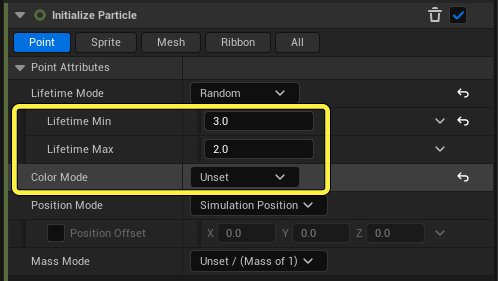
Change the Lifetime Min value to 3.0.
-
Change the Lifetime Max value to 2.0.
-
Set Color Mode to Unset. You will set the color of the explosion in Particle Update.
-
Click Sprite under Initialize Particle to open the Sprite Attribute settings.
-
Set the Sprite Size Mode to Uniform.
-
Change the Uniform Sprite Size to 20.0. This sets the size of the sprites that spawn.
You're reading a preview
The full reference is free for BrainDeadGuild Discord members — sign in to read it all, or open the original at the source.
Sign in with your BrainDead.TV / BrainDeadGuild Discord account for full access.