
Create Clothing Assets in Unreal Engine
Create your Clothing Asset in Unreal Engine
The process of converting your cloth meshes into cloth assets is performed in Unreal Engine 5. In this section, we will import a USD file from Marvelous Designer. However, you can import assets from any external DCC package in FBX or USD formats.
The process of converting your cloth meshes into cloth assets is performed in Unreal Engine 5. In this section, we will import a USD file from Marvelous Designer. However, you can import assets from any external DCC package in FBX or USD formats.
As part of the Talisman: MetaHuman template, you can access several downloadable assets including an Unreal Engine project with the MetaHuman wearing Captain Roux’s jacket from the Talisman GDC demo. To learn how to access the downloadable files, see the Talisman MetaHuman Template tutorial.
Once you download the files, follow these steps to convert your meshes into a Cloth Asset:
Create a New Unreal Engine Project
-
Create a new Unreal Engine 5 project.
-
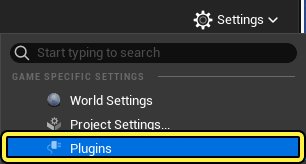
Click Settings > Plugins to open the Plugins menu.
-
Search for then enable the Chaos Cloth Asset and Chaos Cloth Asset Editor plugins.
You're reading a preview
The full reference is free for BrainDeadGuild Discord members — sign in to read it all, or open the original at the source.
Sign in with your BrainDead.TV / BrainDeadGuild Discord account for full access.