
The Rush Expression
Rush
The rush expression is used to run a block of two or more async expressions concurrently (simultaneously).
The rush expression is used to run a block of two or more async expressions concurrently (simultaneously).
When the fastest subexpression completes, any expression that follows the rush is evaluated, and any remaining subexpressions continue to evaluate.
|  | set WinnerResult = rush: |
| --- | --- |
|  | # All three async functions start at the same time |
|  | AsyncFunctionLongTime() |
|  | AsyncFunctionShortTime()  # This will win and its result is used |
|  | AsyncFunctionMediumTime() |
|  | # Next expression is called after the fastest async function (AsyncFunctionShortTime()) completes. |
|  | # All other subexpression tasks (AsyncFunctionLongTime(), AsyncFunctionMediumTime()) continue. |
|  | NextExpression(WinnerResult) |
|  | AsyncFunction4() |
|  | # If any rush subexpression tasks are still running when AsyncFunction4 completes |
|  | # then they are now canceled. |

Copy full snippet
The following code shows the syntax for the rush expression.
|  | expression0 |
| --- | --- |
|  | rush: |
|  | slow-expression |
|  | mid-expression |
|  | fast-expression |
|  | expression1 |

Copy full snippet
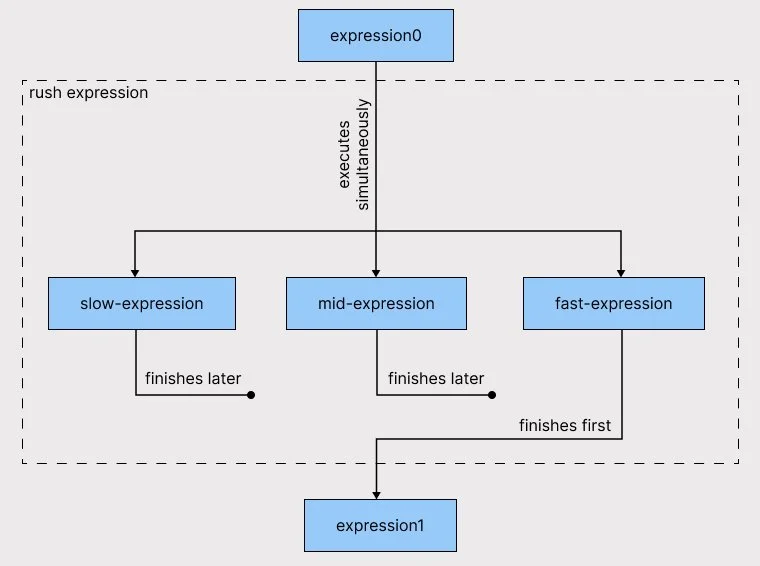
The diagram below shows the execution flow for the expressions.

Rush Expression Use
Where you can use a rush expression |
Async contexts |
|---|---|
Invocation time of the rush expression |
Async |
Requirements for rush code block |
The body of the rush expression must have at least two expressions, and all of the expressions must be async. |
What the rush expression does |
Is similar to race, but expressions that complete after first completion continue. If any expressions effectively complete at the same simulation update, then the earlier encountered expression that completes breaks any tie. Any incomplete expressions continue to evaluate until they complete, or until the enclosing async context completes, at which point, any remaining losing expressions are canceled — whichever occurs first. |
When the rush expression completes |
The rush expression completes when the first expression in the code block has completed. This could be the fastest, shortest length, first completed, or least amount of time to complete. |
When the next expression after rush starts |
Any next expression that follows the rush expression is started when the completed expression finishes. |
Result of the rush expression |
The result of a rush expression is the result of the first completed expression. The result type is the most common compatible type of all expressions in the code block. |
A rush expression cannot currently be used in the body of an iteration expression like loop or for. If it must be used, then wrap it in an async function and have the iteration expression call that function.