
Button Device Design Examples
A button is a device you can use to trigger other devices when a player pushes the button.
Here are a couple of examples of how to use Button devices to build gameplay.
Door Hack
Use a button to provide player interaction with a prop by increasing the radius of the prop and adding text for player instruction.
Devices Used
- 1 x Button
- 1 x Lock
Build It Yourself
-
Place a Button device over the prop you want to use. In this example, it is a computer on a desk but you can use it with any prop.
-
Customize the button to the following settings:
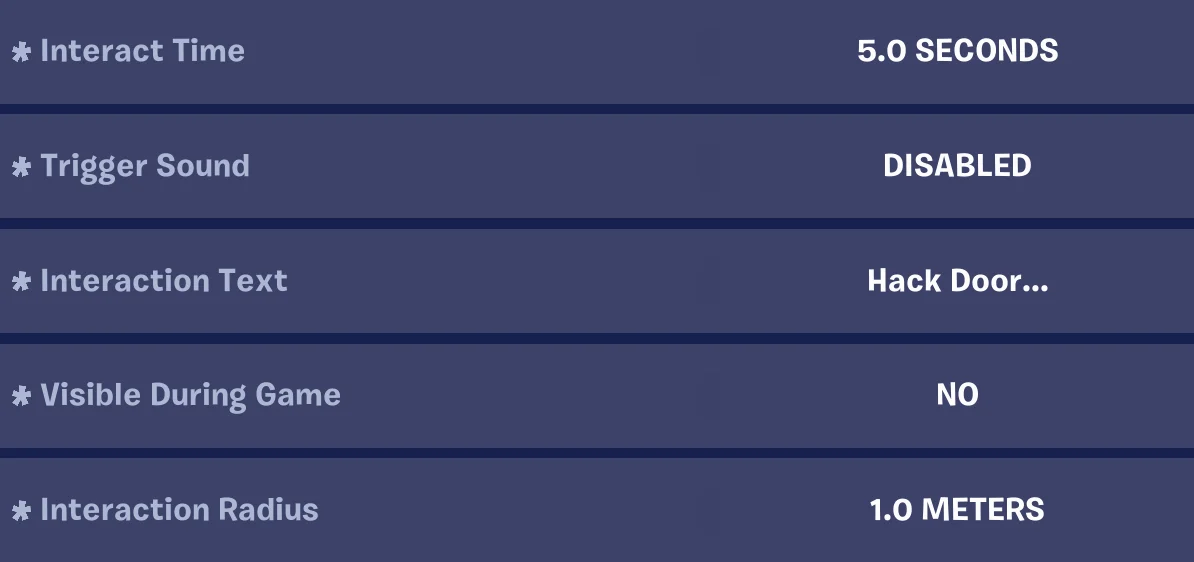
Option Value Description Interact Time 5.0 Seconds Time needed to interact with the button before it activates. Trigger Sound Disabled No sound effects are played when the button is activated. Interaction Text Hack Door... The UI text displayed when the player looks at and interacts with the button. In this case, the text implies the computer is being used to hack. Visible During Game No The button is not visible during gameplay. Interaction Radius 1.0 Meters The distance from the button the player can be while still bringing up the interaction prompt. -
Place a door in another spot in the room, then place a Lock device adjacent to the door, making sure the light turns blue to indicate it is paired with the door.
-
Customize it to the following settings:
You're reading a preview
The full reference is free for BrainDeadGuild Discord members — sign in to read it all, or open the original at the source.
Sign in with your BrainDead.TV / BrainDeadGuild Discord account for full access.