
Patchwork Instrument Player Device
The Instrument Player (I-PLAY) device provides a wide sound palette, incorporating acoustic instruments and other sounds that would be hard to simulate with a synthesizer.
Like the Drum Player, the Instrument Player is an audio generator that converts note data input into audio data using a bank of samples. It allows you to make big, quick changes to sound output by switching from one instrument to another.
Device Controls
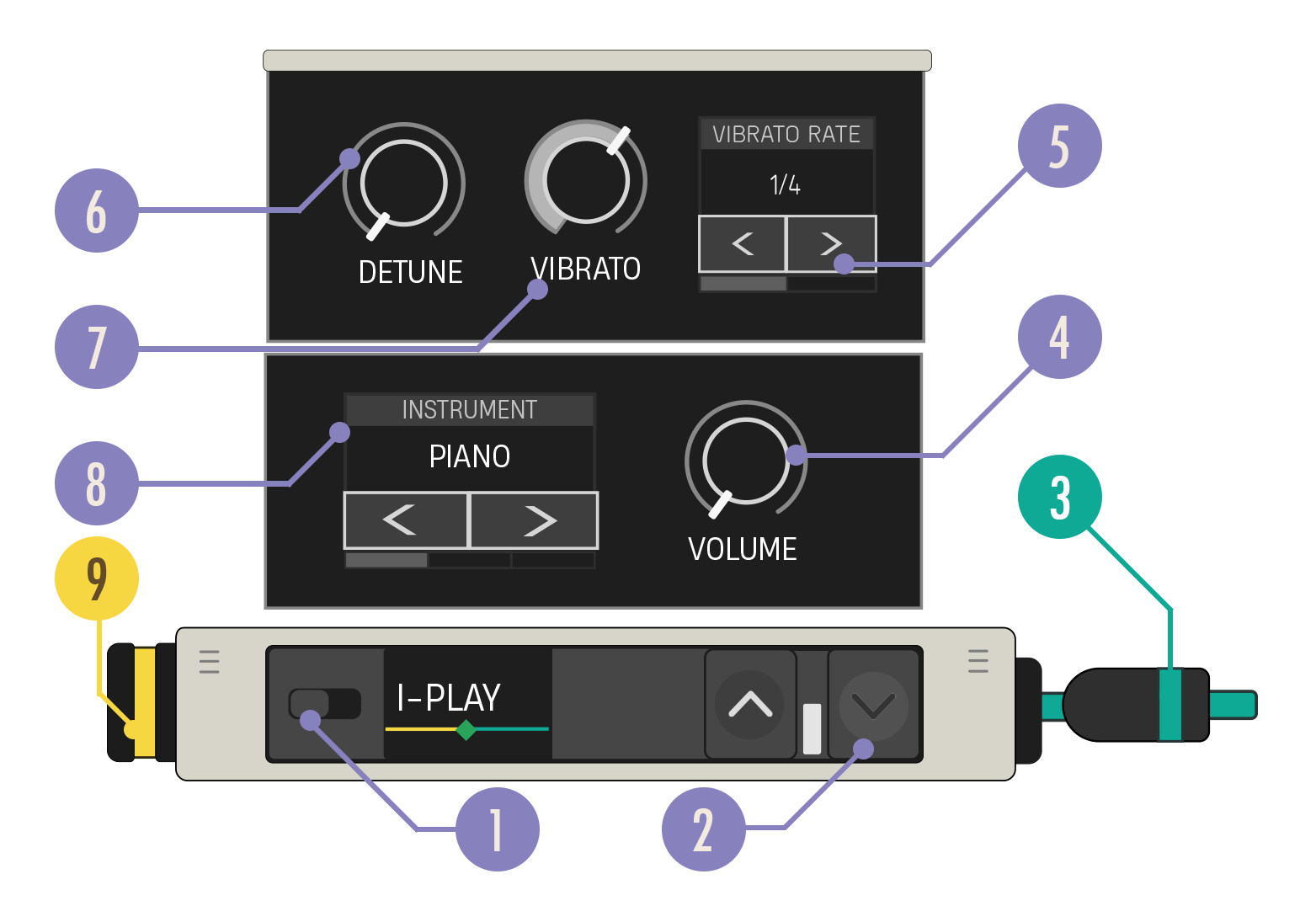
| Option | Values | Description |
|---|---|---|
| 1. Enabled Switch | On, Off | When disabled, the synth does not produce any audio and the signal chain ends. |
| 2. Expand Buttons | Closed, Open | Expand the device to reveal more customization options. |
| 3. Audio Out Cable | N/A | Connect the Audio Out cable to a teal Audio In port. |
| 4. Volume Knob | 1, 0-10 | Control loudness of audio output. |
| 5. Vibrato Rate Carousel | 1 Bar, ½ Note, ¼ Note, ⅛ Note, 1/16 Note, 1/32 Note, 1/64 Note | Sets the oscillation rate of Vibrato when the Vibrato knob is set to a value greater than 0. |
| 6. Detune Knob | default 0, -12 to 12 | Sets the scale of a constant pitch offset of the audio output. |
| 7. Vibrato Knob | default 0, 0 to 1 | Sets the scale of an oscillating pitch offset of the audio output. |
| 8. Instrument Carousel | Piano, Flute, Organ, Upright Bass, Vibraphone, Elec Piano, Baritone Sax, Strings, Pizzicato, Horns, Guitar Clean, Kalimba, Glocken | Selects which instrument sound will be applied to the audio output. |
| 9. Note In Port | N/A | Can only receive a yellow Note In cable. |
You're reading a preview
The full reference is free for BrainDeadGuild Discord members — sign in to read it all, or open the original at the source.
Sign in with your BrainDead.TV / BrainDeadGuild Discord account for full access.