VerseIsland
Feed Learn Leaderboard Guides Reference Explore Search Docs Verse Library
Sign in
Feed Learn 📖 Codex Leaderboard Guides Reference Explore Search Docs Verse Library
Fortnite Creative › Devices · Up to Fortnite Creative · Devices · 106 of 174 in Devices
Browse Fortnite Creative

Patchwork Gain Device

The Patchwork Gain device gives you a volume control that can be applied to specific parts of your Patchwork system.

You can connect one or more of your Patchwork audio devices to the Gain input port to raise or lower the volume of just those devices in your composition.

This device should be placed at the end of your device chain, right before the Patchwork Speaker device.

For help on how to find the Patchwork Gain device, see Using Devices.

If you're using multiple copies of a device on an island, it can be useful to rename them. Choosing names that relate to a device's purpose makes it easier to remember what each one does, and easier to find a specific device when using the Event Browser.

Device Options

Default values are bold.
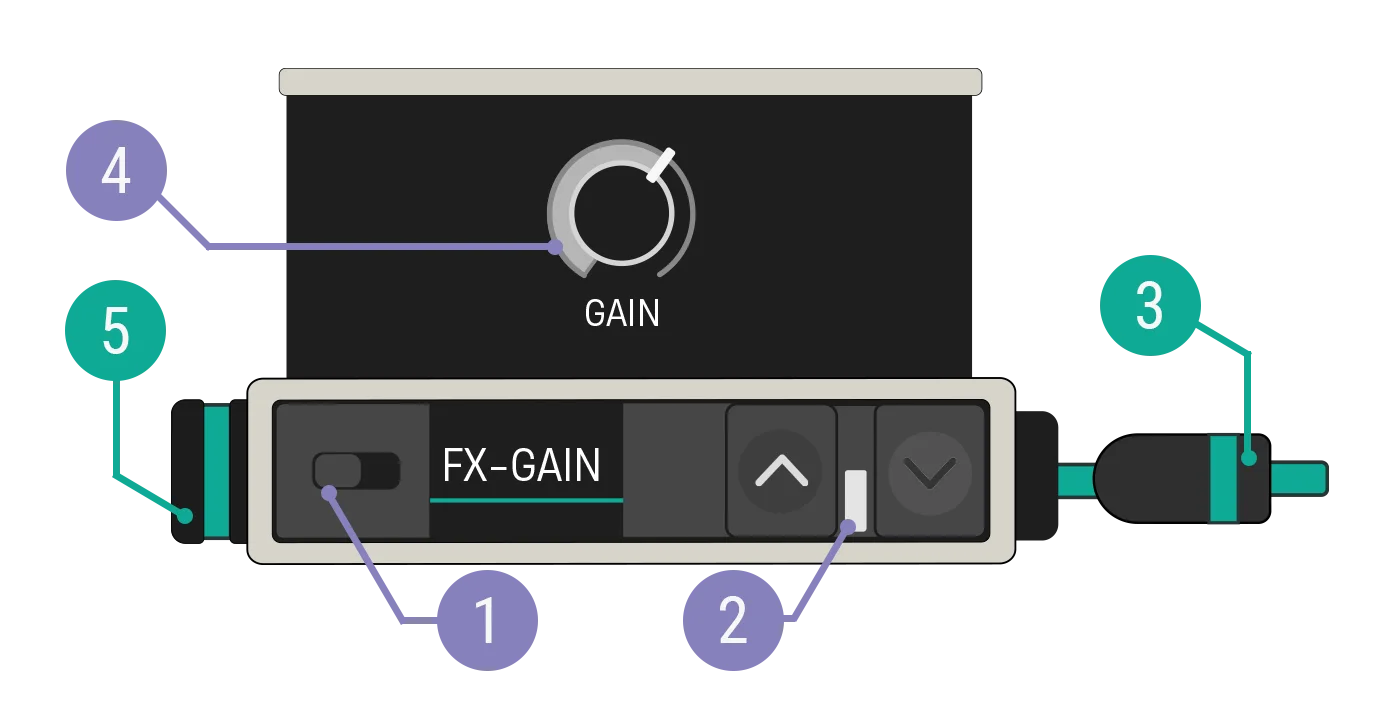
Patchwork Gain with callouts

You're reading a preview

The full reference is free for BrainDeadGuild Discord members — sign in to read it all, or open the original at the source.

Sign in with Discord — free for members Read the original at Epic Games

Sign in with your BrainDead.TV / BrainDeadGuild Discord account for full access.

Comments

    Sign in to vote, comment, or suggest an edit. Sign in
    📄
    Source
    Epic Games

    © Epic Games. Official Epic developer documentation, shown here as a reference with a link to the original. All rights remain with Epic Games. Terms ↗

    View original Sources & licensing
    Request removal
    Last updated Dec 7, 2024
    Keep exploring
    More in Devices · 106 of 174
    Prev
    using patchwork filter devices in fortnite creative
    Next
    using patchwork instrument player devices in fortnite creative
    Browse all files in this folder (A–Z)
    Next up
    • This device should be placed at the end of your device chain, right before the [Patchwork Speaker
    • For help on how to find the **Patchwork Gain** device, see [**Using Devices**
    • If you're using multiple copies of a device on an island, it can be useful to [rename
    • fortnite-creative/using-devices-in-fortnite-creative.md).
    Related topics
    • Using Patchwork Gain Devices In Fortnite Creative Devices
    • Using Patchwork Devices In Fortnite Creative Devices
    • Using Patchwork Devices In Fortnite Creative Devices
    • Getting Started With Patchwork In Fortnite Creative Audio
    • Getting Started With Patchwork In Fortnite Creative Audio

    Related

    Open in graph →

    Linked docs

    • Using Devices In Fortnite Creative

    Related topics

    • Using Patchwork Gain Devices In Fortnite Creative
    • Using Patchwork Devices In Fortnite Creative
    • Using Patchwork Devices In Fortnite Creative
    • Getting Started With Patchwork In Fortnite Creative
    VerseIsland · an archipelago of Verse & UEFN knowledge
    🗺️ Island atlas Learn Guides History About & Press Sources & Licensing Status

    Not affiliated with Epic Games. Fortnite, UEFN, Unreal Engine, and Verse are trademarks of Epic Games, Inc. Content is attributed to its source — see Sources & Licensing.

    🦜

    Scout · your island guide

    The Isle of Verse