
Patchwork Note Trigger Device
The Note Trigger (N-TRG) device is a musical version of the Trigger device. It receives note input, and you can specify which notes will send events to other Fortnite Creative devices.
For example, you could patch the Note Trigger to a Drum Sequencer, then bind it to a Creature Spawner that spawns a new creature on the beat, or patch it to a Note Sequencer to trigger some barrels to explode every time C♯ is played.
Device Options
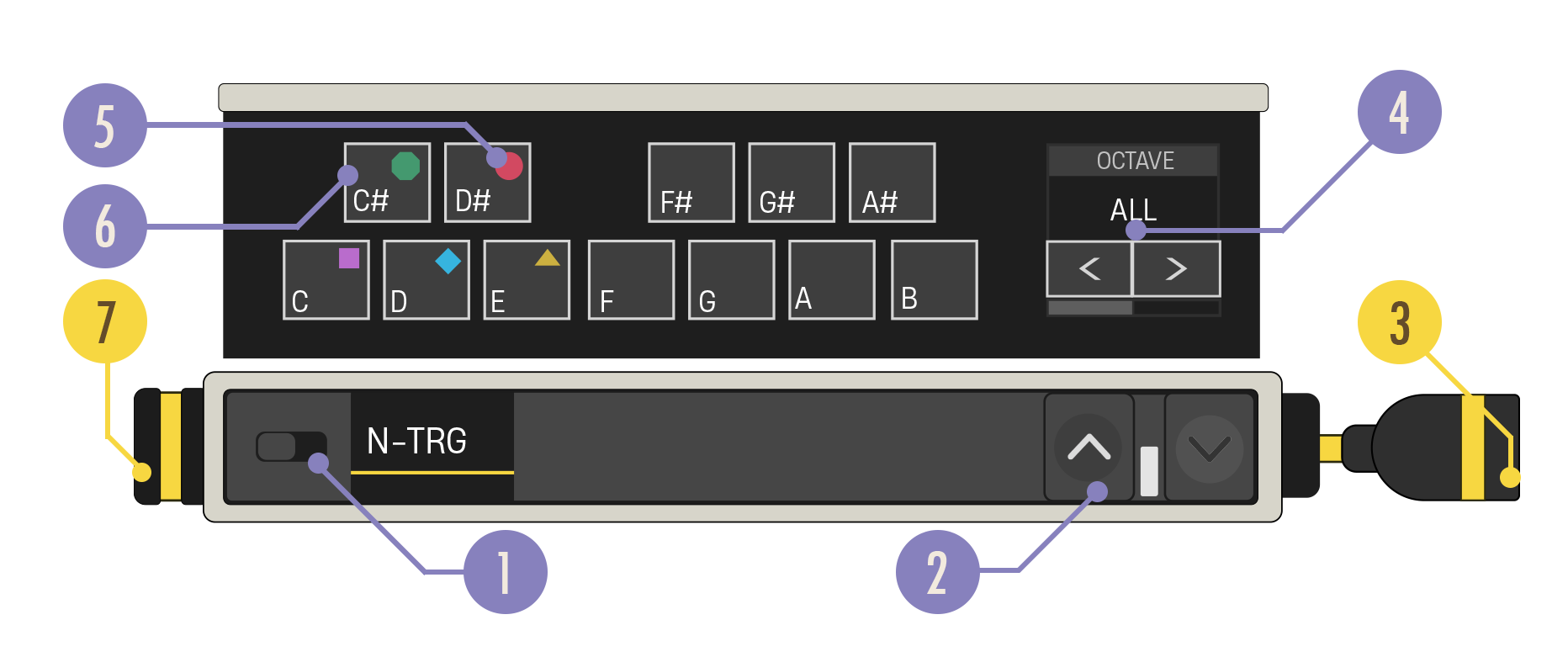
| Option | Values | Description |
|---|---|---|
| 1. Enabled Switch | On, Off | Note data is always passed through this device unchanged. When Disabled, note data is passed through unchanged and no Events are sent. |
| 2. Expand Buttons | Closed, Open | Expand the device to reveal more customization options. |
| 3. Note Out Cable | N/A | The Note Out cable needs to be connected to a yellow Note In port. |
| 4. Octave Carousel | All, 0-6 | Select whether the device should be triggered by notes in any octave or in a specific octave. |
| 5. Drum Note Shape Label | Shapes | When patching the Patchwork Drum Sequencer into the Note Trigger, these labels indicate which drum note shapes on the Drum Sequencer correspond to which notes. |
| 6. Note Select Button | Any number of notes. Default: No Notes | Users can select each button and toggle it to be active/inactive. When a note is set to its active state, the device will send a message when it receives that note as input. |
| 7. Note In Port | N/A | Can only receive a yellow Note In cable. |
You're reading a preview
The full reference is free for BrainDeadGuild Discord members — sign in to read it all, or open the original at the source.
Sign in with your BrainDead.TV / BrainDeadGuild Discord account for full access.