VerseIsland
Feed Learn Leaderboard Guides Reference Explore Search Docs Verse Library
Sign in
Feed Learn 📖 Codex Leaderboard Guides Reference Explore Search Docs Verse Library
Fortnite Creative › Devices · Up to Fortnite Creative · Devices · 112 of 174 in Devices
Browse Fortnite Creative

Patchwork Omega Synthesizer Device

The Omega Synthesizer (O-SYN) device is an audio generator that converts note data from a note generator like the Patchwork Note Sequencer into audio data. That data can then be sent to an audio effect device for further manipulation, or to an output device like a Patchwork Speaker so players can hear it.

The Omega Synth has many presets that sound good out of the box, and gives you the ability to tweak the knobs yourself to get the sound you're looking for!

Device Options

All of the settings that can be manipulated with the Patchwork Tool can also be adjusted using the Customize panel in Create mode, or using the Details panel in UEFN.
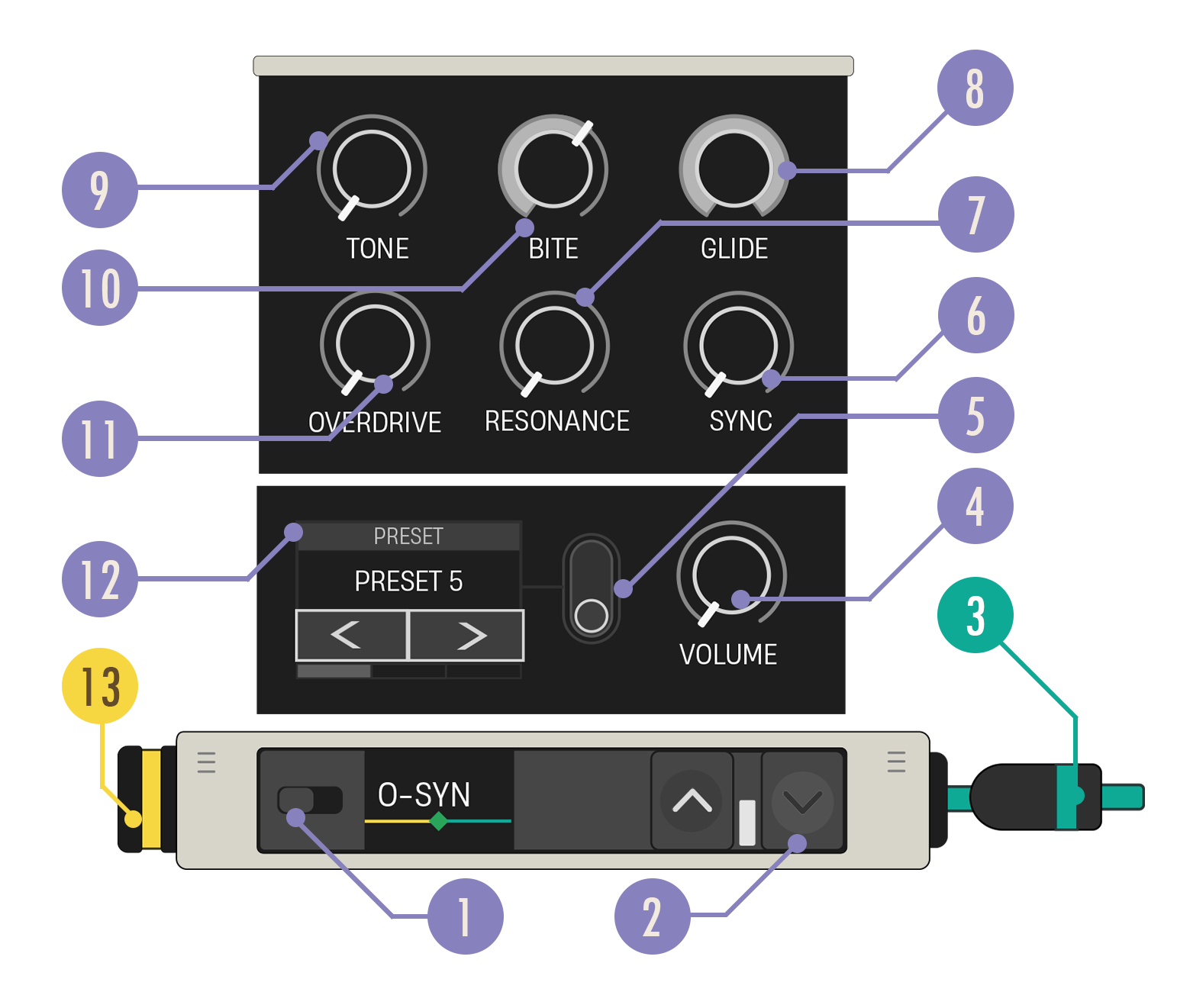
Omega Synth Callouts

You're reading a preview

The full reference is free for BrainDeadGuild Discord members — sign in to read it all, or open the original at the source.

Sign in with Discord — free for members Read the original at Epic Games

Sign in with your BrainDead.TV / BrainDeadGuild Discord account for full access.

Comments

    Sign in to vote, comment, or suggest an edit. Sign in
    📄
    Source
    Epic Games

    © Epic Games. Official Epic developer documentation, shown here as a reference with a link to the original. All rights remain with Epic Games. Terms ↗

    View original Sources & licensing
    Request removal
    Last updated Dec 7, 2024
    Keep exploring
    More in Devices · 112 of 174
    Prev
    using patchwork note trigger devices in fortnite creative
    Next
    using patchwork song sync devices in fortnite creative
    Browse all files in this folder (A–Z)
    Next up
    • The **Omega Synthesizer (O-SYN)** device is an [audio generator
    • 1. Drag an Omega Synthesizer device onto your island.
    • This device takes in an audio signal and sends it out again, but with a time delay, like your voice echoing in a canyon.
    • Use this audio-shaping tool that results in sounds typical of genres like electronic, rock, and metal.
    • [Speaker
    Related topics
    • Using Patchwork Omega Synthesizer Devices In Fortnite Creative Devices
    • Getting Started With Patchwork In Fortnite Creative Audio
    • Using Patchwork Note Progressor Devices In Fortnite Creative Devices
    • Using Patchwork Echo Effect Devices In Fortnite Creative Devices
    • Using Patchwork Note Sequencer Devices In Fortnite Creative Cinematics

    Related

    Open in graph →

    Related topics

    • Using Patchwork Omega Synthesizer Devices In Fortnite Creative
    • Getting Started With Patchwork In Fortnite Creative
    • Using Patchwork Note Progressor Devices In Fortnite Creative
    • Using Patchwork Echo Effect Devices In Fortnite Creative
    • Using Patchwork Echo Effect Devices In Fortnite Creative
    VerseIsland · an archipelago of Verse & UEFN knowledge
    🗺️ Island atlas Learn Guides History About & Press Sources & Licensing Status

    Not affiliated with Epic Games. Fortnite, UEFN, Unreal Engine, and Verse are trademarks of Epic Games, Inc. Content is attributed to its source — see Sources & Licensing.

    🦜

    Scout · your island guide

    The Isle of Verse