VerseIsland
Feed Learn Leaderboard Guides Reference Explore Search Docs Verse Library
Sign in
Feed Learn 📖 Codex Leaderboard Guides Reference Explore Search Docs Verse Library
Fortnite › Building & Props · Up to Fortnite · Building & Props · 1 of 104 in Building & Props
Browse Fortnite

Building the Firework Head in Unreal Editor for Fortnite

Begin the firework by building the firework head. This emitter drives the other emitters and sends event information to them through an event, signaling them to work at specific times during the effect phase.

  1. Click Properties on the empty emitter and the Details panel will display the properties for the empty emitter.

  2. Enable Required Persistent IDs. In this example, Required IDs help other emitters to reliably reference this emitter's particles.
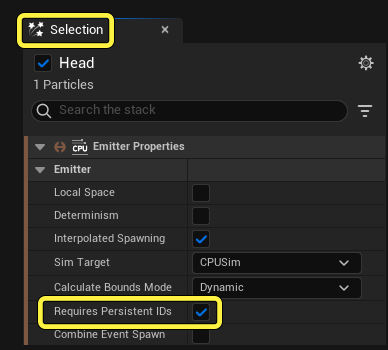
    Enable Required Persistent IDs.

Emitter Update

Emitter Update modules occur every time the emitter ticks on the CPU. Modules in this group should compute values for Particle Spawn or Update parameters in this frame. Modules are executed in order, from the top to the bottom of the stack.

These settings determine the number of effects spawned and how many times the effects spawn.

  1. Select the Emitter Update group to open the Emitter Update module settings in the Details panel.
  2. Click the Plus icon next to Emitter Update and select Spawn Burst Instantaneous from the dropdown menu. The Spawn Burst Instantaneous settings automatically open in the Details panel.
  3. Ensure the Spawn Count setting is set to 1. This causes the emitter to spawn one particle at a time.

You're reading a preview

The full reference is free for BrainDeadGuild Discord members — sign in to read it all, or open the original at the source.

Sign in with Discord — free for members Read the original at Epic Games

Sign in with your BrainDead.TV / BrainDeadGuild Discord account for full access.

Comments

    Sign in to vote, comment, or suggest an edit. Sign in
    📄
    Source
    Epic Games

    © Epic Games. Official Epic developer documentation, shown here as a reference with a link to the original. All rights remain with Epic Games. Terms ↗

    View original Sources & licensing
    Request removal
    Last updated Feb 11, 2026
    Keep exploring
    More in Building & Props · 1 of 104
    Next
    air vent gallery
    Browse all files in this folder (A–Z)
    Next up
    • The head of the firework is ready to drive the other emiiters, or parts, of the firework. Now to [build the trail
    Related topics
    • Creating Fireworks 5 Making The Second Firework Explosion In Unreal Editor For Fortnite General
    • Creating Fireworks Using Niagara In Unreal Editor For Fortnite Materials/Vfx
    • Creating Fireworks 4 Making The First Firework Explosion In Unreal Editor For Fortnite General
    • Creating Fireworks 1 Create The Firework Material And Niagara Emitter In Unreal Editor For Fortnite Materials/Vfx
    • Creating Fireworks With Niagara In Unreal Editor For Fortnite Materials/Vfx

    Related

    Open in graph →

    Related topics

    • Creating Fireworks 5 Making The Second Firework Explosion In Unreal Editor For Fortnite
    • Creating Fireworks Using Niagara In Unreal Editor For Fortnite
    • Creating Fireworks 3 Building The Firework Trail In Unreal Editor For Fortnite
    • Creating Fireworks 4 Making The First Firework Explosion In Unreal Editor For Fortnite
    • Creating Fireworks 1 Create The Firework Material And Niagara Emitter In Unreal Editor For Fortnite
    VerseIsland · an archipelago of Verse & UEFN knowledge
    🗺️ Island atlas Learn Guides History About & Press Sources & Licensing Status

    Not affiliated with Epic Games. Fortnite, UEFN, Unreal Engine, and Verse are trademarks of Epic Games, Inc. Content is attributed to its source — see Sources & Licensing.

    🦜

    Scout · your island guide

    The Isle of Verse