
Basics of Writing Code 6 Defining a Function in Verse
You learned in Lesson 5 that a function is reusable code that provides instructions for performing an action, or for creating an output based on input.
To define a function, you need three key parts: a unique identifier, the type of information to expect as its result, and what the function will do when it's called.
How to Define a Function
Function Signatures
In Lesson 3, you saw how to declare a variable or constant by naming it and giving the type of value it will use.
A function signature works in a similar way. The function signature uses a unique identifier for the function, along with the parameters that describe the input it will need, and finally, the return type for the result, or output.
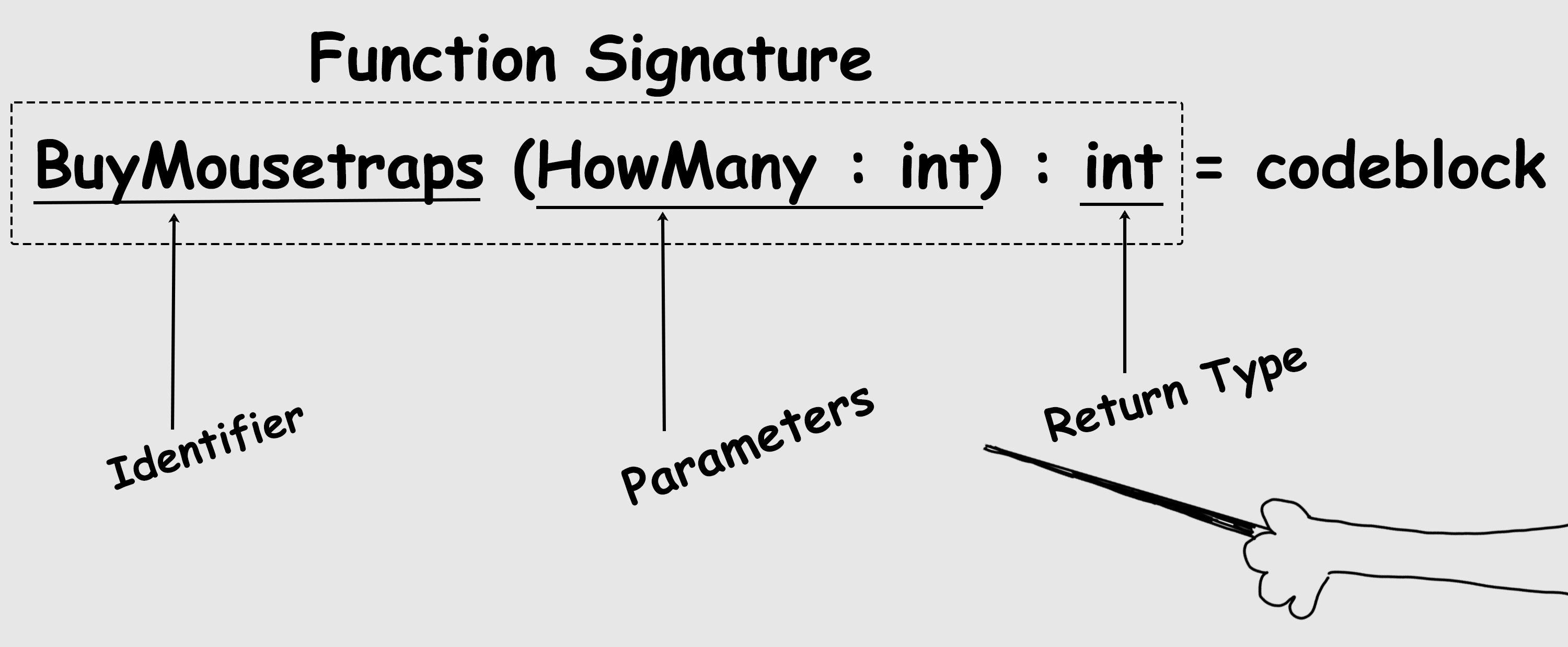
What the function actually does is defined in the code block.
Code Block
The code block is the group of expressions that comes after the function signature. This is the syntax for the function and its code block:
|  |  |
| --- | --- |
|  | name() : type = |
|  | codeblock |
name() : type = codeblock
Copy full snippet(2 lines long)
There are several ways to format a code block. One way is to indent the lines of code after the identifier. You can see this in the function syntax above. (You'll learn more about how to set up code blocks later, but for now you can use this.)
The expressions in the code block define what that function will actually do when called.
These expressions will run only when that function is called. When the program reaches the end of that block of code, these expressions will be done — at least until the next time that function is called — and the program will execute the next bit of code that follows this function call.
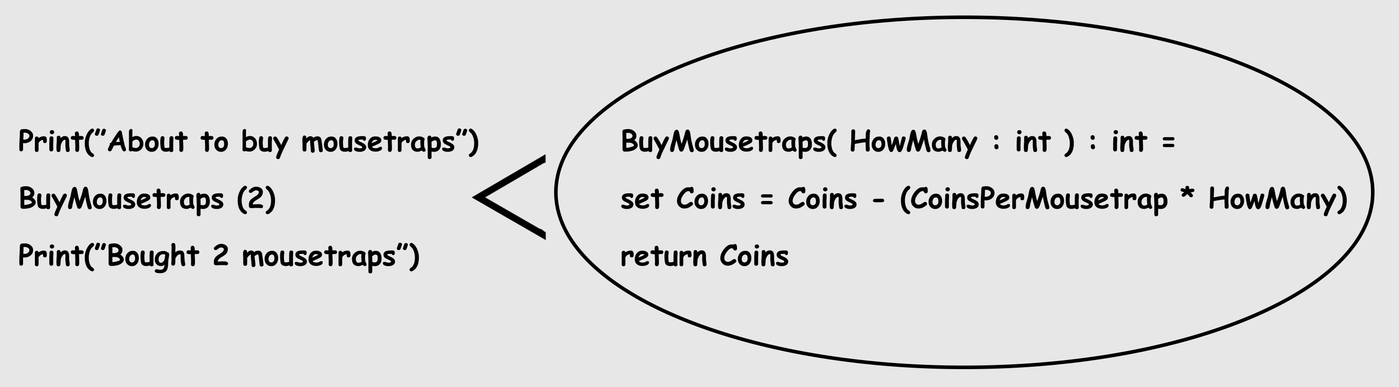
Body
The code block is also called a body when it defines what the function does.
Scope
So far, you've learned:
- A function has a unique identifier that's used to activate it to do something in the program.
- What a function does is based on the expressions in the function body.
- When the last line of code in the body is done, the function call finishes, and the program moves on to the next line of code after the function call that is in the program.
The instructions in that function and any values that come out of the function determine the function scope.
Time to circle back to expressions you can use to define the function. You can create constants and variables (remember these from Lesson 3?) and add them to the function body.
When you put a variable into the body, it is local to the function scope. Local, in this sense, means that this code lives and works only in that body, and only when the function is called.
So then what is scope? It's the association of the function name to the value produced by the function. That value can only be used within the code block where it is created — or within that scope.
Instantiation
An instance is a unique application of that function when it's called and executed. The creation of this instance is the instantiation. Note that instance and instantiation are both related to the word instant, which means a very short amount of time.
And this brings up the concept of lifetime.
Lifetime
An instance has a lifetime — a beginning, a middle, and an end.
This means that the lifetime of what’s in that function body is limited to the scope of the body, and you can’t access the local variables (those limited to this current scope) outside of the scope.
Conditionals
The following example shows how to calculate the maximum number of mousetraps that a player can buy with the number of coins the player has.
The constant MousetrapsYouCanBuy is created within the if block, and the scope is limited to the if block.
When the constant MaxMousetrapsYouCanBuy is used outside of the if code block, it produces an error because the name MaxMousetrapsYouCanBuy doesn't exist outside of the scope. You will see an error message: Unknown Identifier. This means that the MaxMousetrapsYouCanBuy is only valid within that scope.
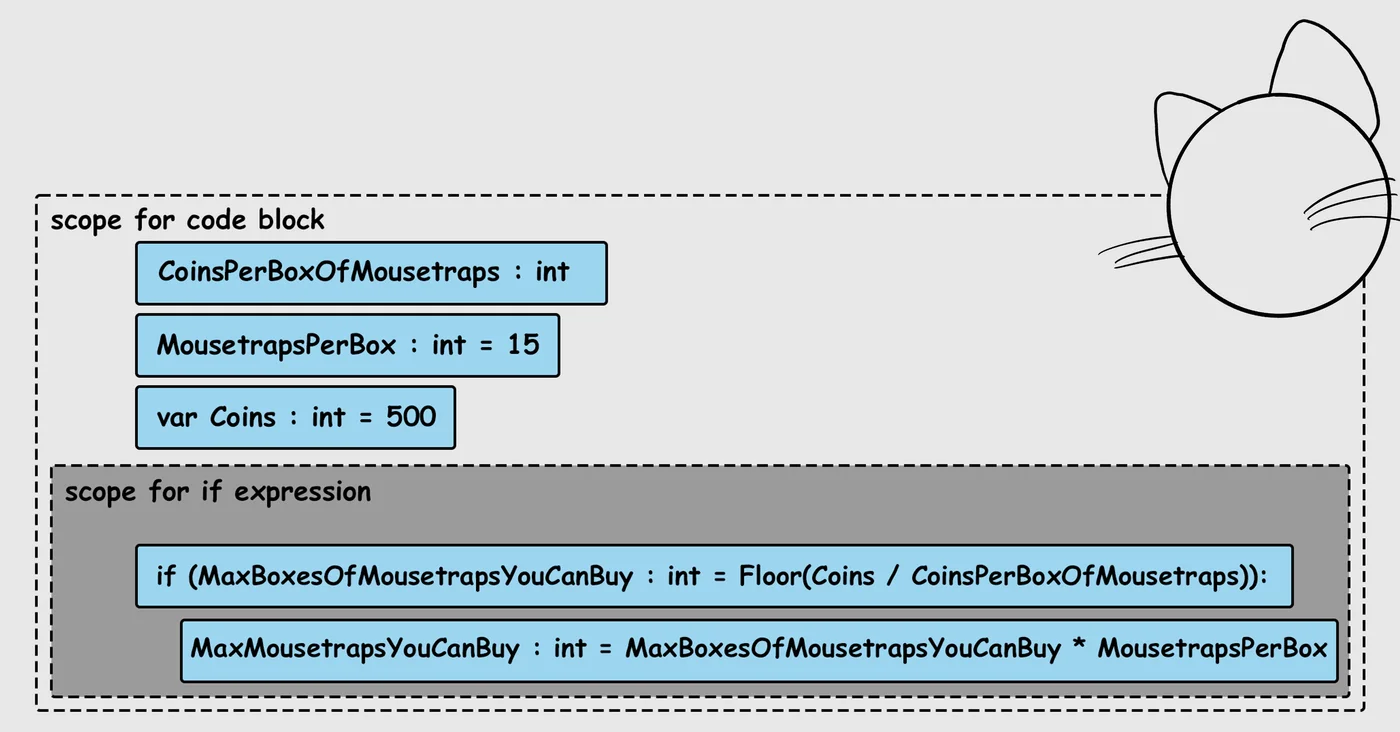
When the expression completes, the local constants and local variables created in the body no longer exist. They have reached the end of their lifetime.
Think of the scope as a little chunk of code where things work until they’re done.
Function Syntax
Let’s look at the function syntax again, but this time a little more deeply.
|  |  |
| --- | --- |
|  | name() : type = |
|  | codeblock |
name() : type = codeblock
Copy full snippet(2 lines long)
name() : type = |
This is the function signature. It is the name() and type with a colon in the middle. It looks very much like a constant, except that the name() includes this: (). Inside the () is where you add the parameters that show the input the function will need. (You'll find out more about parameters in Lesson 8.) The function signature includes the type of input that will be used. The value that the function returns (what comes after the =) has to match the type. |
codeblock |
The function code block, or body, is where you add constants, variables, or other expressions to show what the function will do when called. |
For example, a function to pay for a mousetrap might look like this:
|  |  |
| --- | --- |
|  | var Coins : int = 500 |
|  | CoinsPerMousetrap : int = 100 |
|  |  |
|  | BuyMousetrap() : void = |
|  | set Coins = Coins - CoinsPerMousetrap |
|  | Print("Mousetrap bought! You have {Coins} coins left.") |
var Coins : int = 500 CoinsPerMousetrap : int = 100 BuyMousetrap() : void = set Coins = Coins - CoinsPerMousetrap Print("Mousetrap bought! You have {Coins} coins left.")
Copy full snippet(6 lines long)
The naming conventions and rules for function names are the same as what you’d use for variables and constants. Since functions perform a sequence of actions, it's good practice to name them in a way that reflects the actions they perform, such as BuyMousetrap().
Void
You might have noticed void in the function signature for BuyMousetrap(). The void type for a function means its function call won’t return anything. You'll learn more about what 'void' is and how to use it in the next lesson.
Don't Repeat Yourself
An important principle of programming is Don't Repeat Yourself.
This means that if you're repeating a line of code three times or more, you should consider writing it a different way. And yes, there’s a reason for this!
The more lines of code you write, the harder that code is to maintain, and the more likely you’ll end up with bugs when you inevitably change code in one place but not in another.
Functions, like constants, are a way of not repeating code when you don't need to, so not only do functions save you from duplicating code, they also reduce maintenance, and lower the likelihood of code errors.
Pay attention to your capitalization when writing code, both in how you name your expressions and functions, and when using keywords and built-in functions. Verse is case-sensitive, and errors in correct and consistent capitalization can cause bugs and compilation errors.
Summary
- A function is reusable code that provides instructions for performing an action, or creating an output based on input.
- Functions need three parts: an identifier, a type, and a code block that contains what the result of the function will be when called.
- Functions are called by their function signatures.
- A code block is also called a body when it defines what the function does.
- Scope refers to the value associated with the function, which, in turn, is defined by the contents of the code block.
- Code contained within a code block is local to that scope.
- Lifetime is the span of the scope.
- Don't Repeat Yourself.
Practice Time!
-
[

Lesson 6: Practice Time!
Define a function — or two! You can do it!](/docs/documentation/en-us/fortnite/basics-of-writing-code-6-practice-time-in-verse.md)