VerseIsland
FeedLearnLeaderboardGuidesReferenceExploreSearchDocsVerse Library
Sign in
Feed Learn 📖 Codex Leaderboard Guides Reference Explore Search Docs Verse Library
Browse Fortnite›Materials/VFX·Up to Fortnite · Materials/VFX·8 of 211 in Materials/VFX

Create Two-sided Materials

Use a two-sided Material to create the leaves of a bush or a depth effect on your mesh. Begin by selecting a base color and add onto it with more Material nodes.

  1. Create a new Material in your project and double-click the Material thumbnail to open the Material Editor.

  2. Select the Main Material node and check the Two Sided option in the Details panel.
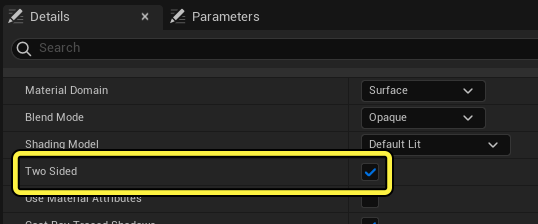
    Check the Two Sided option in the Details panel.

  3. Add the following nodes:

    1. 2 X Constant 3Vector expression node
    2. TwoSidedSign node
    3. Saturate node
    4. Interpolate node
  4. Select the first Constant 3Vector expression node and add a color, then drag off the node and plug it into the A input on the Lerp node.

  5. Select the second Constant 3Vector expression node and add a color, then drag off the node and plug it into the B input on the Lerp node.

  6. Drag off the TwoSidedSign node and plug it into the Saturate node.

  7. Drag off the Saturate node and plug it into the Alpha input on the Lerp node.

  8. Drag off the Interpolate node and plug it into the Material root node.

You're reading a preview

The full reference is free for BrainDeadGuild Discord members — sign in to read it all, or open the original at the source.

Sign in with Discord — free for members Read the original at Epic Games documentation

Sign in with your BrainDead.TV / BrainDeadGuild Discord account for full access.

Guided course

Add this to your free study plan — we’ll suggest related material and stitch it into one compile-checked lesson.

Keep exploring
More in Materials/VFX · 8 of 211
Prev
create light effects in unreal editor for fortnite
Next
creating custom ui with material instances in unreal editor for fortnite
Browse all files in this folder (A–Z)

Source

Epic Games documentation

View original

Last updated 2026-02-10T17:21:13.574809+00:00

VerseIsland· an archipelago of Verse & UEFN knowledge
🗺️ Island atlasLearnGuidesHistoryAbout & PressSources & LicensingPrivacy PolicyTermsStatus

Not affiliated with Epic Games. Fortnite, UEFN, Unreal Engine, and Verse are trademarks of Epic Games, Inc. Content is attributed to its source — see Sources & Licensing.

🦜

Scout · your island guide

The Isle of Verse