VerseIsland
Feed Learn Leaderboard Guides Reference Explore Search Docs Verse Library
Sign in
Feed Learn 📖 Codex Leaderboard Guides Reference Explore Search Docs Verse Library
Fortnite › Materials/VFX · Up to Fortnite · Materials/VFX · 7 of 211 in Materials/VFX
Browse Fortnite

Create Light Effects

Light effects can be used in a number of ways; to draw the player’s attention to something important on the island or to create a specific atmosphere, such as a ghostly setting.

Before beginning this tutorial, refer to Using the Emissive Input documentation from the Unreal Engine documentation site for background knowledge for this workflow.

Basic Material Node Set Up

Follow along below for a basic tutorial on how to create a pulsing light beacon.

  1. Create a new material in your project, then double-click the material thumbnail to open the Material Editor.

  2. Add the following nodes:

    1. Time node
    2. Sine node
    3. Constant3Vector node
    4. ComponentMask node
    5. TextureCoordinate node
    6. ConstantBiasScale node
    7. MaterialFunctionCall node
    8. Saturate node
    9. 2 X OneMinus node
    10. 2 X Abs node
    11. 2 X Vertex NormalWS node
    12. 5 X Multiply node
  3. Change the mesh to a Cylinder in the Preview window.
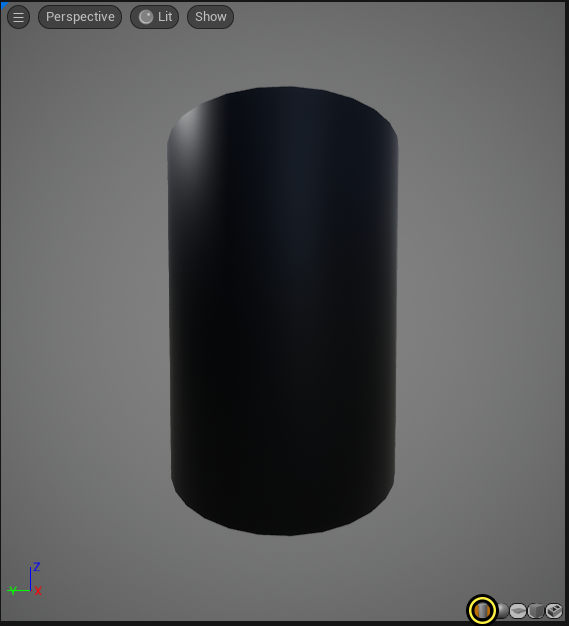
    Change the mesh in the preview window to a cylinder.

  4. Add a color to the Constant 3Vector expression node and plug it into the B input of the first Multiply node.

  5. Right-click the Constant 3Vector expression node to change it to a Parameter node, then plug the bottom input into the B input on the first Multiply node.

  6. Drag off the top output of the Constant 3Vector expression node and plug it into the A input of the first Multiply node and the Base Color input on the Main Material Node.

  7. Drag off the Multiply node and plug it into the Emissive Color input on the Main Material node.

You're reading a preview

The full reference is free for BrainDeadGuild Discord members — sign in to read it all, or open the original at the source.

Sign in with Discord — free for members Read the original at Epic Games

Sign in with your BrainDead.TV / BrainDeadGuild Discord account for full access.

Comments

    Sign in to vote, comment, or suggest an edit. Sign in
    📄
    Source
    Epic Games

    © Epic Games. Official Epic developer documentation, shown here as a reference with a link to the original. All rights remain with Epic Games. Terms ↗

    View original Sources & licensing
    Request removal
    Last updated Feb 11, 2026
    Keep exploring
    More in Materials/VFX · 7 of 211
    Prev
    create interactive materials in unreal editor for fortnite
    Next
    create twosided materials in unreal editor for fortnite
    Browse all files in this folder (A–Z)
    Next up
    • Before beginning this tutorial, refer to [**Using the Emissive Input**
    • 7. Drag off the **Multiply** node and plug it into the **Emissive Color** input on the **Main Material** node.
    • To use the material function, do the following:
    • An example of the MaterialFunctionCall node.
    • The UnspecifiedMaterial node turns into the BreakOutFloat2Component node.
    • 7. Drag off the second **Multiply** node and plug it into the third **Multiply** node **A** input.
    Related topics
    • Lighting In Unreal Editor For Fortnite Materials/Vfx
    • Lighting In Unreal Editor For Fortnite Materials/Vfx
    • Material Effects In Unreal Editor For Fortnite Materials/Vfx
    • Light Components In Unreal Editor For Fortnite Materials/Vfx
    • Gameplay Camera And Control Devices In Unreal Editor For Fortnite Cinematics

    Related

    Open in graph →

    Related topics

    • Lighting In Unreal Editor For Fortnite
    • Lighting In Unreal Editor For Fortnite
    • Material Effects In Unreal Editor For Fortnite
    • Light Components In Unreal Editor For Fortnite
    • Gameplay Camera And Control Devices In Unreal Editor For Fortnite
    VerseIsland · an archipelago of Verse & UEFN knowledge
    🗺️ Island atlas Learn Guides History About & Press Sources & Licensing Status

    Not affiliated with Epic Games. Fortnite, UEFN, Unreal Engine, and Verse are trademarks of Epic Games, Inc. Content is attributed to its source — see Sources & Licensing.

    🦜

    Scout · your island guide

    The Isle of Verse