VerseIsland
Feed Learn Leaderboard Guides Reference Explore Search Docs Verse Library
Sign in
Feed Learn 📖 Codex Leaderboard Guides Reference Explore Search Docs Verse Library
Fortnite › Spawning · Up to Fortnite · Spawning · 3 of 138 in Spawning
Browse Fortnite

Editing Dust Spawn Effect Shapes

The basic shape created for the visual effect above is a box/plane that provides a large area for the sprites to spawn. To create a shaft of dust, you'll change the Shape Primitive option, then lower the sprite spawn amount to account for the new shape.

  1. Return to the Content Browser and right-click on the Dust_Particle thumbnail.

  2. Select Duplicate and rename the thumbnail Dust_Particle_Shaft.

  3. Double-click on the new thumbnail to open the system editor.

  4. Select Shape Location to open the Shape Location options in the Details panel.

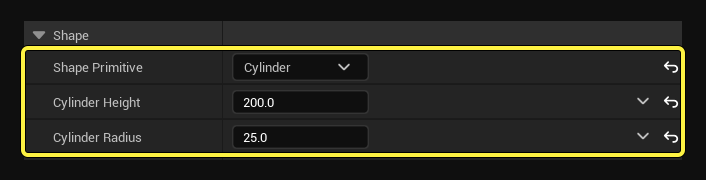
  5. Select Cylinder from the Shape Primitive dropdown menu.

  6. Change the following options:

    • Cylinder Height: 200.0
    • Cylinder Radius: 25.0

Use the values above to edit the Shape options.

  1. Select Random Vector from the Non Uniform Scale menu.

  2. Change the Vector Scale to 10.0.

  3. Select Axis Angle from the Rotation Mode dropdown menu.

  4. Change the Rotation Axis:

    • X: 5.0
    • Y: 0.0
    • Z: 0.0

You're reading a preview

The full reference is free for BrainDeadGuild Discord members — sign in to read it all, or open the original at the source.

Sign in with Discord — free for members Read the original at Epic Games

Sign in with your BrainDead.TV / BrainDeadGuild Discord account for full access.

Comments

    Sign in to vote, comment, or suggest an edit. Sign in
    📄
    Source
    Epic Games

    © Epic Games. Official Epic developer documentation, shown here as a reference with a link to the original. All rights remain with Epic Games. Terms ↗

    View original Sources & licensing
    Request removal
    Last updated Feb 11, 2026
    Keep exploring
    More in Spawning · 3 of 138
    Prev
    capture the flag 4 set up spawn rooms in unreal editor for fortnite
    Next
    item spawner
    Browse all files in this folder (A–Z)
    Next up
    • The number of sprites that spawn in the cone should be half the number that spawned before.
    Related topics
    • Dust Tutorial 3 Edit The Spawn Effect Shape In Unreal Editor For Fortnite Spawning
    • Dust Tutorial 2 Modify The Emitter In Unreal Editor For Fortnite Tutorials
    • Dust Tutorial 2 Modify The Emitter In Unreal Editor For Fortnite Tutorials
    • Create A Realistic Dust Particle Effect In Unreal Editor For Fortnite Materials/Vfx
    • Dust Tutorial 0 Realistic Dust Effect In Unreal Editor For Fortnite Tutorials

    Related

    Open in graph →

    Related topics

    • Dust Tutorial 3 Edit The Spawn Effect Shape In Unreal Editor For Fortnite
    • Dust Tutorial 2 Modify The Emitter In Unreal Editor For Fortnite
    • Dust Tutorial 2 Modify The Emitter In Unreal Editor For Fortnite
    • Create A Realistic Dust Particle Effect In Unreal Editor For Fortnite
    • Dust Tutorial 0 Realistic Dust Effect In Unreal Editor For Fortnite
    VerseIsland · an archipelago of Verse & UEFN knowledge
    🗺️ Island atlas Learn Guides History About & Press Sources & Licensing Status

    Not affiliated with Epic Games. Fortnite, UEFN, Unreal Engine, and Verse are trademarks of Epic Games, Inc. Content is attributed to its source — see Sources & Licensing.

    🦜

    Scout · your island guide

    The Isle of Verse