
Edit Spawn Effect Shape
3. Edit the Spawn Effect Shape
The basic shape created for the visual effect above is a box/plane that provides a large area for the sprites to spawn. To create a shaft of dust, you'll change the Shape Primitive option, then lower the sprite spawn amount to account for the new shape.
The basic shape created for the visual effect above is a box/plane that provides a large area for the sprites to spawn. To create a shaft of dust, you'll change the Shape Primitive option, then lower the sprite spawn amount to account for the new shape.
-
Return to the Content Browser and right-click on the Dust_Particle thumbnail.
-
Select Duplicate and rename the thumbnail Dust_Particle_Shaft.
-
Double-click on the new thumbnail to open the system editor.
-
Select Shape Location to open the Shape Location options in the Details panel.
-
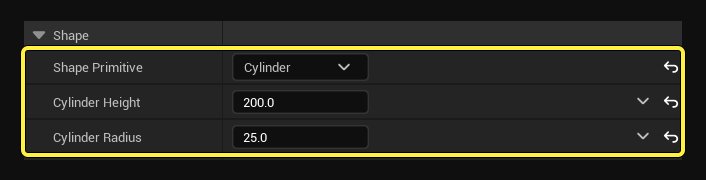
Select Cylinder from the Shape Primitive dropdown menu.
-
Change the following options:
- Cylinder Height: 200.0
- Cylinder Radius: 25.0
- Select Random Vector from the Non Uniform Scale menu.
- Change the Vector Scale to 10.0.
- Select Axis Angle from the Rotation Mode dropdown menu.
- Change the Rotation Axis:
You're reading a preview
The full reference is free for BrainDeadGuild Discord members — sign in to read it all, or open the original at the source.
Sign in with your BrainDead.TV / BrainDeadGuild Discord account for full access.