VerseIsland
Feed Learn Leaderboard Guides Reference Explore Search Docs Verse Library
Sign in
Feed Learn 📖 Codex Leaderboard Guides Reference Explore Search Docs Verse Library
Fortnite › Tutorials · Up to Fortnite · Tutorials · 28 of 107 in Tutorials
Browse Fortnite

Styling The Outside Cabin Area

The visual aesthetic of the outdoors should be eerie and laden with fog. This should make the cabin and the surrounding area feel ominous and foreboding.

Outside the cabin place the barrier device and make sure to include the sub basement in the depth, otherwise players may not be able to leave the basement. Afterwards, get the other devices you’ll need and set them up in a place that you can organize them.

In the front of the cabin around the Pickup Truck Spawner, you need to set up Mutator Zones, HUD Messages, and Triggers to prompt players into performing certain actions for the truck, like getting gas and searching for the key.

You will also need to set up the cabin door with a Conditional Button, Lock, Audio Player, and End Game devices.
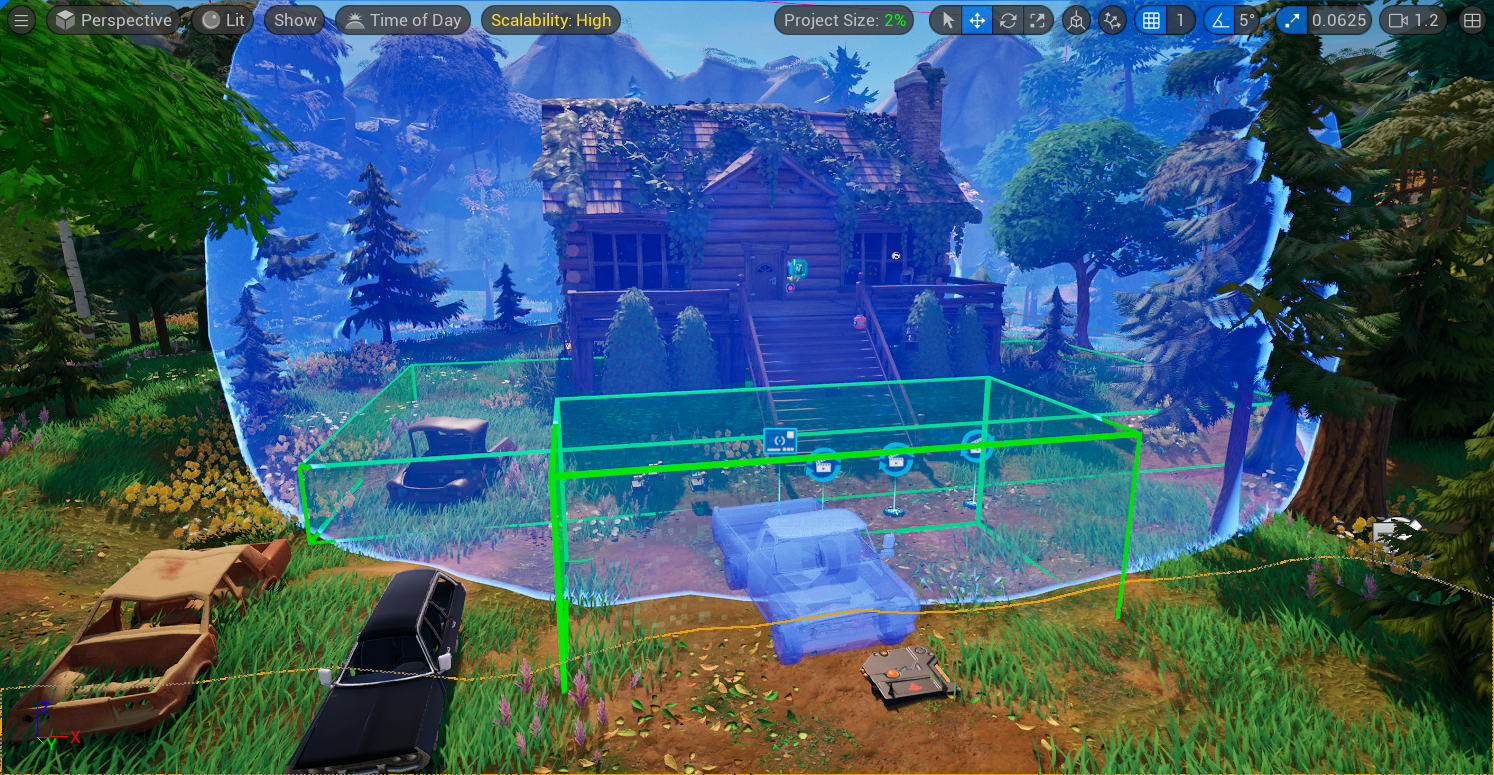
An example of how the devices are arranged outside the cabin.

Devices Used:

  • 4 x Mutator Zone
  • 2 x Cinematic Sequence
  • 3 x HUD Message
  • 1 x Pickup Truck Spawner
  • 1 x Trigger
  • 1 x End Game
  • 1 x Barrier
  • 1 x Audio Player
  • 1 x HUD Controller
  • 1 x Day Sequence
  • 6 x VFX Spawner
  • 1 x Lock
  • 1 x Conditional Button

You're reading a preview

The full reference is free for BrainDeadGuild Discord members — sign in to read it all, or open the original at the source.

Sign in with Discord — free for members Read the original at Epic Games

Sign in with your BrainDead.TV / BrainDeadGuild Discord account for full access.

Comments

    Sign in to vote, comment, or suggest an edit. Sign in
    📄
    Source
    Epic Games

    © Epic Games. Official Epic developer documentation, shown here as a reference with a link to the original. All rights remain with Epic Games. Terms ↗

    View original Sources & licensing
    Request removal
    Last updated Feb 11, 2026
    Keep exploring
    More in Tutorials · 28 of 107
    Prev
    escape room 07 second puzzle room in unreal editor for fortnite
    Next
    escape room 09 inside cabin in unreal editor for fortnite
    Browse all files in this folder (A–Z)
    Next up
    • An example of how the devices are arranged outside the cabin.
    • An example of how the devices are arranged outside the cabin.
    • Using Hud Message Devices In Fortnite Creative
    • ite/d21bfd80-f390-49ab-a9de-c7a9bea1c49d.png)
    • e-creative/using-mutator-zone-devices-in-fortnite-creative.md)
    • (using-cinematic-sequence-device-in-unreal-editor-for-fortnite.md)
    Related topics
    • Escape Room 07 Second Puzzle Room In Unreal Editor For Fortnite Tutorials
    • Escape Room Tutorial In Unreal Editor For Fortnite Tutorials
    • Escape Room 09 Inside Cabin In Unreal Editor For Fortnite Tutorials
    • Escape Room 05 Sub Basement In Unreal Editor For Fortnite Tutorials
    • Escape Room 03 Setting Up The Level In Unreal Editor For Fortnite Tutorials

    Related

    Open in graph →

    Related topics

    • Escape Room 07 Second Puzzle Room In Unreal Editor For Fortnite
    • Escape Room Tutorial In Unreal Editor For Fortnite
    • Escape Room 09 Inside Cabin In Unreal Editor For Fortnite
    • Escape Room 05 Sub Basement In Unreal Editor For Fortnite
    • Escape Room 03 Setting Up The Level In Unreal Editor For Fortnite
    VerseIsland · an archipelago of Verse & UEFN knowledge
    🗺️ Island atlas Learn Guides History About & Press Sources & Licensing Status

    Not affiliated with Epic Games. Fortnite, UEFN, Unreal Engine, and Verse are trademarks of Epic Games, Inc. Content is attributed to its source — see Sources & Licensing.

    🦜

    Scout · your island guide

    The Isle of Verse