VerseIsland
Feed Learn Leaderboard Guides Reference Explore Search Docs Verse Library
Sign in
Feed Learn 📖 Codex Leaderboard Guides Reference Explore Search Docs Verse Library
Fortnite › UI · Up to Fortnite · UI · 9 of 147 in UI
Browse Fortnite

Game Details Screen in Fortnite

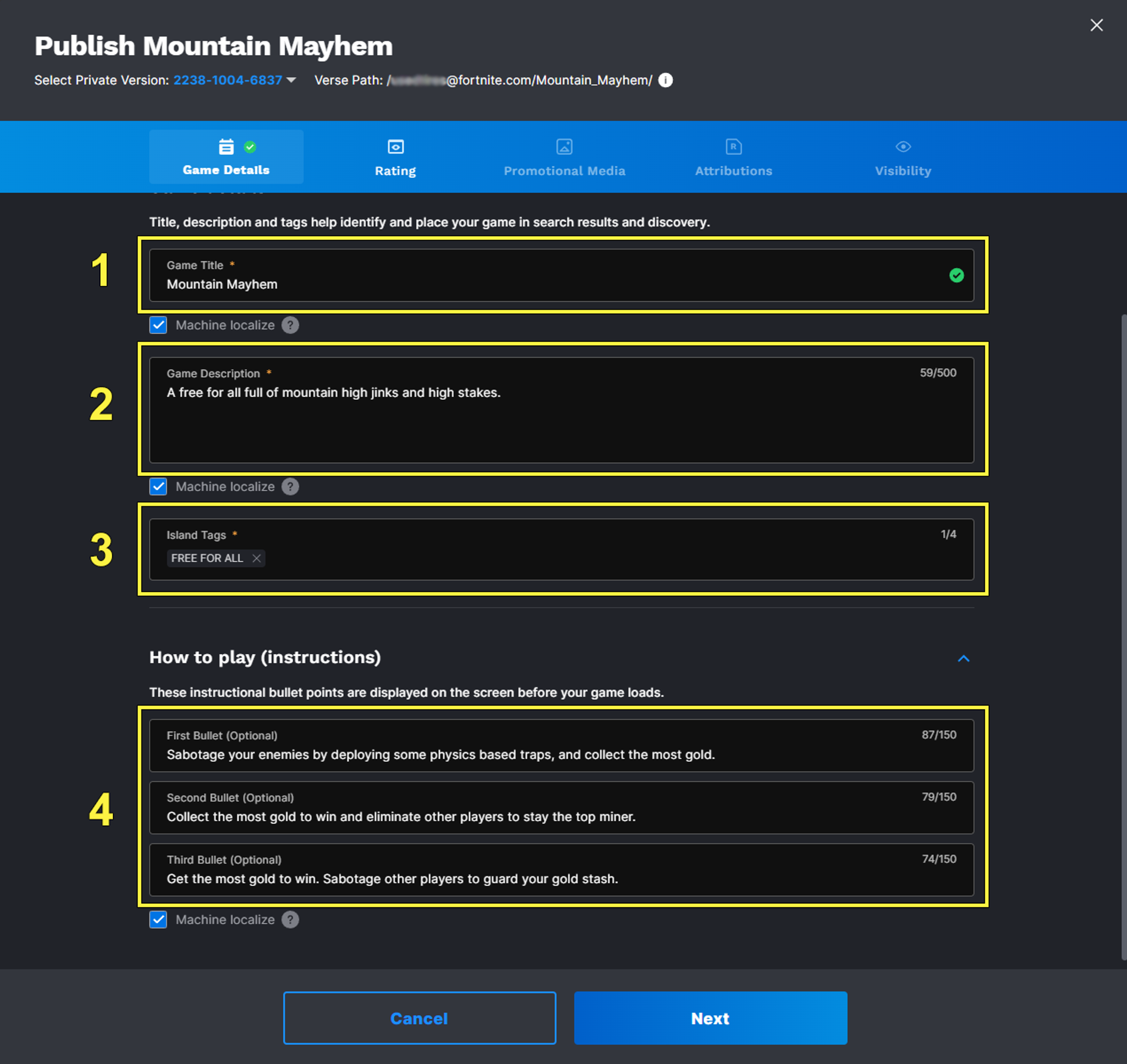
The Game Details screen in Creator Portal is where you provide the information about your island that appears on your island page, in Discover, and on the loading screen. This includes:

  1. Title
  2. Game Description
  3. Island Tags
  4. How To Play

When you fill out the Game Details template, take your time and be thorough. This is part of marketing your island.

Click image to enlarge.

Title

The name of your island is important. It communicates the unique style of your island and suggests the creativity and thought that went into the creation of the game.

Your island name should go beyond the genre your island falls under. (You can identify the genre using Game Tags in the Island Tags.)

Titles go through a content pre-check that looks at whether your title is similar to one that is already published or if your title is misleading to players. In such cases, you are prompted to provide a new title.

If you submit an island that received a Similarity Warning without fixing the title, your island may get filtered out of the top rows in Discover when it gets published. For information on how Discover Filtering affects islands in Discover, see How Discover Works.

You're reading a preview

The full reference is free for BrainDeadGuild Discord members — sign in to read it all, or open the original at the source.

Sign in with Discord — free for members Read the original at Epic Games

Sign in with your BrainDead.TV / BrainDeadGuild Discord account for full access.

Comments

    Sign in to vote, comment, or suggest an edit. Sign in
    📄
    Source
    Epic Games

    © Epic Games. Official Epic developer documentation, shown here as a reference with a link to the original. All rights remain with Epic Games. Terms ↗

    View original Sources & licensing
    Request removal
    Last updated Feb 11, 2026
    Keep exploring
    More in UI · 9 of 147
    Prev
    exploring the sidebar and game menu in fortnite creative
    Next
    getting to know the user interface in unreal editor for fortnite
    Browse all files in this folder (A–Z)
    Next up
    • Titles go through a **[content pre-check
    • To learn more about game tags, see the **[Games and Game Tags page
    • Once you’ve filled out all the fields on the **Game Details** screen, click **Next** to move onto the [Rating screen
    • | Success | [An example of a successful content pre-check.
    • | Content Rule Warning | [An example of a pre-check content warning.
    • | Similarity Warning | [An example of a pre-check similarity warning.
    Related topics
    • Overview And Tools Settings In Fortnite Creative General
    • Creator Portal Creator Economy
    • Creator Pages In Fortnite Creative Creator Economy
    • Fortnite Communities In Fortnite General
    • Publishing From The Creator Portal In Fortnite Creative Creator Economy

    Related

    Open in graph →

    Related topics

    • Overview And Tools Settings In Fortnite Creative
    • Creator Portal
    • Creator Pages In Fortnite Creative
    • Fortnite Communities In Fortnite
    • Publishing From The Creator Portal In Fortnite Creative
    VerseIsland · an archipelago of Verse & UEFN knowledge
    🗺️ Island atlas Learn Guides History About & Press Sources & Licensing Status

    Not affiliated with Epic Games. Fortnite, UEFN, Unreal Engine, and Verse are trademarks of Epic Games, Inc. Content is attributed to its source — see Sources & Licensing.

    🦜

    Scout · your island guide

    The Isle of Verse